17
Operating Your Television
Lock Menu Options
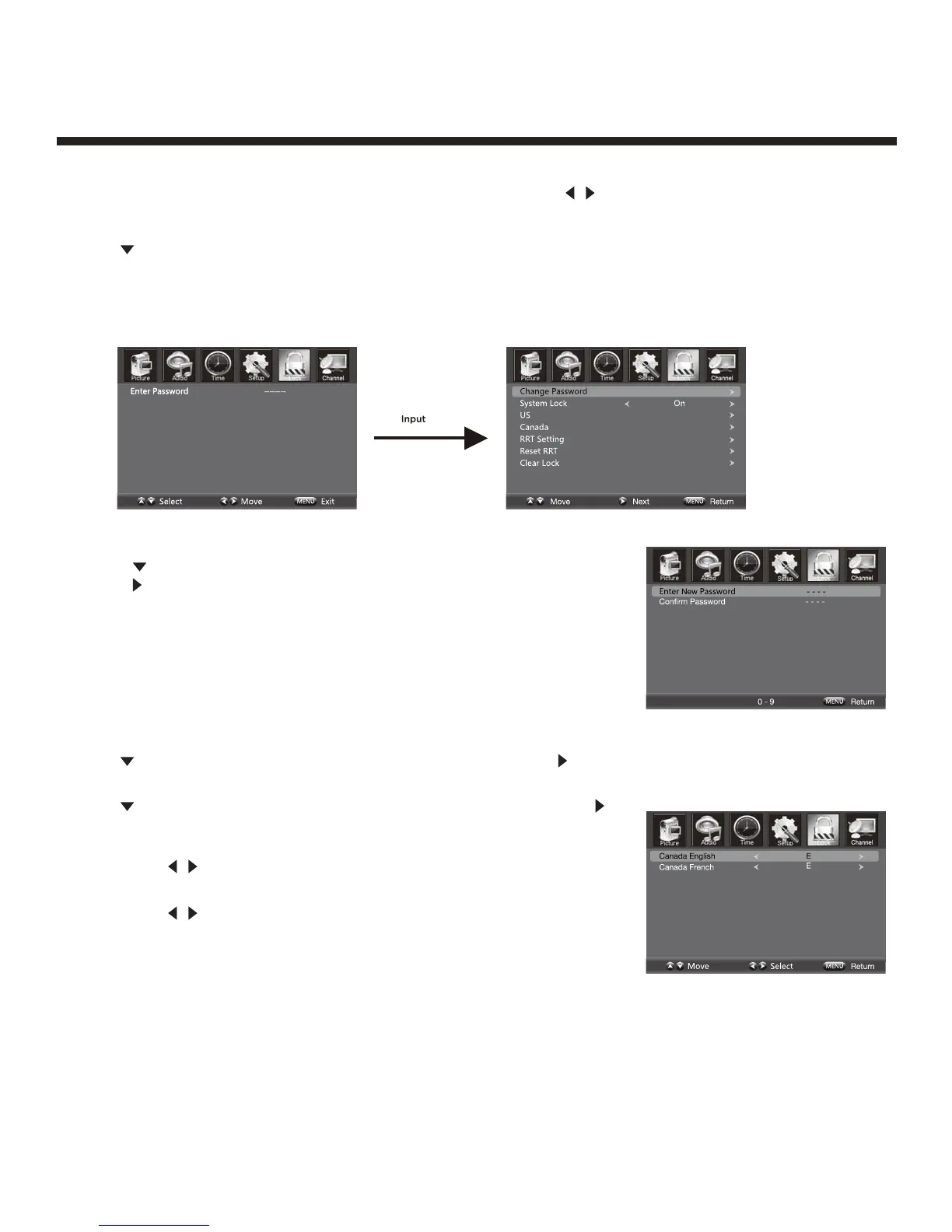
Press Menu on the side panel or on the remote control, then use
/ to select the LOCK menu.
Press d button or OK to enter.
Use the button to enter the “Enter Password” selection and use the numeric buttons to input a 4-digit
password. The screen will display the sub-menu. After setting, press the Menu button to exit.
NOTE: The factory password is 0000.
Change Password
Press the button to select the “Change Password” selection and then
press the
button to enter into the following menu. Input the 4-digit
password once and again to confirm.
System Lock
Allows you to turn On or Off the system lock. If you turn off the system
lock, then the following options (US, Canada, RRT Setting and Reset
RRT) are unavailable for use.
US
Use the button to highlight the “US” selection, then press the button to enter into the following menu.
Canada
Use the button to highlight the “Canada” selection, then press the
button to enter into the following menu.
Canada English
Use
/ buttons to select among: E, C, C8+, G, PG, 14+ and 18+.
Canada French
Use
/ buttons to select among: E, G, 8ans+, 13ans+, 16ans+
et 18ans+.
RRT Setting
Rating Region Table setting.
Reset RRT
Allows you to reset the RRT setting.
Clear Lock
Clear lock of RRT.
4-digit password


 To Next Page