26
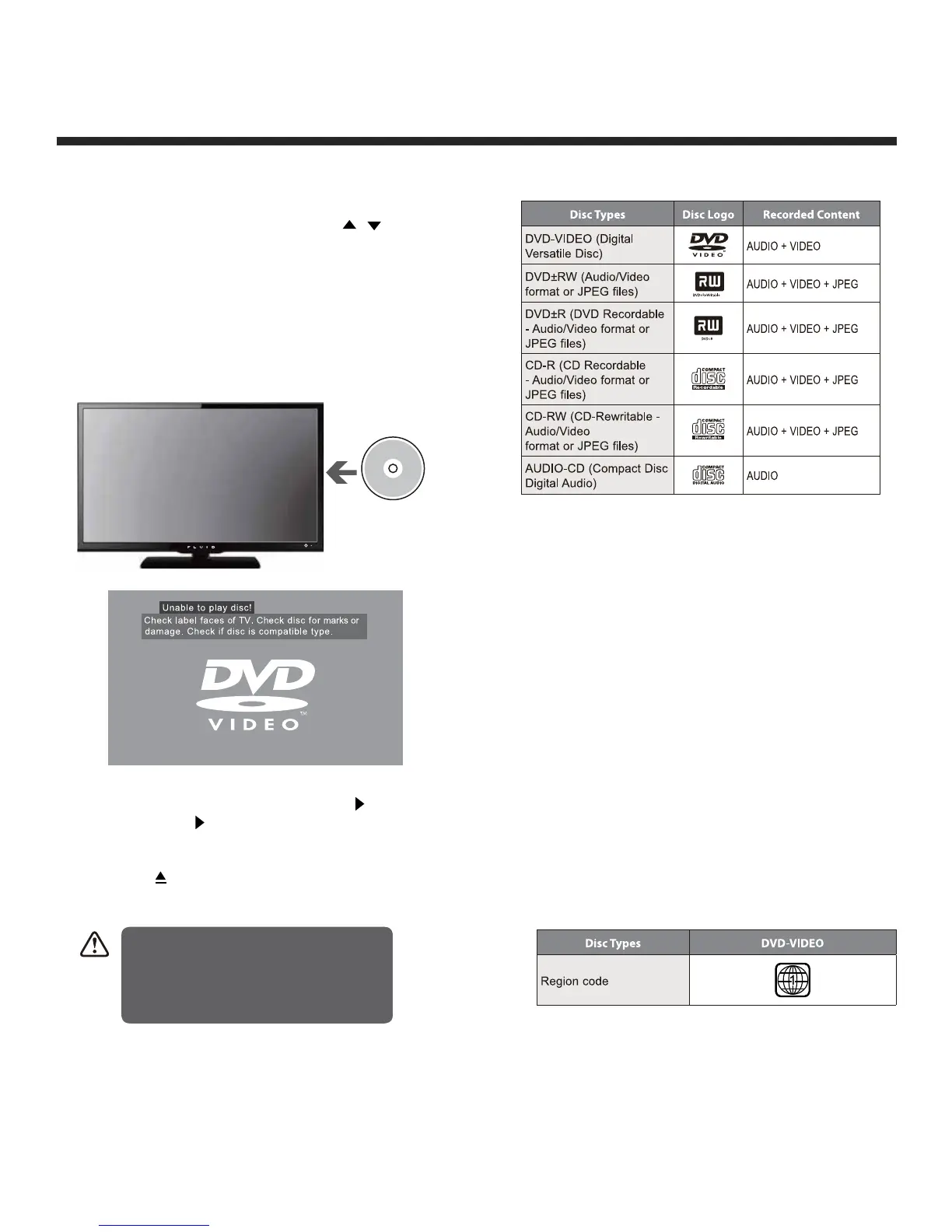
Compatible Disc Types
Supported Formats
JPEG
• The file extension has to be .jpg and not
.jpeg.
• Pictures encoding must comply with JPEG/
ISO format.
• This DVD player can only display DCF-
standard still pictures or JPEG pictures such
as TIFF.
Region Code
Both the DVD player and the discs are coded
by region. These regional codes must match
in order to play the disc. If the codes do not
match, the disc will not play.
The region number for this DVD player is
described on the rear panel of the TV.
Using the Built-in DVD Player
1. Press the SOURCE button on the remote control
to display the source list. Use the / buttons
to select DVD and then press the OK button to
confirm.
2. Insert a disc with the label side facing towards the
rear of the TV. (CD-R, CD-RW, DVD-R, DVD-RW,
CD, DVD+R, or DVD+RW). Allow 10 seconds for
the player to load the disc. If you insert the disc
incorrectly, an error message will be displayed.
3. After the disc is inserted, Press the II button on
the unit or the II button on the remote control to
start playing.
4. Press the button if you want to remove the disc.
Label side at
the back
DVD Functions
sD
• Only insert 12cm discs. Do not
insert or play 8cm discs; they will
get stuck.• Ensure disc is fully
ejected before removing it, or else
you risk damaging the DVD player.


 To Next Page