9
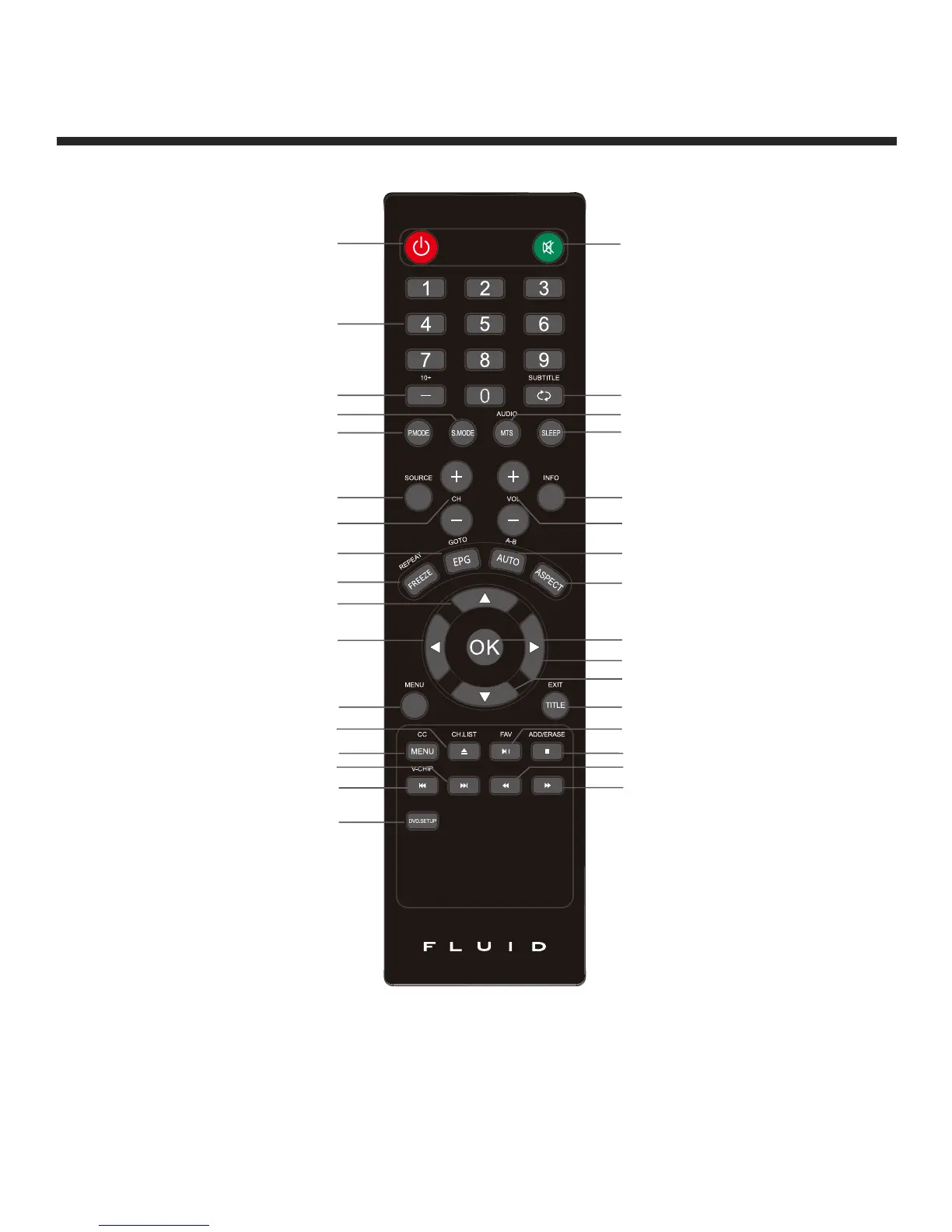
Remote Control Button Functions
Power button
Numeric buttons
Channel setup/DVD 10+ button
Sound mode button
Picture mode button
Signal SOURCE selection button
Channel selection buttons
EPG/GOTO button
FREEZE/REPEAT button
UP button
LEFT button
TV setup MENU button
OPEN/CLOSE/CH.LIST button
CC/DVD MENU button
NEXT button
PREV/V-CHIP button
DVD.SETUP button
1
2
3
4
5
6
7
8
9
10
11
12
13
14
15
16
17
18
19
20
21
22
23
24
25
26
27
28
29
30
31
32
33
Mute button
Return channel/DVD SUBTITLE
MTS/AUDIO button
SLEEP button
Information button
Volume adjust buttons
AUTO/A-B button
ASPECT button
ENTER button
RIGHT button
DOWN button
TITLE/EXIT OSD menu button
FAV/Play/Pause button
ADD/ERASE/STOP button
REWIND button
FORWARD button
If there is light around the TV, the remote control may fail or work abnormally.
If not using the remote for a long period of time, please remove the batteries.


 To Next Page