32
DVD Functions
Using the DVD Custom Setup Page
In the DVD mode, press the DVD.SETUP button
on the remote control. Press the
/
buttons to
select the Custom Setup menu, and then press the
/ buttons to select the menu options. Press the
DVD.SETUP to exit the menu.
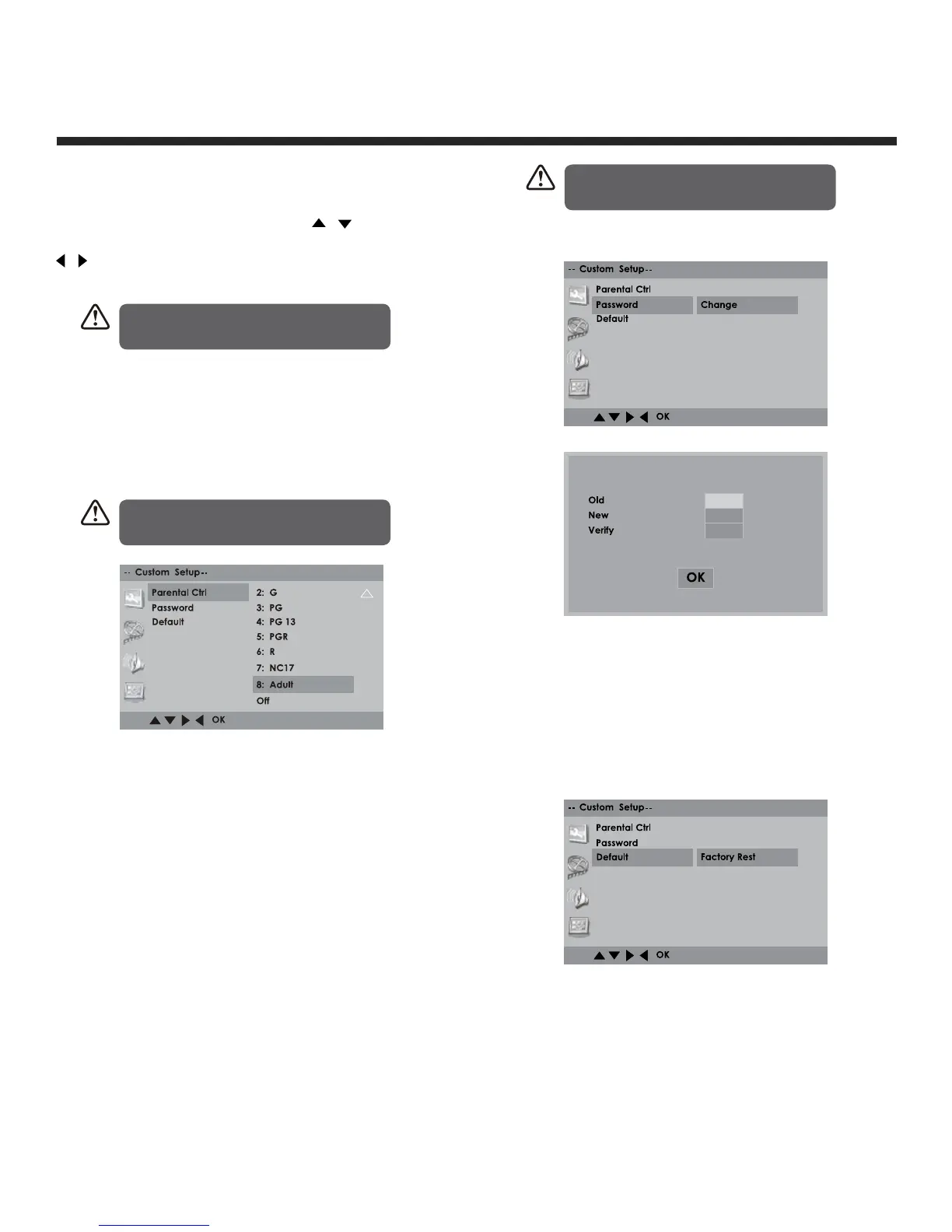
Parental Control
Allows the user to set a maximum rating level for a
movie that can be played (e.g. PG rating). Movies
rated higher than the level set will not be played.
The parental lock can only be changed after
inputting the correct password.
Password
Press OK once, LED turns green, press once again
to enter setup.
To change password, you need to:
1. Input old password. (For initial use, enter the
factory default password “8899”).
2. Input a new 4-digit password and then press
the OK button to confirm.
Default
To restore all setup parameters to the factory
settings EXCEPT the password.
This function is available in stop state or when the
tray is opened.
In Setup mode, the disc playback
function will not be available.
If you forget your DVD password,
enter the master password “8899”.
This function is available only when the
discs have ratings encoded on them.


 To Next Page