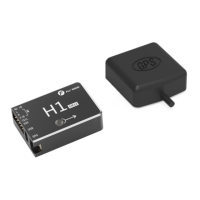
Ready to install
relative devices
When use H1,Please prepare helicopter,transmitter system,ESC,servo and battery,ect
by yourself. Supported devices as follows:
A. Helicopter :H3 and HR3 swashplate;Main power is battery or oil;The rear is a
variable pitch or motor driven helicopter.
B. Servo:Support 1520us wide-duty servo as swashplate servo, support 1520us
wide frequency or 760us narrow frequency as the tail servo, the servo working
frequency is automatically recognized.
C. ESC:Main motor tail motor ESC support standard PWM ESC.
D. Receiver:Support S.bus protocol, PPM protocol, Graupner SUMD HD08 protocol
E. Battery:3-6S Lipo battery,support voltage check,with low voltage protection.
Download Assistant Software
Download software H1-Heli
Please visit the web to download:
https://www.flywingrc.com/software/
The assistant software needs to use Win7 and above. XP can be used, and some
compatibility problems may occur.
Install Assistant software
H1-Heli will guide you through the FC system's parameter
settings, please follow the steps below to install
Windows Installation and operation on the system:
Support Win7, Win8 , Win10(32 or 64-bit )system
1. Connect the TYPE-C USB port to your PC using the TYPE-C USB cable.
2. Run the H1-Heli driver installation package and follow the prompts to
install it.
3.Double-click the H1-Heli icon to run the assistant software.
3. For safety reasons, please remove the propeller or disconnect the
motor when adjusting.
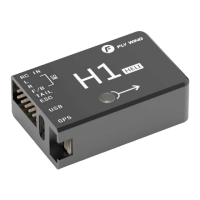
H1
user manual
It is recommended to use Win10 64-bit operating system, which has
achieved the best experience.
If the software still indicates that the flight controller is not found, or the
communication interface failed to initialize, install the driver and restart the
computer or replace the data line and try again.


 To Next Page