Operating Instruction Flytec 6005/6010 21
Set-Mode MEMO [Model 6010]
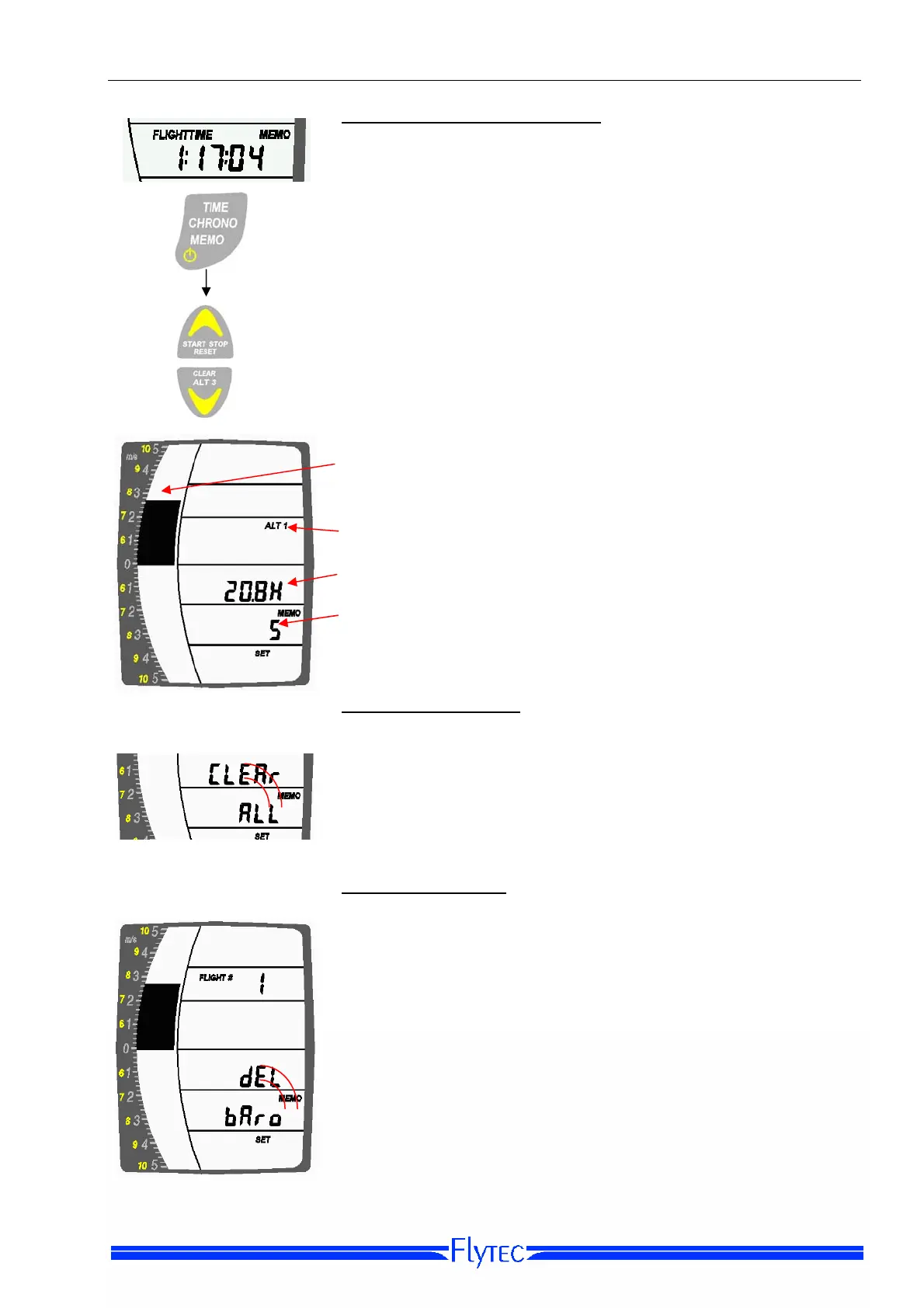
While in MEMO display, use a 3-second press on the MEMO
Key to bring the instrument into Memory Set-Mode. The
display will now show the parameters to be recorded, the
recording time in hours, and the record interval. Note: The set
mode is only active if l no flight acceptance is present.
Press 3 sec.
Use the Arrow Keys to scroll through the possible record
intervals and clearing options: 1, 5, or 15, CLEAR ALL, OFF
and DEL BARO (visible only if you have recorded
barograms). If you select OFF, the barograph recording feature
will be disabled and only maximum values will be stored in the
flight log.
• Barograph storage capacity. The scale will empty as the
barogram memory is filled. After that, the oldest flights will
be overwritten.
• The parameters to be recorded are set in MEMO Option-
Mode (see below).
• Remaining barograph record time. Takes into account the
chosen recording interval and available storage capacity.
• Recording interval in seconds.
Clear All Barograms
As you cycle through the choices in MEMO Set-Mode using
short presses on the arrow Keys, you arrive at CLEAR ALL,
which allows you to delete all the recordings and the logbook.
To confirm, press the ALT1/ALT2 Key for at least three
seconds until you hear the confirmation tone.
Delete a Barogram
If you have barogram recorded in the 6010 and you cycle
through the choices in MEMO Set-Mode with short presses on
the arrow Keys you will arrive at DEL BARO, shown with the
flight number of your most recent flight that has a barogram
(i.e., if no barograph recording was made for Flight #1, Flight
#2 will appear, and so on). To delete this flight, press the ALT
1/ALT2 Key for at least three seconds.
No single flights can be deleted directly from the logbook. You
can only delete your most recent barogram; barograms
recorded later in the logbook cannot be deleted before those
recorded earlier have been deleted.


 To Next Page