Operating Instruction Flytec 6005/6010 5
Switching the Instrument ON / OFF
Switching the Instrument On
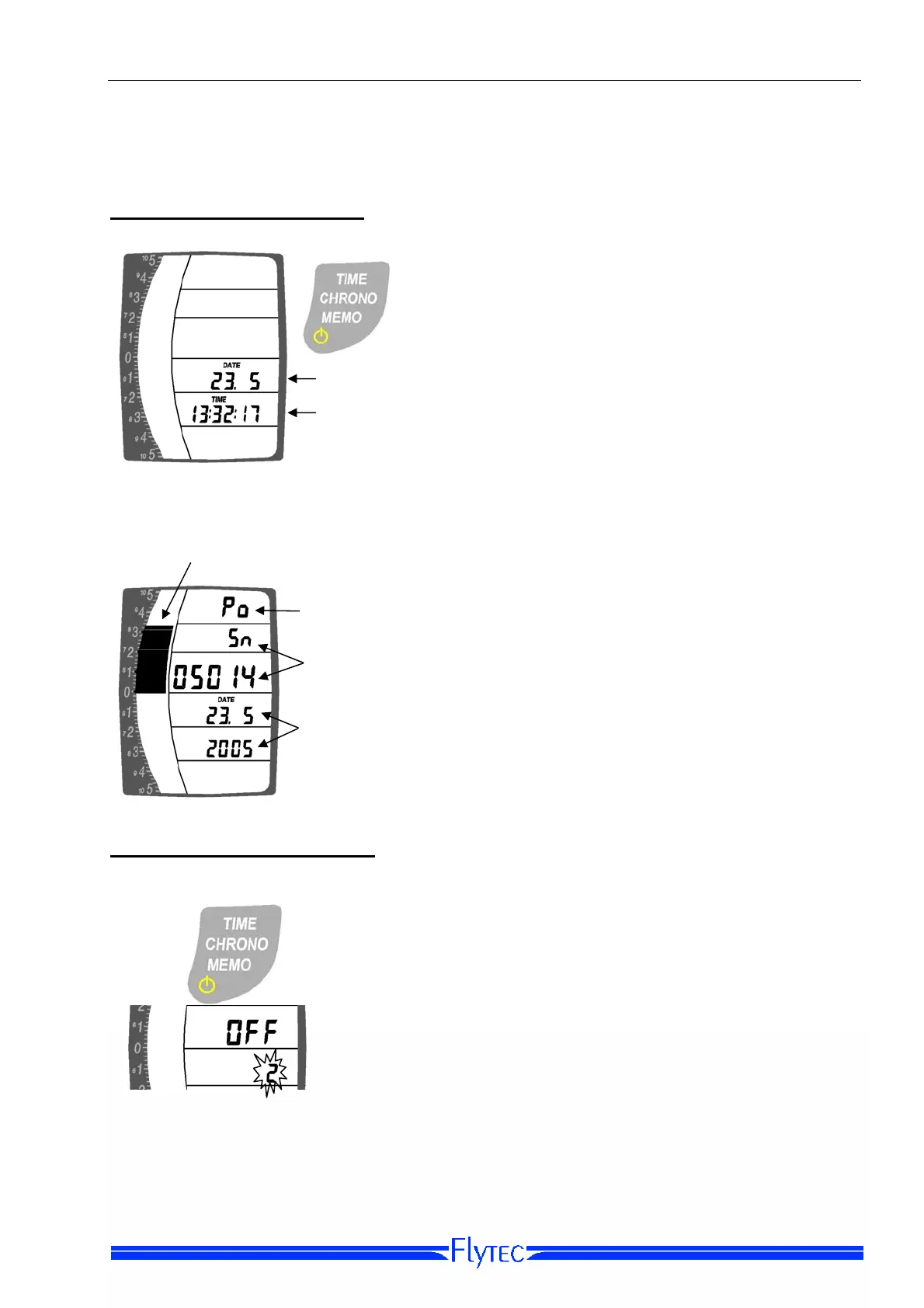
Time
Date
The date and time are displayed when the instrument
is off.
To turn on the instrument, press and hold the On /
Off “
TIME/CHRONO/MEMO” Key until you hear a
beep, and then release it. After a short display test
you will see the Startup Screen.
Startup Screen
Battery condition:
10= full... 0= em
t
Power Up
indicator
Day, month
and
ea
Serial number
The Startup Screen shows the serial number,
the battery condition and the date. The analog
scale on the left shows the battery charge.
Switching the Instrument OFF
To switch the instrument OFF press and hold the
TIME/CHRONO/MEMO Key for about seven seconds.
While you are holding the TIME/CHRONO/MEMO
k
ey,the Set Menu for time will appear if an actual flight
has not been recognized by the instrument (refer to
section on Flight acceptance page 19. Continue to
hold the key down while the instrument counts down
from 3 to 1. You will hear a beep and see OFF appear
on the display when the process is complete.
The 6005/10 will automatically power down if no flight activities are detected within 60
minutes of power on. This time period can be altered on the 6010 with FlyChart.


 To Next Page