46 Handler I, II & III Operator’s Manual - October 2008
Plumbing Package
Operation
(Handler 3)
Mixing Liquid Product
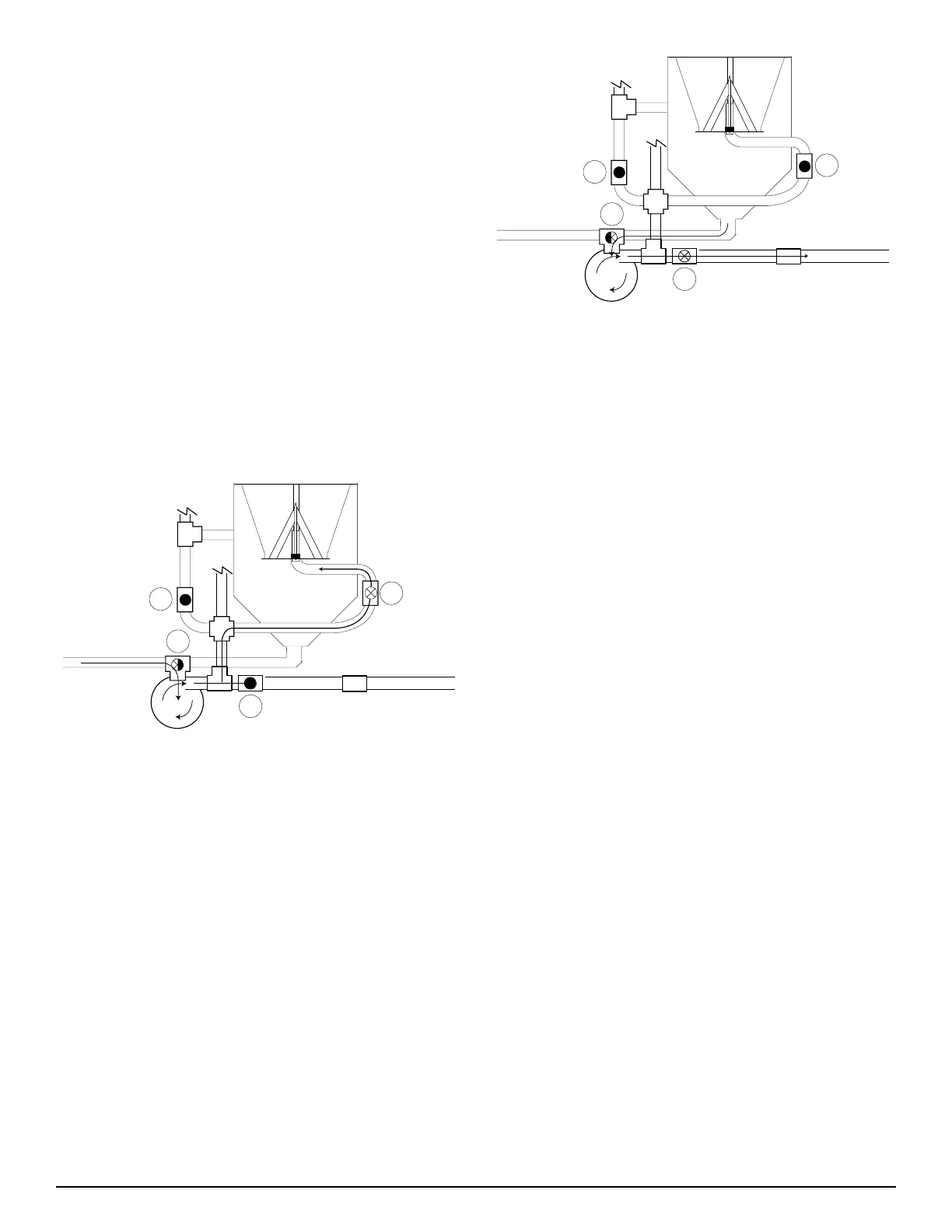
Valve #1 (3 way ball valve on suction side of pump) in the fol-
lowing instructions is part of the optional recirculation package,
and is not included with the package you purchased.
Before adding water, set the ball valves by closing valve #2,
#3 and #4.
Set valve #1 to receive fresh water.
Start your pump.
Place the container into the tank and puncture from the bot-
tom. Push it down with consistant, even pressure to cut the
bottom and allow it to drain.
Figure H3P-5.1
Open valve #4 to rinse the container. Before removing the
container close valve #4 so the incoming fresh water does
not overflow the Handler tank or spray upwards. (See Fig.
H3P-5.1)
Repeat this process until the desired amount of chemical has
been mixed.
To drain the Handler tank, set valve #1 to receive the
product from the Handler tank. Open valve #3 to send the
product to the sprayer.
To rinse replace the lid, close valve #3 and turn valve#1 to
receive fresh water. Open the valve to the RotaFlush nozzle
(not shown) and thoroughly rinse the Handler tank.
1.
2.
3.
4.
1.
2.
3.
4.
Figure H3P-5.2
To drain rinsate from tank, first close RotaFlush valve, turn
valve #1, to draw from Handler tank. Next open valve #3 to
send rinsate to sprayer. (See Fig. H3P-5.2)
Once the Handler tank has been cleaned of all product
residue, turn off the RotaFlush valve and turn on valve #1 to
receive fresh water and continue to fill the sprayer until it is
at the desired level.
Shut off your pump.
1.
2.
3.


 To Next Page