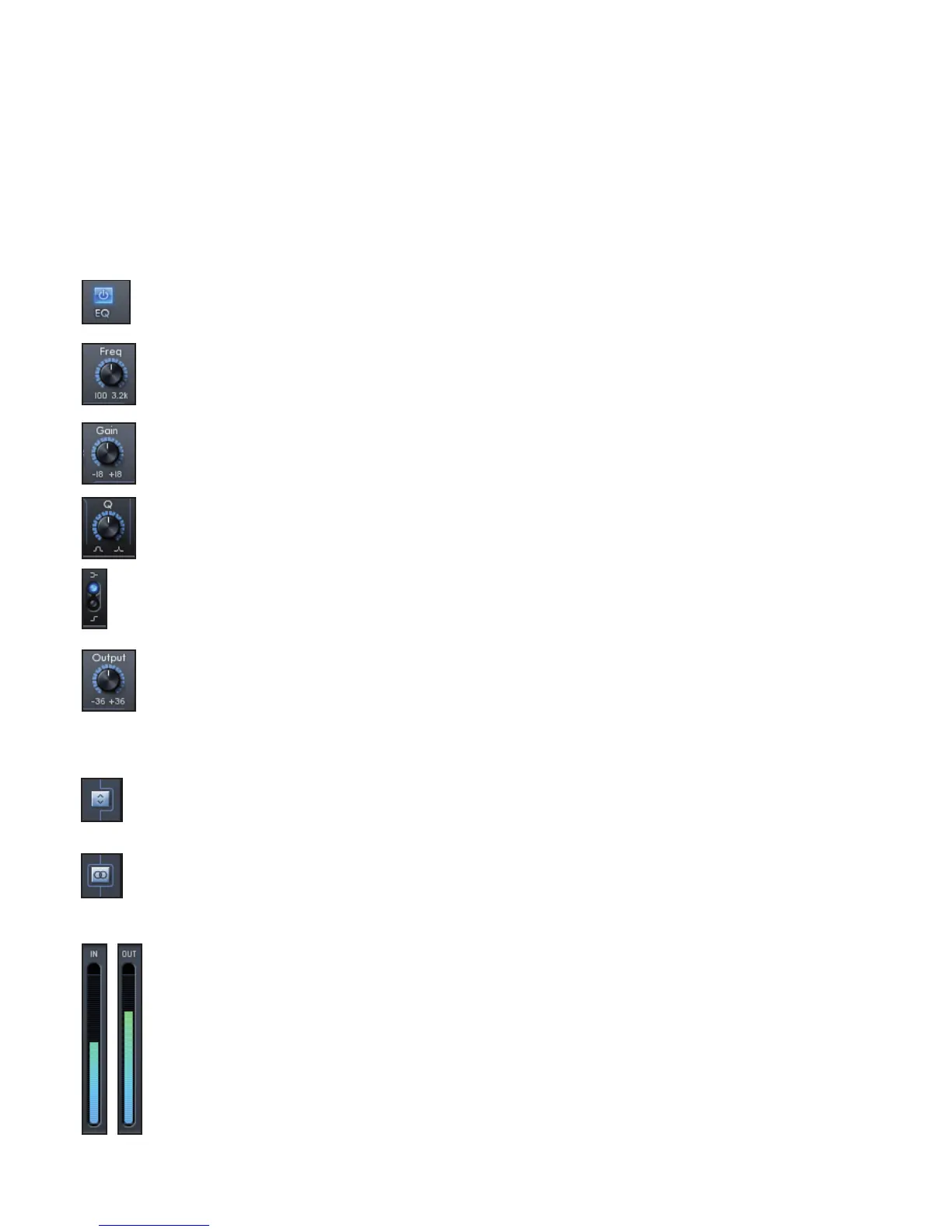
EQ
Equalisation of sound is an essential part of the recording process, necessary to remove or boost specic sections of the audible
frequency spectrum. The Focusrite EQ is 4-band, with 2 fully parametric mid bands and the option of shelving or high-pass / low-
pass on bands 1 and 4, and exhibits the same curves as the classic Focusrite EQ.
The two central bands have the same 3 knobs for modifying parameters: Frequency, Gain and Q. When high and lows bands are in
high-pass or low-pass mode (switch in lower position), the Gain knob changes into Q. This is because there is no cut or boost option
with a high-pass or low-pass lter, just a slope of variable Q at a selected cut-off frequency. The shelving mode doesn’t require a Q
control because the slope is xed.
The controls are:
EQ ACTIVE Button - Click to turn the EQ on or off.
FREQUENCY Knobs – Set the frequency that the band affects, e.g. the centre frequency in bell mode, the cut-off
frequency in high-pass /low-pass mode or the start of the shelf in shelving mode.
GAIN Knobs – Increase or decrease the level of the corresponding band of EQ. The band will have no effect with the knob
in a central position. Rotate clockwise to increase and anticlockwise to decrease the level by up to 18dB.
Q Knobs – Set the level of resonance of the band, making the band have a more pronounced effect. Increasing Q
decreases the bandwidth so that the bell acts on less of the frequency range.
SHELVING/HIGH-PASS or LOW-PASS Switch – Selects a low-shelf (upper) or high-pass (lower) for band 1, and a high-
shelf (upper) or low-pass (lower) for band 4.
OUTPUT Knob – Increases or decreases the level of the signal at the EQ output. No gain modication occurs with the
knob in a central position. Rotate clockwise to increase and anticlockwise to decrease the level by up to 36dB.
Additional Controls
FX Chain Order Button - Click to change the order in which Compressor and EQ are chained. If the Compressor is
positioned above the EQ, the signal is compressed before EQ. With EQ positioned above the Compressor, EQ is applied
before compression.
FX Mono / Stereo Button - Click to switch between 2 channel Mono and 2 channel Stereo operation. When in Stereo
mode, FX controls for input 2 on the right are unavailable. All parameter settings are set on the Left channel but are
applied to both Left and Right channels. Note that when in Stereo Mode, the Compressor works in True Stereo - i.e. equal
compression is applied to both channels.
Input / Output Meters - Display the signal level directly before and after Compression and EQ.




 To Next Page