Reverb Section
Reverberation is an effect that enables a sound source to be placed in an environment. It does this by adding a reverberant tail of
reected sound, the properties of which correspond to a space of varying dimensions.
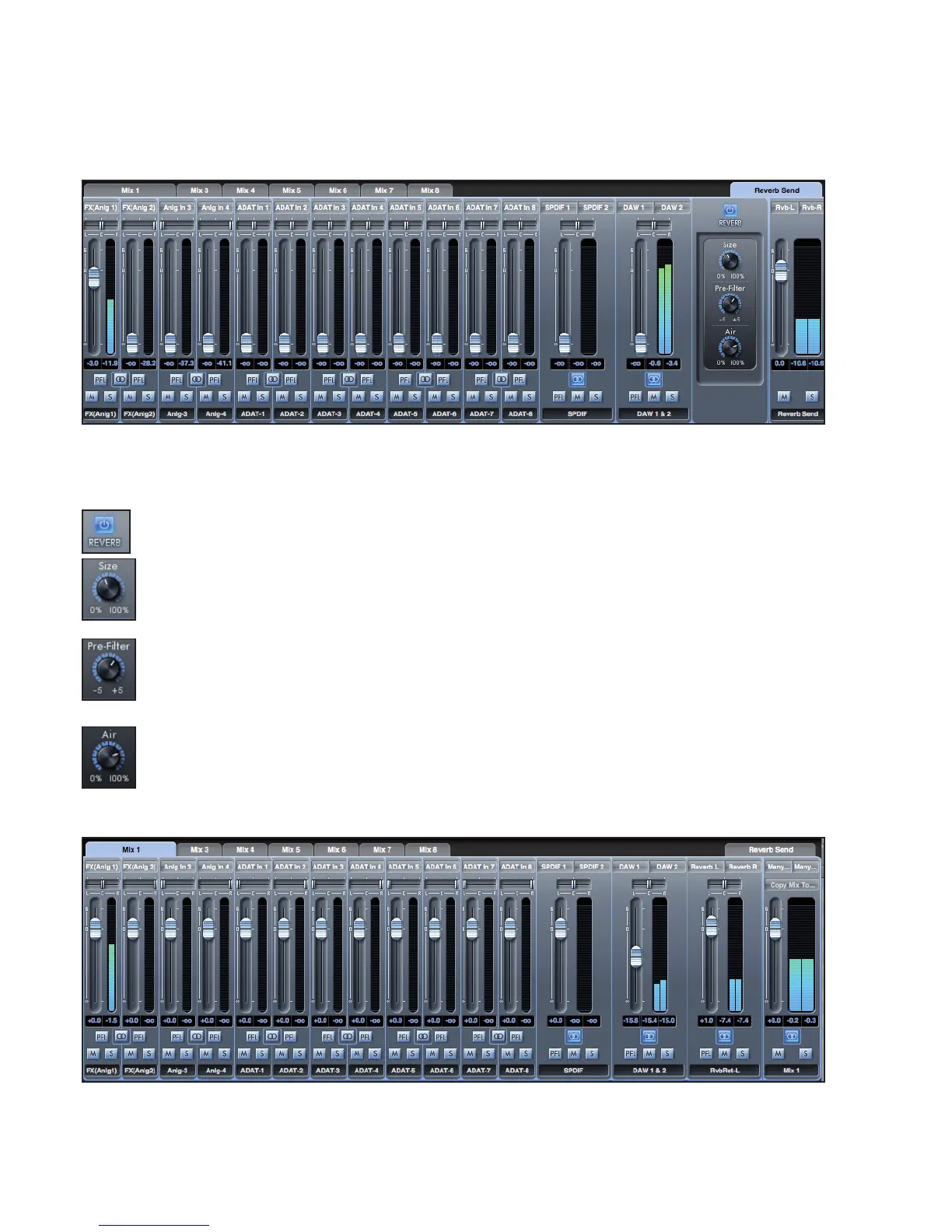
Click on the Reverb Send Mixer tab to access Reverb send settings and Reverb Controls.
The level of the faders of each of the mixer channels determines the signal level being sent to the reverb unit.
In the above picture, only channel 1 - ‘FX(Anlg1)’ is being sent to the reverb.
The Reverb controls are:
REVERB ACTIVE Button - Click to turn the reverb on or off.
SIZE Knob – Denes the size of the reverberant space. Rotate clockwise to increase. Increasing the size makes the
reverberation greater, e.g. more time between initial sound and early reections, plus longer decay time
PRE-FILTER Knob – Acts as a high- or low- pass lter for the reected sound (removes the bass or treble, respectively).
Rotate anti-clockwise to produce a low-pass lter effect, where the maximum cutoff (lowest frequency) is set in the
extreme anticlockwise position. Rotate clockwise to create a high-pass lter effect, with the maximum cutoff (highest
frequency) is set in the extreme clockwise position. In the centre, no ltering of the reected sound occurs
AIR Knob – Sets the amount of absorption (or damping) of reected sound (the more absorption, the less ‘airiness’).
In a fully anticlockwise position, absorption is at a maximum so there is very little air. Rotate clockwise to decrease
absorption and increase ‘air’
Reverb Return
Each Mixer (Mix 1 - 8) includes a Reverb Return channel.
Set the fader level of the reverb return channel to determine how much of the reverberation signal is to be sent to the output of that
mix.




 To Next Page