Monitoring with or without FX
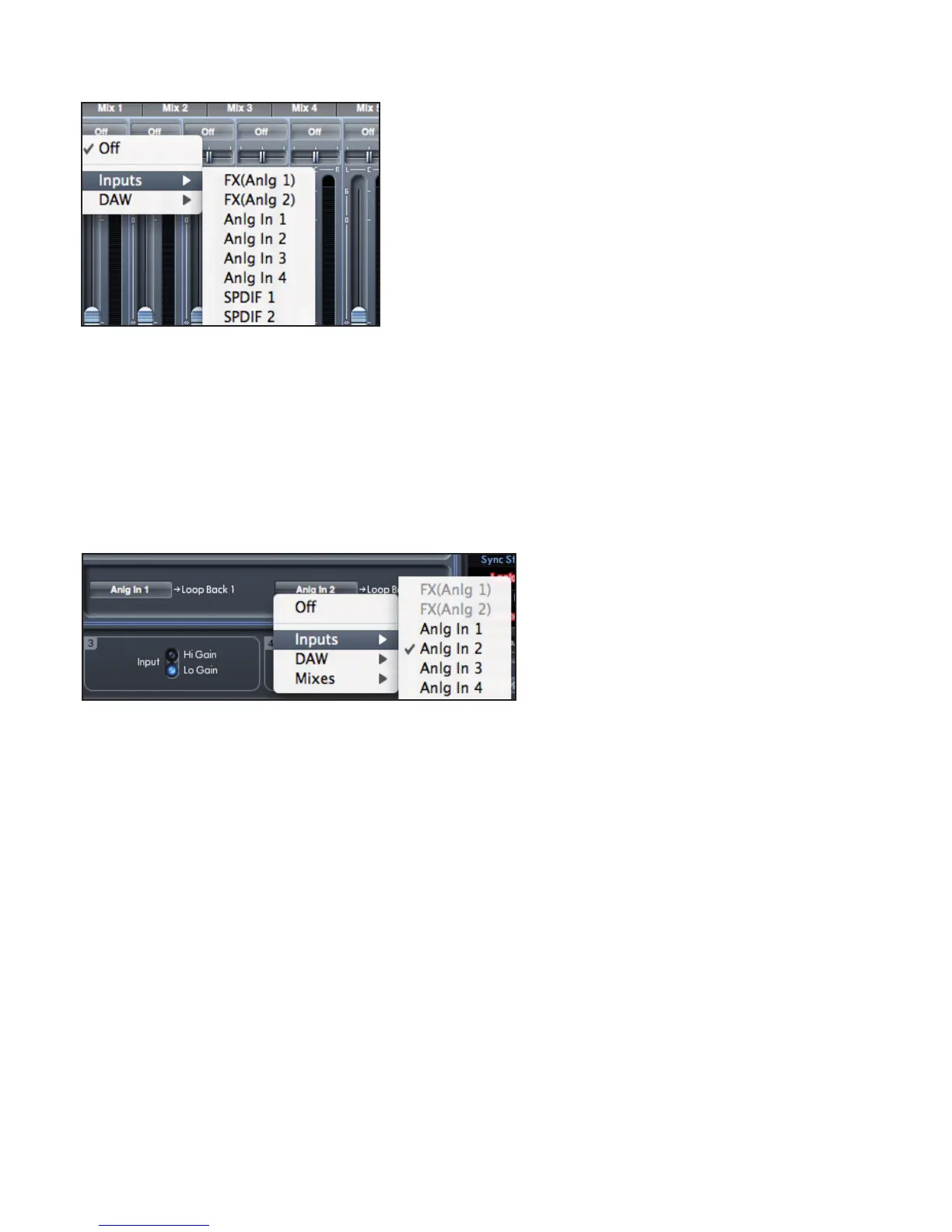
Safre MixControl allows monitoring of Inputs 1 and 2 with or without FX.
When selecting an Input source in the Mixer or Routing section, the dry signal is represented by ‘Anlg In 1’ and ‘Anlg In 2’, and the
wet signal as ‘FX(Anlg 1)’ and ‘FX(Anlg 2)’.
Recording with or without FX
The signal routing can be setup so that analogue inputs 1 and 2 can be recorded to the DAW with or without the DSP FX.
When you select input 1 and 2 in your DAW software, the input signal with DSP is recorded (when the DSP FX are active).
To record inputs 1 and 2 without DSP FX, you must use the Loopback feature which is available from the Routing Panel (see page 21).
The loopback inputs should be set to ‘Anlg In 1’ and ‘Anlg In 2’
When ‘Anlg In 1’ and ‘Anlg In 2’ are routed to Loopback, these will be available to record in your DAW via the Loopback input
channels.
As dened in the diagrams on pages 10 and 11, the Loopback channels will appear in your DAW as inputs
15, 16 @ sample rates of 44,1kHz, 48kHz
11, 12 @ sample rates of 88,2kHz, 96kHz




 To Next Page