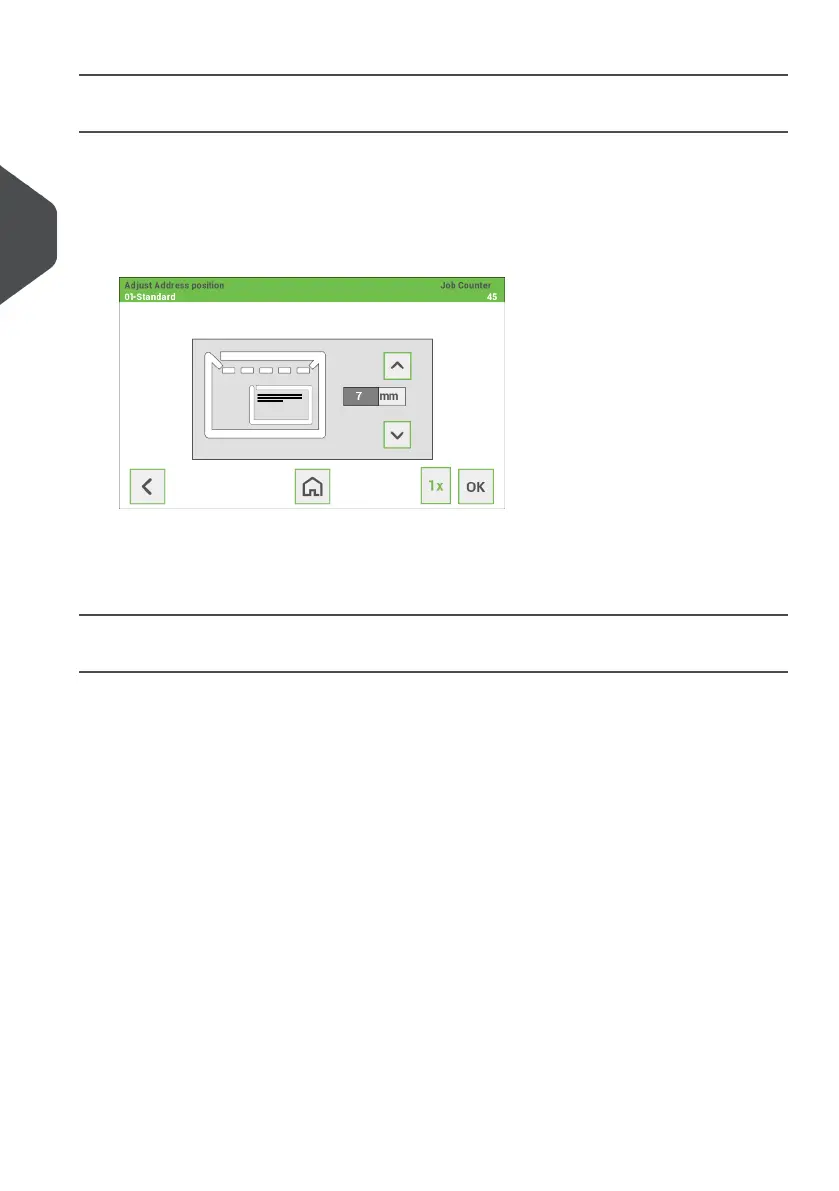
Address position
The address on the document set should be positioned in a way that you can read it from
the envelope window. If it is not readable, adjust the address position as follows:
Choose a job and tap the [1x] button.1.
2. Use the arrow buttons up/down to adjust the address position.
3. Tap the [1x] button again to verify the new position.
4. Repeat step 2 and 3 until the address is clearly visible in the envelope window.
5. Tap the [OK] button if the position is correct.
A Daily Mail job
To process documents or sets of documents, which can not be processed automatically
(e.g. stapled documents), you can use feeder 1 as a daily mail feeder. Daily mail can handle
sets with a maximum of five sheets (80 g/m2).
To use the daily mail function, define a new job with daily mail (see “Create a new
Job on page 14”) or use an existing daily mail job.
1.
2. Place the document or document set in the feeder 1.
20
| Page 20 | Jan-15-2019 03:21 | Working with Jobs
3
English


 To Next Page