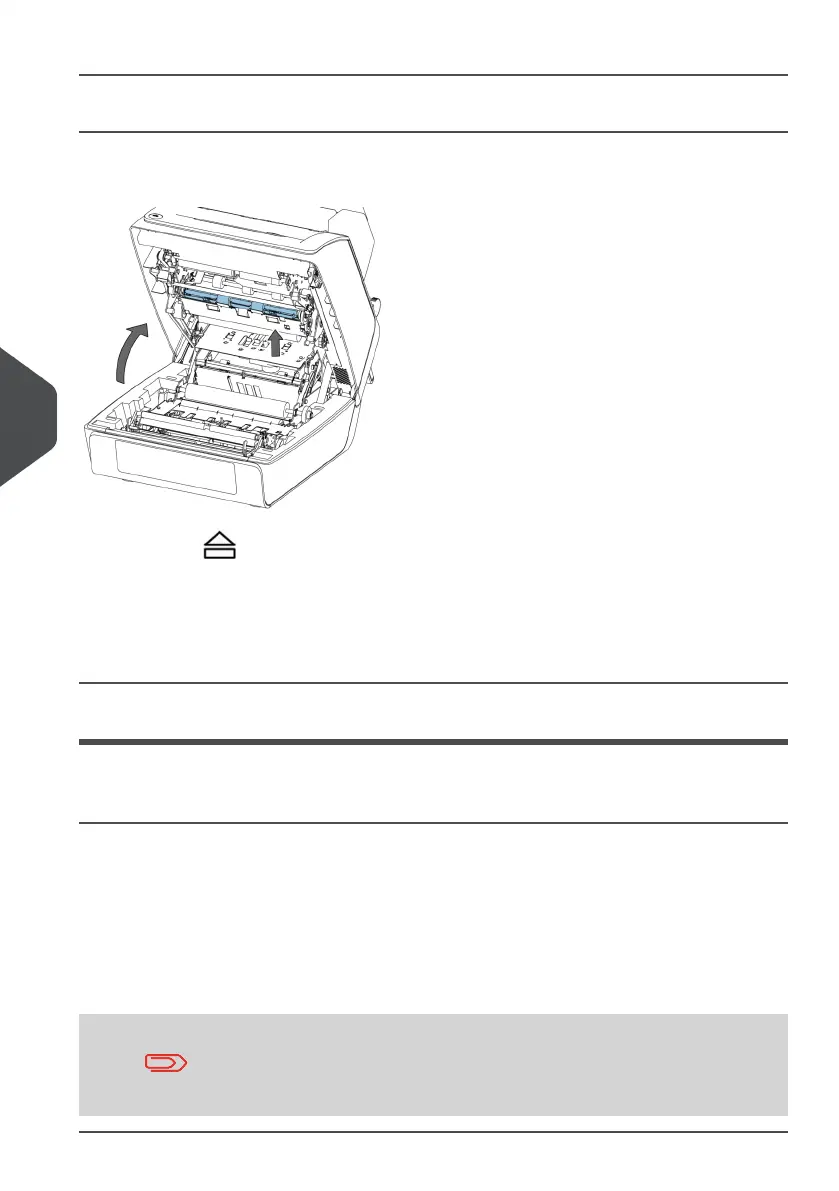
Envelope Hopper
When a stoppage occurs in the envelope hopper, remove the envelopes as follows:
1.
Press the button to open the system.
2. Remove the envelope.
If this is not possible, try to remove it from the top of the hopper:
• Close the system.
• Remove the envelope stack and remove the envelope.
Operator Troubleshooting
Operator Troubleshooting
To resolve problems:
Write down the event message number that is shown in the message on the screen.1.
2. Try to solve the problem by consulting the Troubleshooting Table.
3. Switch the inserter off and on again, to verify system operation.
4. When the error still occurs contact your service organization.
When contacting the service organization, you will also be asked
for the last error message and the software package version of the
installed software. To determine the software package version,
see Software overview.
46
| Page 46 | Jan-15-2019 03:21 | Fault finding
7
English


 To Next Page