8 Preparation and Set Up | 9
This product has demonstrated EMC compliance under conditions that included
the use of compliant peripheral devices and shielded cables between system
components. It is important that you use compliant peripheral devices and
shielded cables between system components to reduce the possibility of
causing interference to radios, televisions, and other electronic devices.
Use of controls or adjustments or performance of procedures other than
those specified herein may result in hazardous radiation exposure.
3.1.5 Isopropyl Alcohol (IPA)
Formlabs does not manufacture isopropyl alcohol. Consult the chemical
manufacturer or supplier for detailed safety information.
Carefully follow the safety instructions provided with the isopropyl alcohol that
you purchase. Isopropyl alcohol can be flammable, even explosive, and should
be kept away from heat, fire, or sparks. Any containers holding isopropyl alcohol
should be kept closed or covered when not in use. We also recommend that
you wear protective gloves and have good ventilation when working with IPA.
3.2 Personal Protective Equipment (PPE)
Always wear clean gloves when handling resin or resin-coated surfaces.
Always wear clean gloves when handling optical surfaces.
Some methods of support removal may enable small pieces of supports to
break away. Beware of flying debris and consider wearing eye protection
and gloves to protect the skin and eyes.
3.3 Specifications of Tools to be Used
The Form 2 shall only be used with supplied accessories and additional tools rec-
ommended by Formlabs. Third-party accessories and materials may cause damage.
Purchase additional supplies:
• Keep paper towels in stock to ensure a clean work environment for printing
and finishing.
•
Isopropyl alcohol (IPA, 90% or higher) is the recommended solution for rinsing
parts and cleaning liquid resin after each completed print.
•
Use a shielded CAT-5 Ethernet cable to connect the printer to a local network.
• Disposable chemical resistant gloves (nitrile or neoprene)
NOTICE
WARNING
NOTICE
CAUTION
4. Preparation and Set Up
Consider the weight and dimension of the product for installation.
4.1 Installing the Form 2
Choose a stable, level workspace to install and operate the Form 2.
Reserve the following minimum dimensions for the most convenient access:
Width: 36 cm Depth: 43 cm Height: 76 cm
Allow additional space for accessories, such as the Form 2 Finish Kit, Form Wash,
and Form Cure.
4.2 Unboxing the Form2
To unbox the Form 2:
1. Remove the top foam packaging insert.
2. Use the provided handles to lift your printer from the box.
3. Remove the printer from the carrier tray and set in workspace.
During unboxing, inspect the Form 2 for any damage or missing items. In the
case of damage or missing items, contact Formlabs or the authorized reseller.
Remove all packaging material before connecting power. Lift the cover to
remove the protective shipping material from the resin tank carrier.
Save the Form 2 packaging for transporting your printer. Original packaging
isrequiredfor warranty service.
4.3 Installing the Form 2
4.3.1 Connect Cables
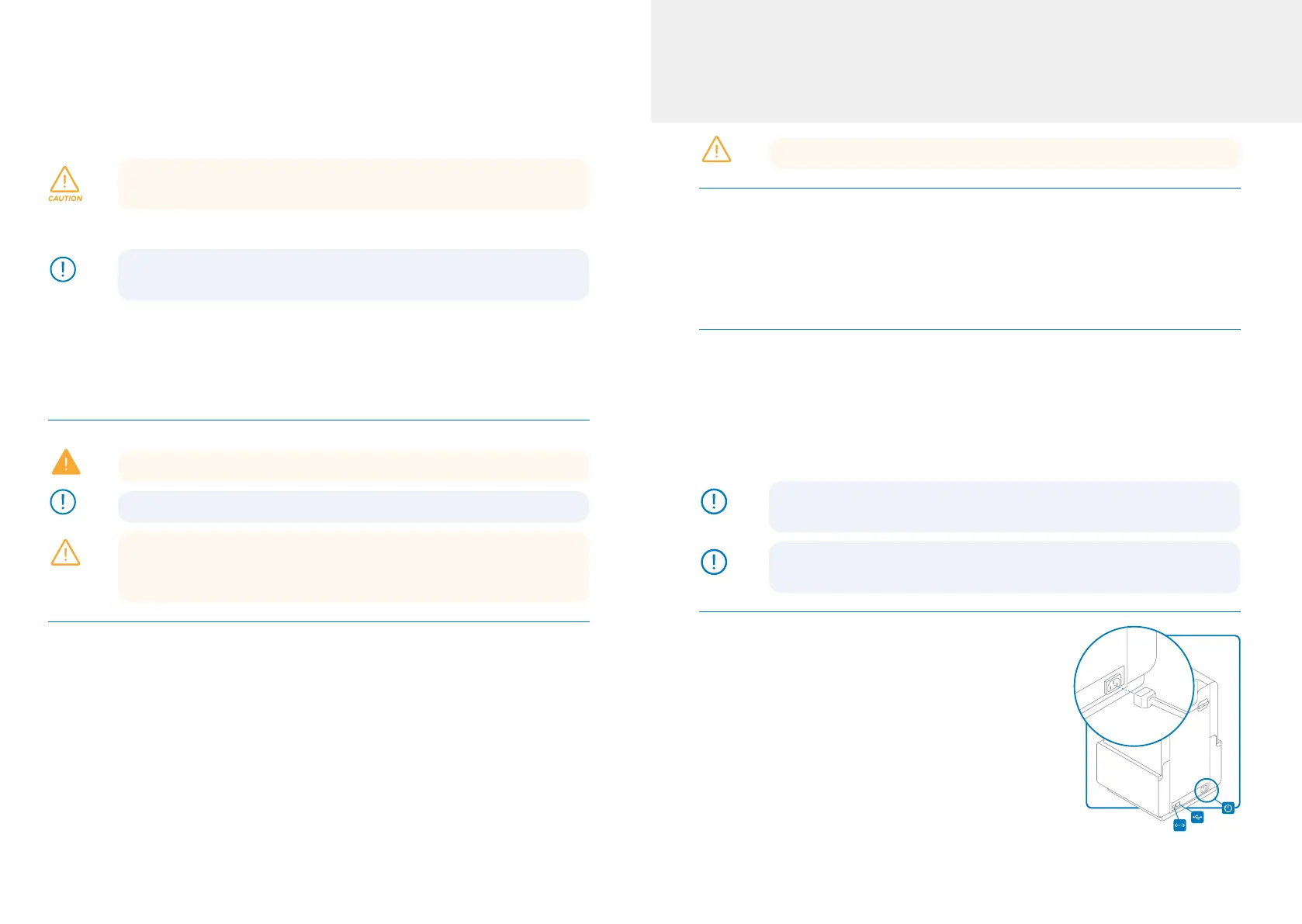
Connect the power cable to the printer and the
power supply. Files can be uploaded via USB,
Wi-Fi, or Ethernet. For USB, connect the printer
to a nearby computer. For Ethernet, connect the
printer to an Ethernet port.
The Form 2 includes three connection ports on the
back panel. From left to right: Ethernet, USB, and power.
The power connection is shown in the inlaid image. ⊲
CAUTION
NOTICE
NOTICE



 To Next Page