Third Party DDNS will take effect.
② Do port forwarding within the router
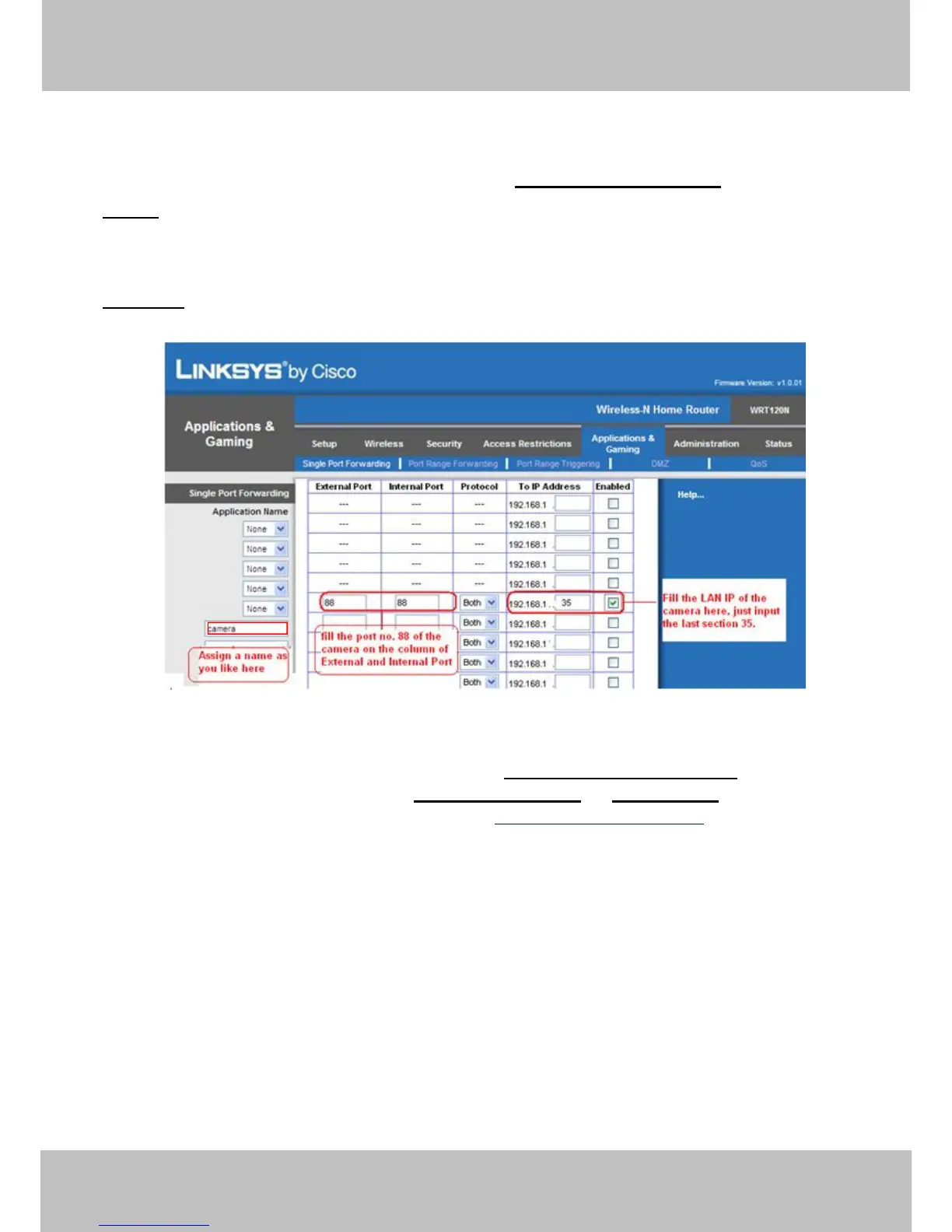
Example: The camera’s LAN IP address is http://192.168.1.35:88 ,
Firstly, login the router, goes to the menu of Port Forwarding or Port Trigger (or named Virtue
Server on some brands of router). Take Linksys brand router as an example, Login the
router, and goes to Applications & Gaming->Single Port Forwarding.
Secondly, Create a new column by LAN IP address & HTTP Port No. of the camera within the
router showed as below.
Figure 3.27
③ Use domain name to access the camera via internet
After the port forwarding is finished, you can use the domain name+ http no. to access the
camera via internet. Take hostname ycxgwp.no-ip.info and http no. 88for example, the
accessing link of the camera via internet would be http:// ycxgwp.no-ip.info:88
3.11 Mail Service Settings
If you want the camera to send emails when motion/sound has been detected, Mail Service
Settings will need to be configured.



 To Next Page