22
w
w
w
w
w
w
w
w
www
www
www
www
www
www
www
www
.foscam.co
.foscam.co
.foscam.co
.foscam.co
.foscam.co
.foscam.co
.foscam.co
.foscam.co
m
m
m
m
m
m
m
m
Shenzhen
Shenzhen
Shenzhen
Shenzhen
Shenzhen
Shenzhen
Shenzhen
Shenzhen
Foscam
Foscam
Foscam
Foscam
Foscam
Foscam
Foscam
Foscam
Intelligent
Intelligent
Intelligent
Intelligent
Intelligent
Intelligent
Intelligent
Intelligent
Technology
Technology
Technology
Technology
Technology
Technology
Technology
Technology
Co.,
Co.,
Co.,
Co.,
Co.,
Co.,
Co.,
Co.,
Limited
Limited
Limited
Limited
Limited
Limited
Limited
Limited
Tel:
Tel:
Tel:
Tel:
Tel:
Tel:
Tel:
Tel:
86
86
86
86
86
86
86
86
755
755
755
755
755
755
755
755
2674
2674
2674
2674
2674
2674
2674
2674
5668
5668
5668
5668
5668
5668
5668
5668
Fax:
Fax:
Fax:
Fax:
Fax:
Fax:
Fax:
Fax:
86
86
86
86
86
86
86
86
755
755
755
755
755
755
755
755
2674
2674
2674
2674
2674
2674
2674
2674
5168
5168
5168
5168
5168
5168
5168
5168
22
22
22
22
3.2
3.2
3.2
3.2 Surveillance
Surveillance
Surveillance
Surveillance Window
Window
Window
Window
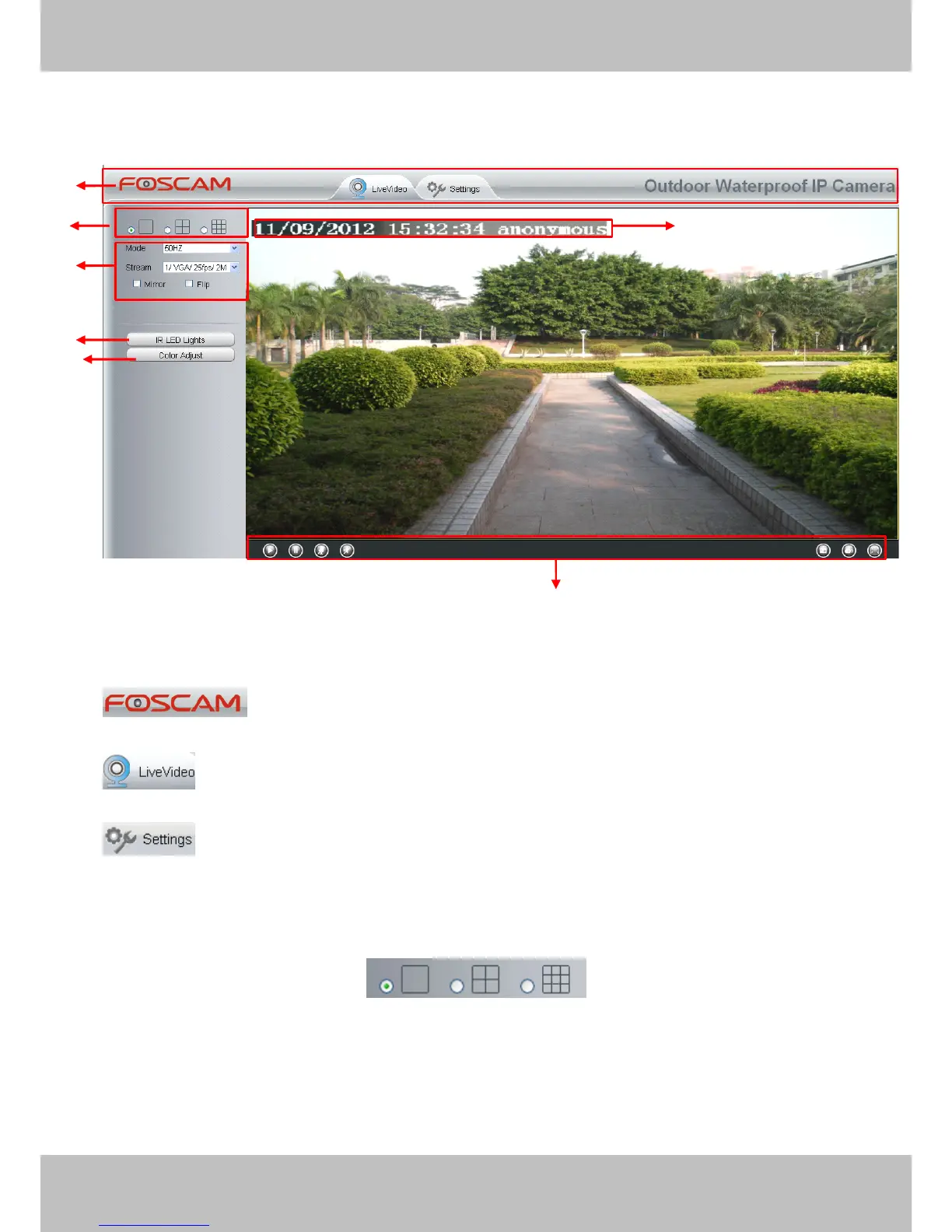
Figure 3.3
Section1
Section1
Section1
Section1 FOSCAM
FOSCAM
FOSCAM
FOSCAM Logo/
Logo/
Logo/
Logo/ LiveVideo
LiveVideo
LiveVideo
LiveVideo /
/
/
/ Settings
Settings
Settings
Settings buttons
buttons
buttons
buttons
:
:
:
: FOSCAM LOGO
:
:
:
: Path to surveillance window. Click this button and back to the surveillance window
:
:
:
: Path to Administrator Control Panel, Click it, and it will lead to Administrator
Control Panel and do advanced settings .
Section2
Section2
Section2
Section2 Multi-Device
Multi-Device
Multi-Device
Multi-Device Window
Window
Window
Window
The firmware inside the camera supports up to maximum of 9 cameras being monitoring at the
same time.
You
can add other cameras in multi- camera panel (read chapter 4 . 2.5 ).
1
1
1
1
2
2
2
2
4
4
4
4
7
7
7
7
3
3
3
3
5
5
5
5
6
6
6
6


 To Next Page