65
w
w
w
w
w
w
w
w
www
www
www
www
www
www
www
www
.foscam.co
.foscam.co
.foscam.co
.foscam.co
.foscam.co
.foscam.co
.foscam.co
.foscam.co
m
m
m
m
m
m
m
m
Shenzhen
Shenzhen
Shenzhen
Shenzhen
Shenzhen
Shenzhen
Shenzhen
Shenzhen
Foscam
Foscam
Foscam
Foscam
Foscam
Foscam
Foscam
Foscam
Intelligent
Intelligent
Intelligent
Intelligent
Intelligent
Intelligent
Intelligent
Intelligent
Technology
Technology
Technology
Technology
Technology
Technology
Technology
Technology
Co.,
Co.,
Co.,
Co.,
Co.,
Co.,
Co.,
Co.,
Limited
Limited
Limited
Limited
Limited
Limited
Limited
Limited
Tel:
Tel:
Tel:
Tel:
Tel:
Tel:
Tel:
Tel:
86
86
86
86
86
86
86
86
755
755
755
755
755
755
755
755
2674
2674
2674
2674
2674
2674
2674
2674
5668
5668
5668
5668
5668
5668
5668
5668
Fax:
Fax:
Fax:
Fax:
Fax:
Fax:
Fax:
Fax:
86
86
86
86
86
86
86
86
755
755
755
755
755
755
755
755
2674
2674
2674
2674
2674
2674
2674
2674
5168
5168
5168
5168
5168
5168
5168
5168
65
65
65
65
4.8
4.8
4.8
4.8 Firewall
Firewall
Firewall
Firewall
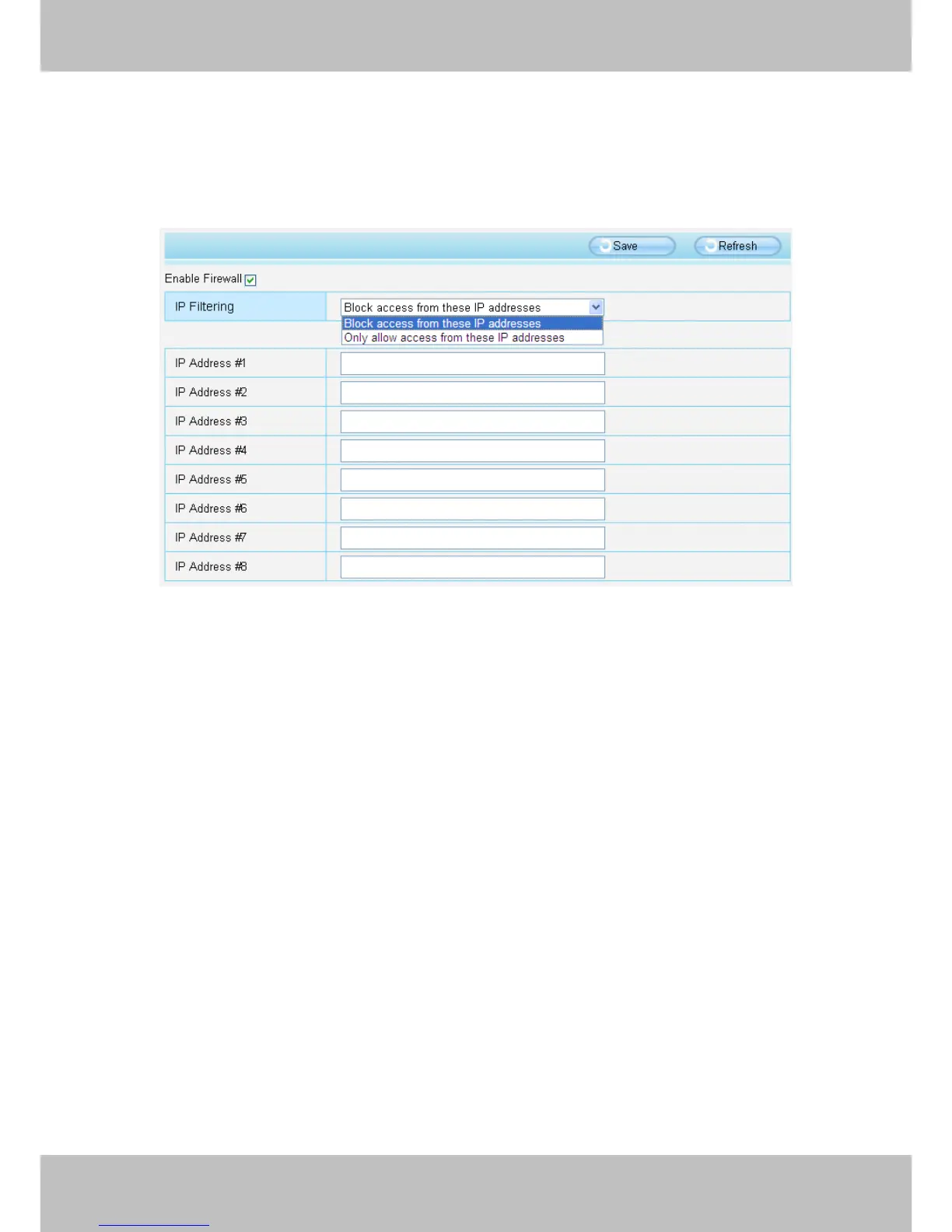
This section explains how to control the access permission by checking the client PC ’ s IP
addresses. It is composed of the following columns: Block
Block
Block
Block access
access
access
access from
from
from
from these
these
these
these IP
IP
IP
IP address
address
address
address es
es
es
es
and Only
Only
Only
Only allow
allow
allow
allow access
access
access
access from
from
from
from these
these
these
these IP
IP
IP
IP addresses
addresses
addresses
addresses .
Figure 4 .5 0
Enable firewall, If you select Only allow access from these IP addresses and fill in 8 IP addresses
at most, only those clients whose IP addresses listed in the Only
Only
Only
Only allow
allow
allow
allow access
access
access
access from
from
from
from these
these
these
these IP
IP
IP
IP
addresses
addresses
addresses
addresses can access the Network Camera. If you select Block
Block
Block
Block access
access
access
access from
from
from
from these
these
these
these IP
IP
IP
IP
address
address
address
address es
es
es
es ,
,
,
, only those clients whose IP addresses are in the IP list cannot access the Network
Camera.
Click Save
Save
Save
Save to take effect.


 To Next Page