EasyManua.ls Logo

Foscam FI9805W - Basic Settings

Foscam FI9805W
97 pages
Print Icon
To Next Page IconTo Next Page
To Previous Page IconTo Previous Page
Loading...
30
w
w
w
w
w
w
w
w
www
www
www
www
www
www
www
www
.foscam.co
.foscam.co
.foscam.co
.foscam.co
.foscam.co
.foscam.co
.foscam.co
.foscam.co
m
m
m
m
m
m
m
m
Shenzhen
Shenzhen
Shenzhen
Shenzhen
Shenzhen
Shenzhen
Shenzhen
Shenzhen
Foscam
Foscam
Foscam
Foscam
Foscam
Foscam
Foscam
Foscam
Intelligent
Intelligent
Intelligent
Intelligent
Intelligent
Intelligent
Intelligent
Intelligent
Technology
Technology
Technology
Technology
Technology
Technology
Technology
Technology
Co.,
Co.,
Co.,
Co.,
Co.,
Co.,
Co.,
Co.,
Limited
Limited
Limited
Limited
Limited
Limited
Limited
Limited
Tel:
Tel:
Tel:
Tel:
Tel:
Tel:
Tel:
Tel:
86
86
86
86
86
86
86
86
755
755
755
755
755
755
755
755
2674
2674
2674
2674
2674
2674
2674
2674
5668
5668
5668
5668
5668
5668
5668
5668
Fax:
Fax:
Fax:
Fax:
Fax:
Fax:
Fax:
Fax:
86
86
86
86
86
86
86
86
755
755
755
755
755
755
755
755
2674
2674
2674
2674
2674
2674
2674
2674
5168
5168
5168
5168
5168
5168
5168
5168
30
30
30
30
4.1.4
4.1.4
4.1.4
4.1.4 Log
Log
Log
Log
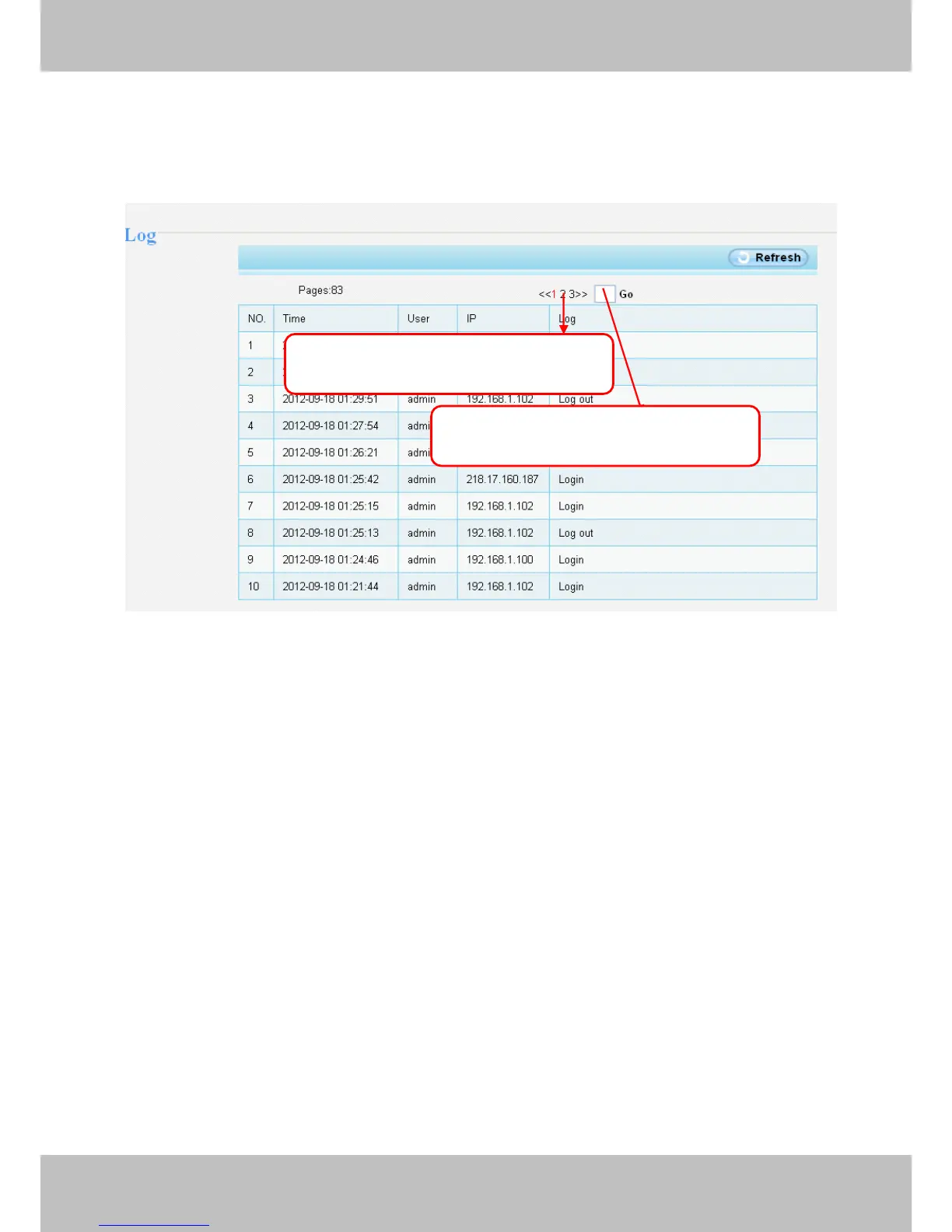
The log record shows who and which IP address accessed or logout the camera and when.
Figure 4.4
Click
Click
Click
Click the
the
the
the page
page
page
page number
number
number
number and
and
and
and go
go
go
go to
to
to
to the
the
the
the
corresponding
corresponding
corresponding
corresponding page
page
page
page to
to
to
to see
see
see
see more
more
more
more logs
logs
logs
logs
Fill
Fill
Fill
Fill in
in
in
in one
one
one
one page
page
page
page number,
number,
number,
number, click
click
click
click Go
Go
Go
Go button
button
button
button
and
and
and
and go
go
go
go to
to
to
to the
the
the
the corresponding
corresponding
corresponding
corresponding page
page
page
page