5
w
w
w
w
w
w
w
w
www
www
www
www
www
www
www
www
.foscam.co
.foscam.co
.foscam.co
.foscam.co
.foscam.co
.foscam.co
.foscam.co
.foscam.co
m
m
m
m
m
m
m
m
Shenzhen
Shenzhen
Shenzhen
Shenzhen
Shenzhen
Shenzhen
Shenzhen
Shenzhen
Foscam
Foscam
Foscam
Foscam
Foscam
Foscam
Foscam
Foscam
Intelligent
Intelligent
Intelligent
Intelligent
Intelligent
Intelligent
Intelligent
Intelligent
Technology
Technology
Technology
Technology
Technology
Technology
Technology
Technology
Co.,
Co.,
Co.,
Co.,
Co.,
Co.,
Co.,
Co.,
Limited
Limited
Limited
Limited
Limited
Limited
Limited
Limited
Tel:
Tel:
Tel:
Tel:
Tel:
Tel:
Tel:
Tel:
86
86
86
86
86
86
86
86
755
755
755
755
755
755
755
755
2674
2674
2674
2674
2674
2674
2674
2674
5668
5668
5668
5668
5668
5668
5668
5668
Fax:
Fax:
Fax:
Fax:
Fax:
Fax:
Fax:
Fax:
86
86
86
86
86
86
86
86
755
755
755
755
755
755
755
755
2674
2674
2674
2674
2674
2674
2674
2674
5168
5168
5168
5168
5168
5168
5168
5168
5
5
5
5
1.4
1.4
1.4
1.4
1.4
1.4
1.4
1.4
Physical
Physical
Physical
Physical
Physical
Physical
Physical
Physical
Description
Description
Description
Description
Description
Description
Description
Description
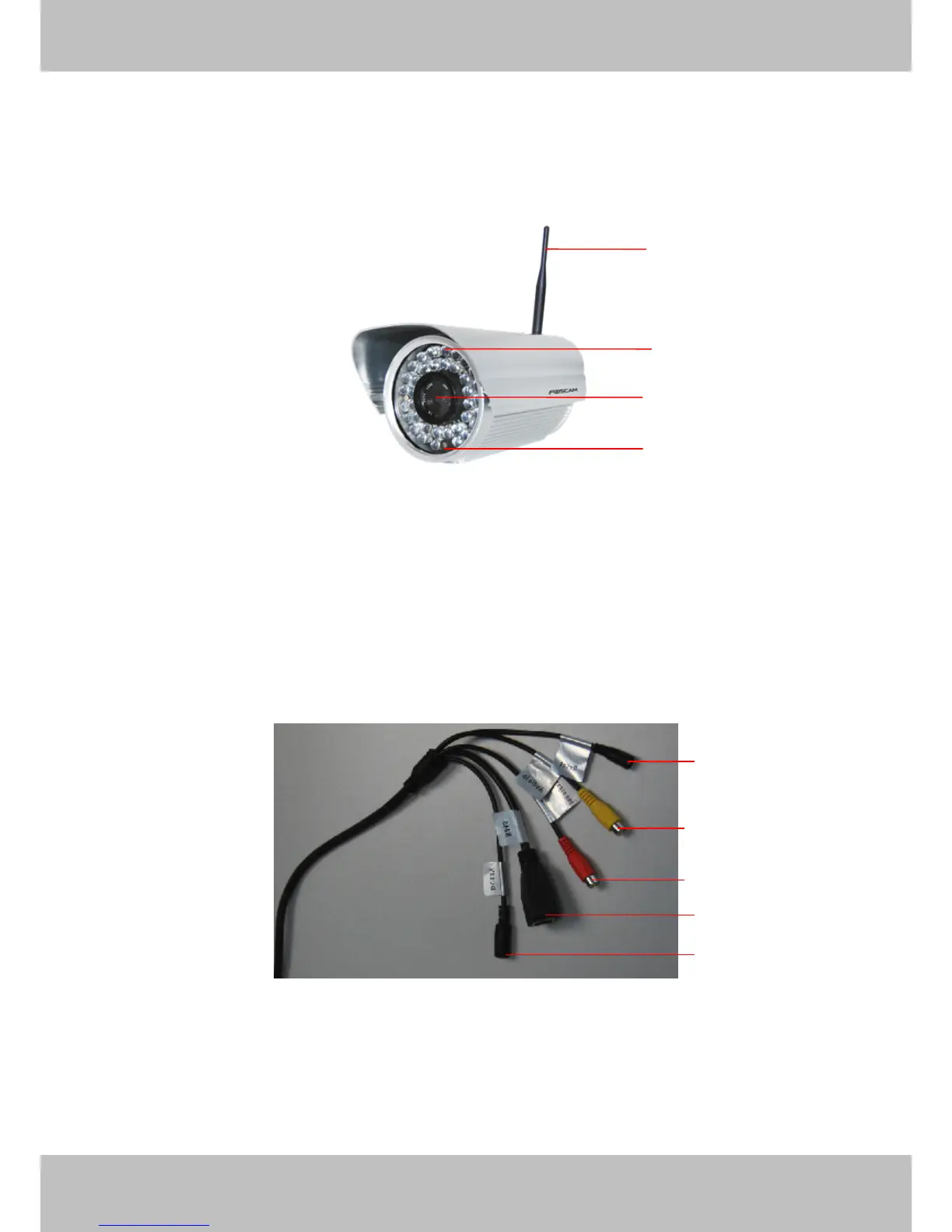
Front
Front
Front
Front Panel
Panel
Panel
Panel
Figure 1.1
1
1
1
1 WIFI
WIFI
WIFI
WIFI Antenna:
Antenna:
Antenna:
Antenna: Wireless Antenn a
2
2
2
2 Infrared
Infrared
Infrared
Infrared LED:
LED:
LED:
LED: 36 IR LEDs
3
3
3
3 LENS:
LENS:
LENS:
LENS: CMOS sensor with fixed focus lens
4
4
4
4 Induction
Induction
Induction
Induction IC
IC
IC
IC
Interface
Interface
Interface
Interface
Figure 1. 2
1
1
1
1 ) Reset
Reset
Reset
Reset button
button
button
button :
:
:
: Press and hold on the reset button for 5 seconds. Releas ing the reset
button , the password will back to the factory default administrator password. The default
administrator user is admin with no password.
2
2
2
2 ) Audio
Audio
Audio
Audio input
input
input
input interface
interface
interface
interface : The jack is used to plug external microphone .
1
1
1
1
2
2
2
2
3
3
3
3
4
4
4
4
5
5
5
5
1
1
1
1
2
2
2
2
3
3
3
3
4
4
4
4



 To Next Page