35
w
w
w
w
w
w
w
w
www
www
www
www
www
www
www
www
.foscam.co
.foscam.co
.foscam.co
.foscam.co
.foscam.co
.foscam.co
.foscam.co
.foscam.co
m
m
m
m
m
m
m
m
Shenzhen
Shenzhen
Shenzhen
Shenzhen
Shenzhen
Shenzhen
Shenzhen
Shenzhen
Foscam
Foscam
Foscam
Foscam
Foscam
Foscam
Foscam
Foscam
Intelligent
Intelligent
Intelligent
Intelligent
Intelligent
Intelligent
Intelligent
Intelligent
Technology
Technology
Technology
Technology
Technology
Technology
Technology
Technology
Co.,
Co.,
Co.,
Co.,
Co.,
Co.,
Co.,
Co.,
Limited
Limited
Limited
Limited
Limited
Limited
Limited
Limited
Tel:
Tel:
Tel:
Tel:
Tel:
Tel:
Tel:
Tel:
86
86
86
86
86
86
86
86
755
755
755
755
755
755
755
755
2674
2674
2674
2674
2674
2674
2674
2674
5668
5668
5668
5668
5668
5668
5668
5668
Fax:
Fax:
Fax:
Fax:
Fax:
Fax:
Fax:
Fax:
86
86
86
86
86
86
86
86
755
755
755
755
755
755
755
755
2674
2674
2674
2674
2674
2674
2674
2674
5168
5168
5168
5168
5168
5168
5168
5168
35
35
35
35
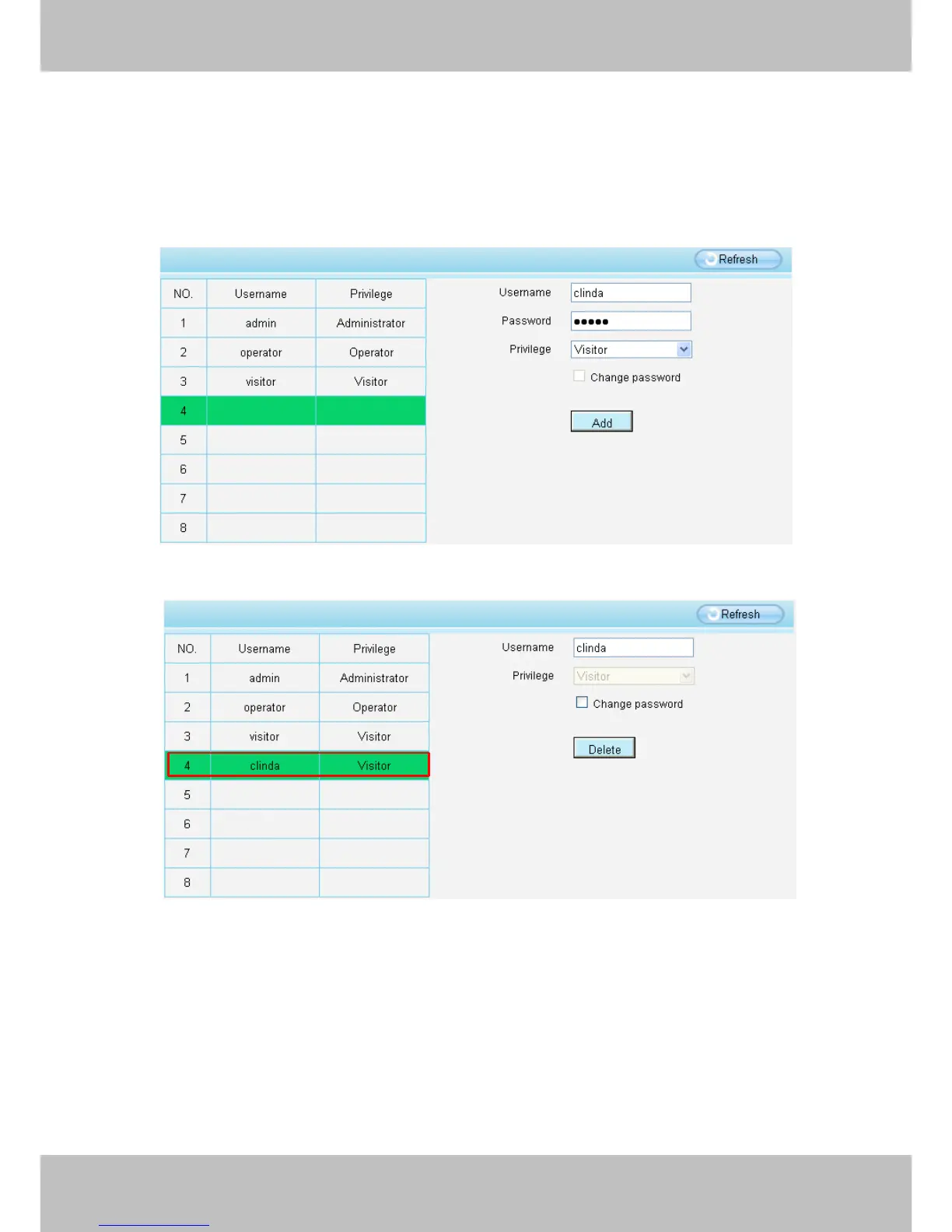
Figure 4 .11
How
How
How
How to
to
to
to add
add
add
add account
account
account
account ?
?
?
?
Select one blank column, then enter the new user name, password and privilege , last click Add
to take effect. You can see the new added account on the Account list.
Figure 4 .12
Figure 4 .13
Delete
Delete
Delete
Delete Select the account which you want to delete, then click Delete button to take effect.
Note:
Note:
Note:
Note: The default admin istrator account cannot be deleted, but you can add other administrator
users.



 To Next Page