www
www
.foscam.
.foscam.
us
us
Foscam Digital Technologies LLC
Telephone: 1-800-930-0949
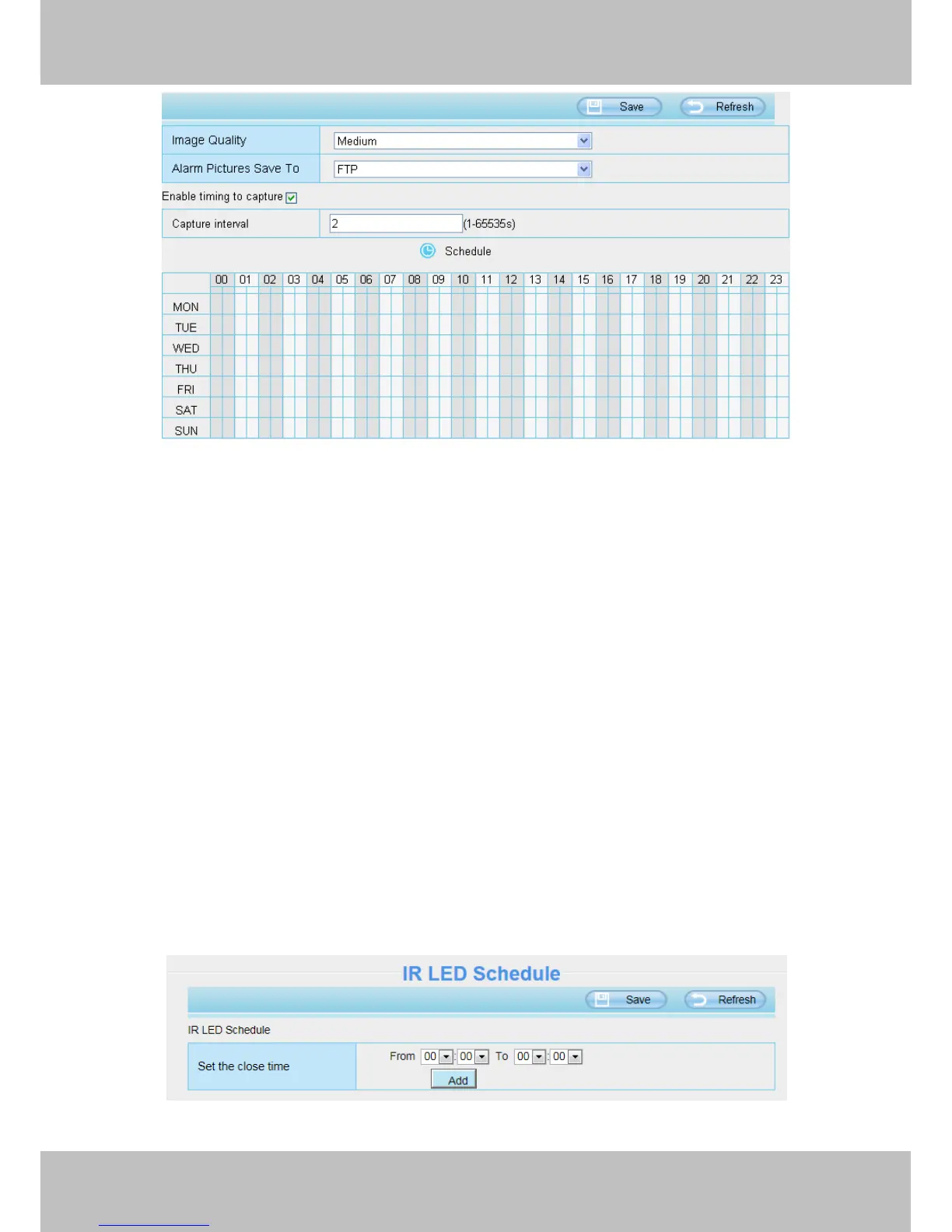
Image Quality: Low, Middle and High. The higher the quality, the picture will be clearer.
Save Path: FTP. If you have done FTP and Alarm settings, when alarming, the camera will snap pictures to the
FTP automatically.
Enable timing to capture
To enable capture interval, follow the steps below:
1 Select Enable Motion detection
2 Capture interval:The interval time between two captures.
3 Select the capture time
Click the black button up the MON, you will see all time range turn red. When something moving in the
detection area at anytime, the camera will capture.
Specify an capture schedule
Click the week day words, the corresponding column will be selected. For example, click TUE, the all
column of TUE turns to red, that means during Tuesday whole day, the camera will capture.
Press the left mouse and drag it on the time boxes, you can select the serial area.
4.4.5 IR LED Schedule
On this page you can set the schedule time for switching IR LED lights. When parameter Mode is set to the
Schedule on the Live Video window, At these schedule time, the IR LED lights will be turned off.



 To Next Page