EasyManua.ls Logo

Foscam FI9831P - Sd Card Management

Foscam FI9831P
88 pages
Print Icon
To Next Page IconTo Next Page
To Previous Page IconTo Previous Page
Loading...
www
www
.foscam.
.foscam.
us
us
Foscam Digital Technologies LLC
Telephone: 1-800-930-0949
59
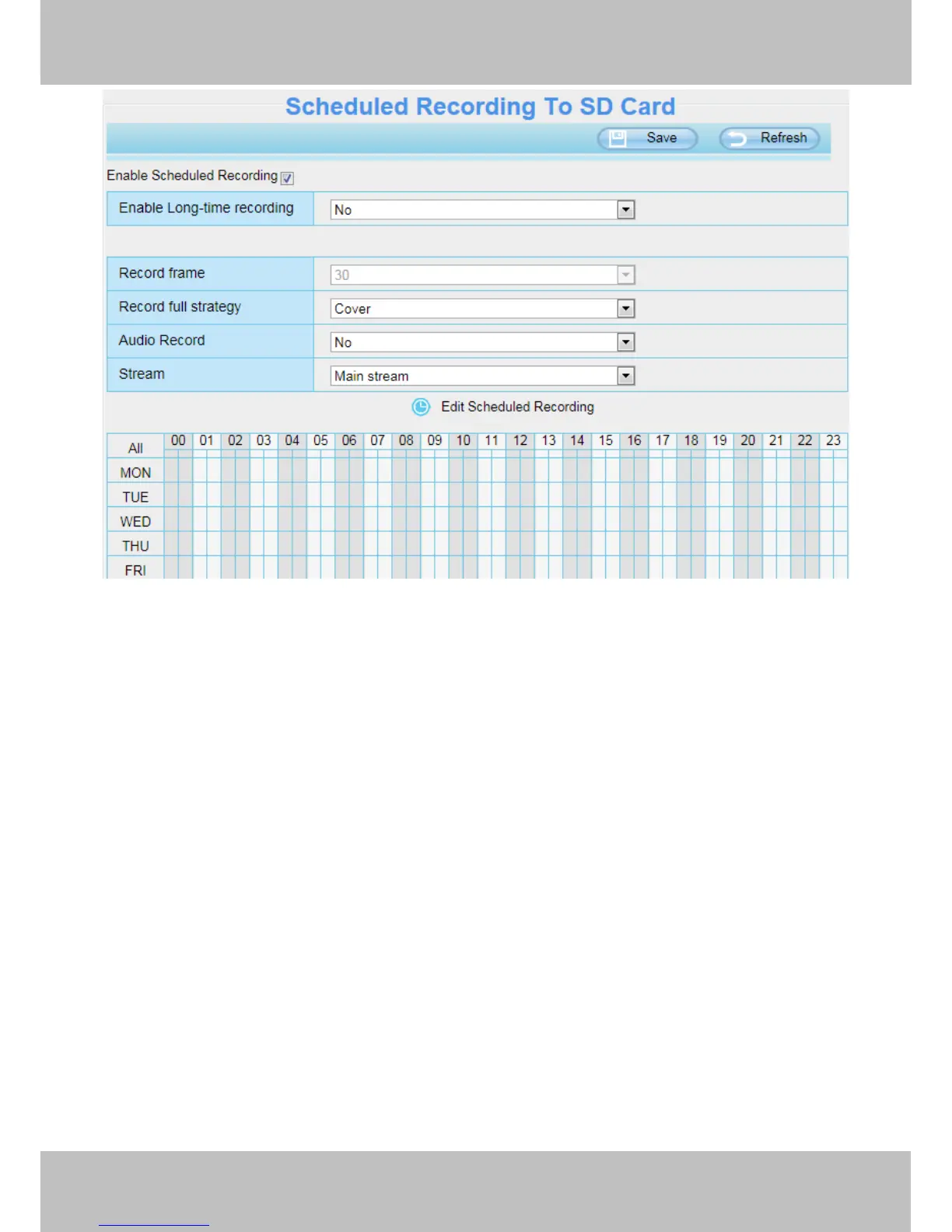
Figure 4.58
Record frame: There are six frame selections, such as 1/30, 4/30, 8/30, 15/30, 24/30, 30/30. Recommended
default is 4/30. The greater the Frame rate is, the sharper picture quality is, and the greater of storage space is,
the shorter the storage time is.
Record full strategy: When the SD card is full, you can choose to cover the previous recording, or stop
recording.
Audio Record: You can choose "yes" or "no".
NOTES:
Scheduled recording only supports video saved to the SD card or FTP server. (FI9818w and FI9808P
have not SD card.)
The schedule recording will stop while alarm recording is beginning ,and it will continue automatically after
alarm recording end.
You can refer to "alarm schedule." in " 4.5 Alarm" about editing the time of recording Schedule.
4.6.5 SD Card Management
This camera supports SD Card and the max size of SD card must be under 32G.
When you plug in the SD card during the camera work process, please reboot the camera again, or else the
SD Card may be cannot work well.


Other manuals for Foscam FI9831P

Related product manuals