EasyManua.ls Logo

Foshk WH2900 - Upload your weather data to Wunderground.com

Default Icon
57 pages
Print Icon
To Next Page IconTo Next Page
To Previous Page IconTo Previous Page
Loading...
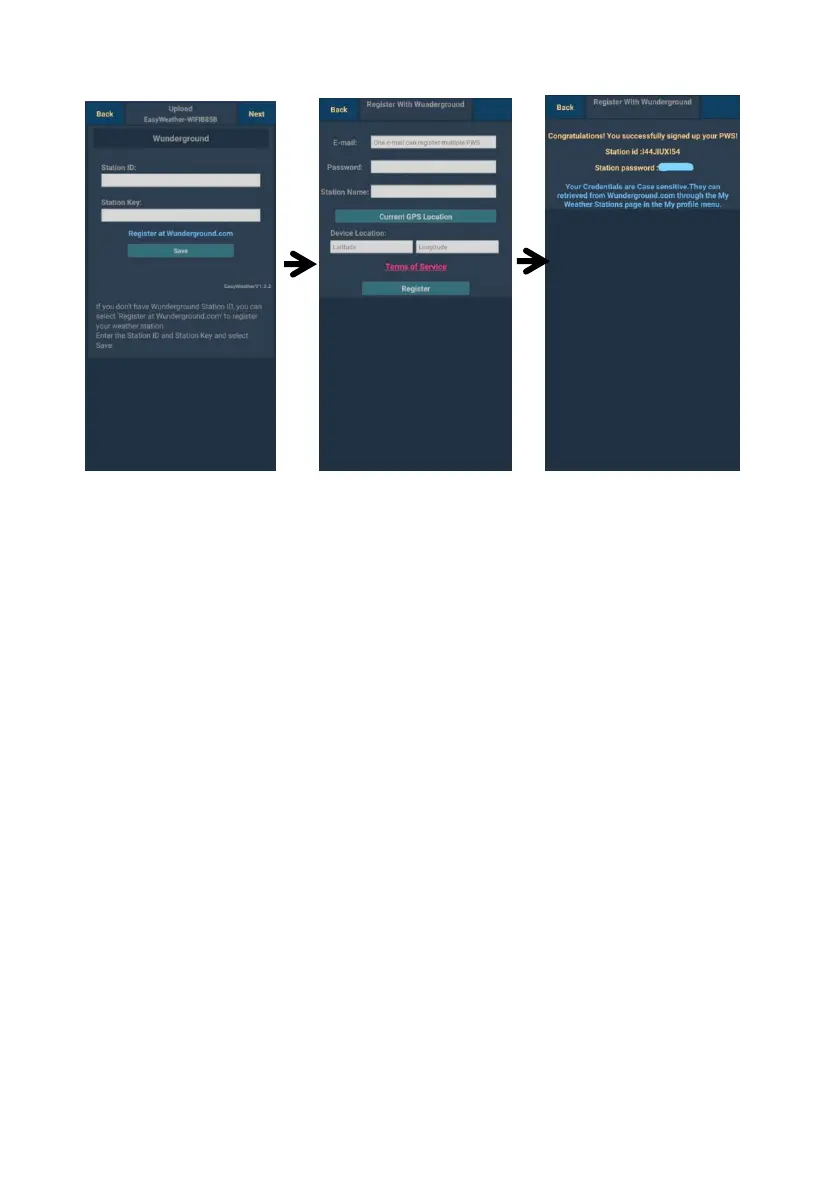
a. Upload your weather data to Wunderground.com
3)
If register successfully,
you’ll receive a Station
ID and Station
password / key.. You
will also receive an
e-mail about the
information of Station
ID and Station
password / key
Then press Back to
return back Upload
screen
U
1)
pload your weather dat
underground.com
Input Station I
R
W d.com
E
a
p
S
K
W m.
Enter the
Name you want.
Press “Current GPS
Location” to get the
device current location
2)
egister at
undergroun
nter your valid e-mail
ddress and
assword to obtain the
tation ID & Station
ey from
underground.co
Station
a to
D & Station
to
load
eathercloud.net
W
Key, press Save. Your
tation ID will be added on
he WU StationID.
hen press Next. Jump
he screen about Up
our weather data to
s
t
t
t
y
W
If you don’t have
of Latitude and
Longitude.
Then press Register
Wunderground Station ID
and Key, pressRegister
at Wunderground.com” to
activating the Register with
Wun ground option
der
34