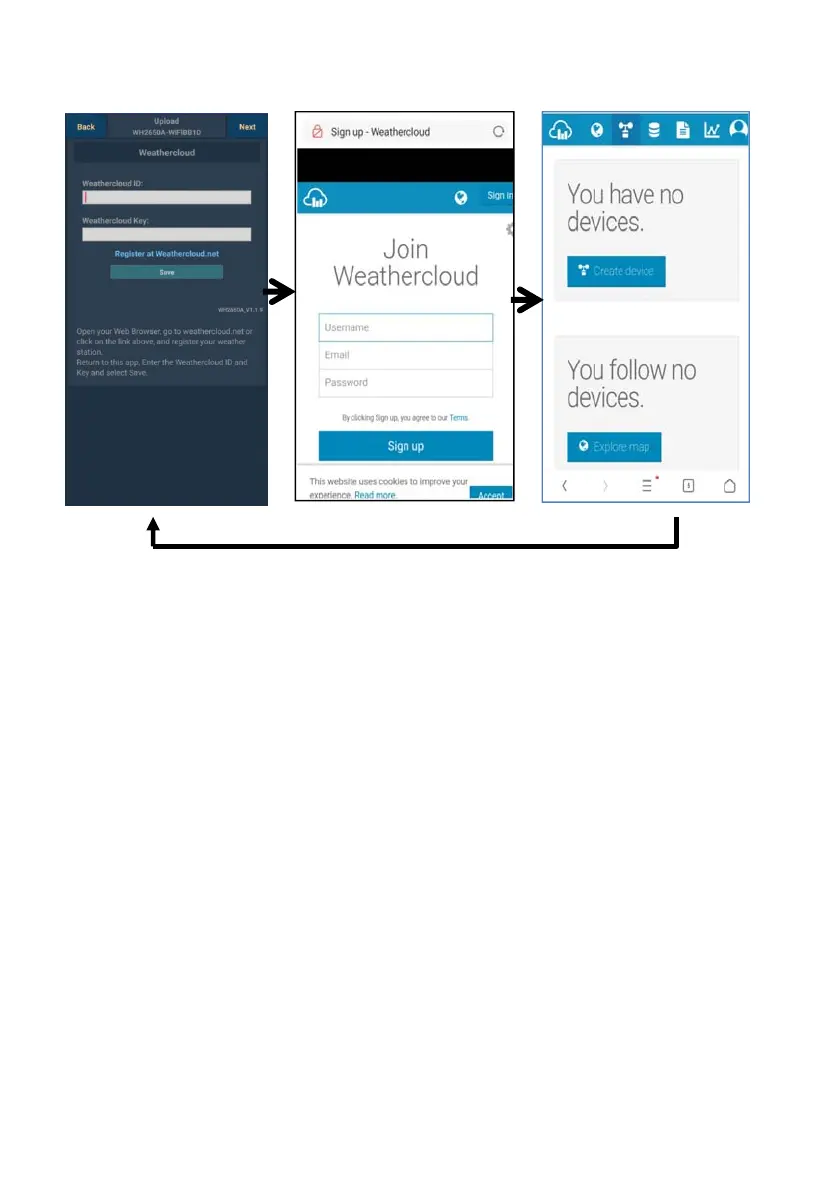
b. Upload your weather data to Weathercloud.net
3)
You will then be prompted
to add a device/ Select
“Create device” and enter
your station’s information:
After registering your
station, take note of the
“Weathercloud ID” and
“Key” presented to you.
Enter these values in the
mobile application.
Upload your weather data to
W
Inp
W
Sa
the
sc
we er
Ob ervation
W
If y u don’t have
W oud ID and Key,
press “ Register at
W oud.net” to open
yo web browser to
activating the Register with
W oud.net option
1) 2)
Register at
thercloud.net
it weathercloud.net
enter a Username,
Email and Password to
sign up
validation
email from Weathercloud
(it may take a few
utes)
eathercloud.net
ut Weathercloud ID &
athercloud Key, press
e..
e
v
n press Next. Jump to the
een about Upload your
ather data to Weath
r
s
ebsite (WOW)
Wea
Vis
and
Respond to the
min
o
eathercl
eathercl
ur
eathercl
36



 To Next Page