EasyManua.ls Logo

Fostex 280 - Overdubbing Guitar and Vocal

Fostex 280
28 pages
Print Icon
To Next Page IconTo Next Page
To Previous Page IconTo Previous Page
Loading...
<STEP
2:
OVERDUBBING
THE
ELECTRIC
BASS
ON
TRACK
2>
WHAT
IS
OVERDUBBING?
It
is
the
process
of
listening
to
one
part
(track)
while
recording
another
in
synchronization.
"Track
layering"
is
another
term
for
this
procedure.
It
is
the
essence
of
multitrack
recording.
Invented
by
Les
Paul
in
collaboration
with
Ampex
audio
en¬
gineers
some
thirty
years
ago,
the
overdub
has
had
a
greater
impact
on
popular
music
than
the
electric
guitar
which
bears
his
name
Here,
we’ll
overdub
the
electric
bass
on
track
2.
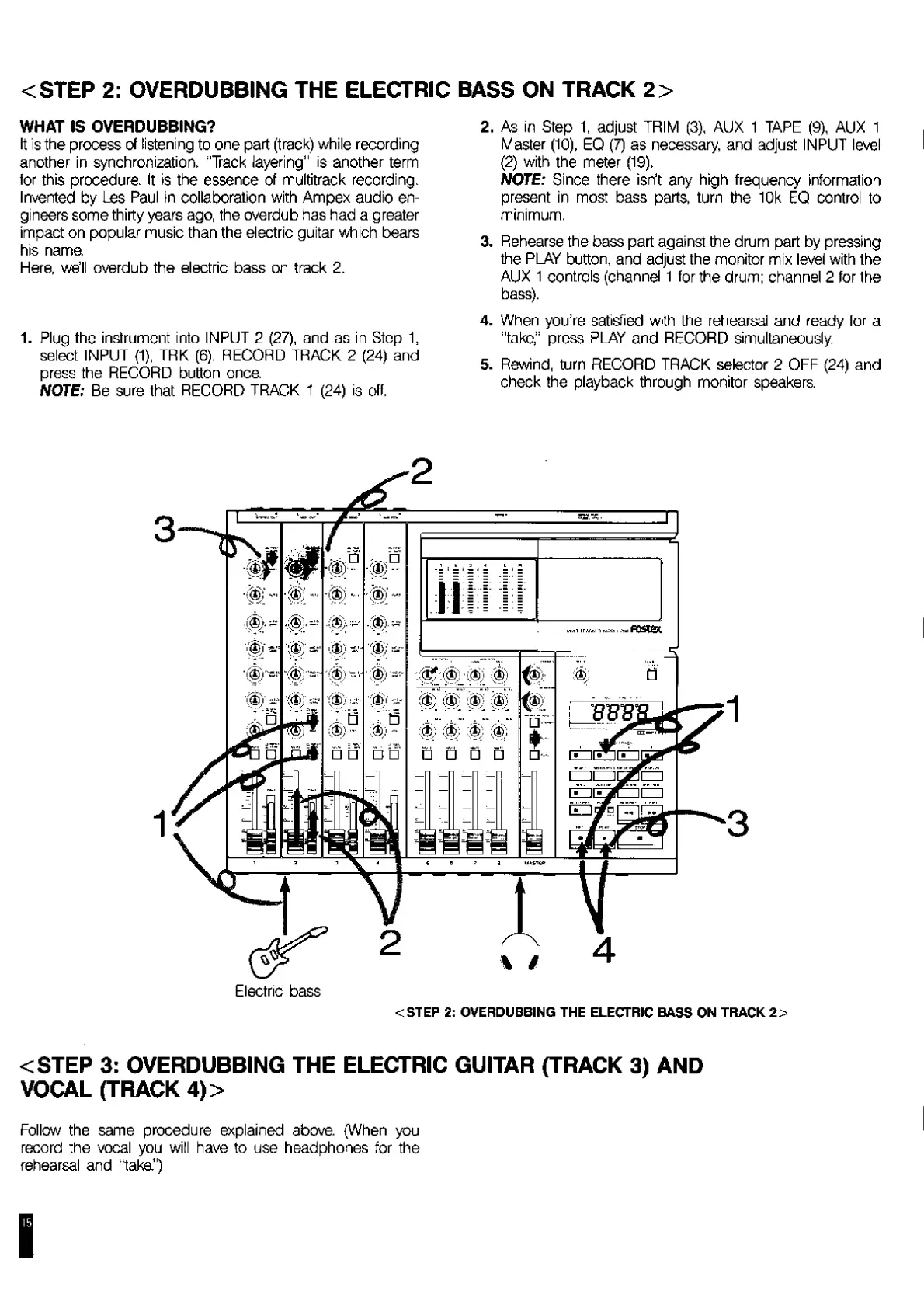
1.
P
lug
the
instrument
into
INPUT
2
(27),
and
as
in
Step
1.
select
INPUT
(1),
TRK
(6),
RECORD
TRACK
2
(24)
and
press
the
RECORD
button
once.
NOTE:
Be
sure
that
RECORD
TRACK
1
(24)
is
off.
2.
As
in
Step
1,
adjust
TRIM
(3),
AUX
1
TAPE
(9),
AUX
1
Master
(10),
EQ
(7)
as
necessary,
and
adjust
INPUT
level
(2)
with
the
meter
(19).
NOTE:
Since
there
isn’t
any
high
frequency
information
present
in
most
bass
parts,
turn
the
10k
EQ
control
to
minimum.
3.
Rehearse
the
bass
part
against
the
drum
part
by
pressing
the
PLAY
button,
and
adjust
the
monitor
mix
level
with
the
AUX
1
controls
(channel
1
for
the
drum;
channel
2
for
the
bass).
4.
When
you’re
satisfied
with
the
rehearsal
and
ready
for
a
"take,”
press
PLAY
and
RECORD
simultaneously.
5.
Rewind,
turn
RECORD
TRACK
selector
2
OFF
(24)
and
check
the
playback
through
monitor
speakers.
Electric
bass
<STEP
2:
OVERDUBBING
THE
ELECTRIC
BASS
ON
TRACK
2>
<STEP
3:
OVERDUBBING
THE
ELECTRIC
GUITAR
(TRACK
3)
AND
VOCAL
(TRACK
4)>
Follow
the
same
procedure
explained
above.
(When
you
record
the
vocal
you
will
have
to
use
headphones
for
the
rehearsal
and
"taka")

Related product manuals