3
FD-4 Ownerís Manual Supplement
INPUT 3
R MON OUT L
R ST OUT L
AUX RTN 1
R MONO/L
AUX RTN 2
R MONO/L
2 AUX SEND 1
4 INSERT 3
INPUT 4
SCSI
OUTIN
DATA
R
RECORDER IN
LIN
MIDI
OUT
PUNCH
IN/OUT
DATA
MIDI
As indicated below, saving/loading song data procedures using a SCSI backup drive differ from that using a DAT.
Saving/Loading Song Data using SCSI Drive
Following about five seconds of pilot signal (shown in gray in the diagram below), song data in the current drive is
output to a connected DAT. Two tracks of audio data (shown in black in the diagram) are output. To save data from
Real tracks 1-4, two-track data will be output twice, which takes twice as much time as the song duration (ABS 0 to
REC END). To save all data including Additional tracks 5-6, two-track data will be output three times, which takes
three times the song duration. Save data is also loaded two tracks at a time.
Using a DAT (S/P DIF digital signal) (Saving/Loading individual Program data: only in Mastering mode)
DAT tape
All Real Track data and Additional track data is output simultaneously to a SCSI disk as shown in black in the
diagram. Therefore, saving and loading a Program takes much less relative to a DAT. No pilot signal or beep is
recorded. If the available disk space is smaller than the song data size, you may use multiple disks (up to 99 disks)
to save and load an entire song.
Using a SCSI disk (Saving/Loading individual Program Data: in any mode)
SCSI disk
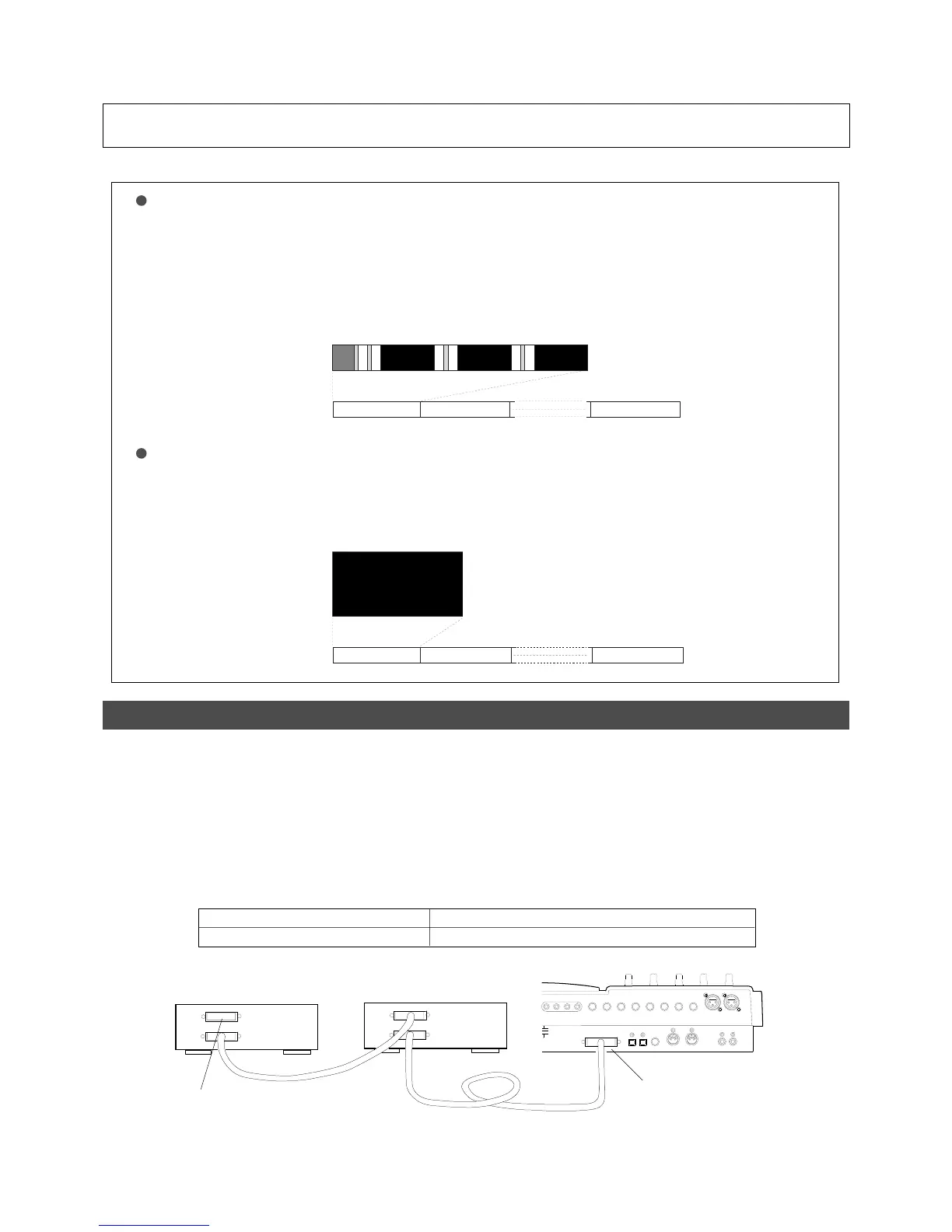
Backup SCSI Drive Connection
SCSI Drive to be used as Current Drive
SCSI Drive to be used for Backup
< SCSI ID Number Setting >
Set the ID number to an elective one among ì1 through 5î.
Set the ID number to ì6î.
SCSI drive for backup
(ID number = 6)
Current SCSI Drive
(ID number = 1, 2, 3, 4, or 5)
Be sure to attach a terminator
on the second SCSI drive
SCSI terminal
The FD-4 with updated software allows you to connect a backup SCSI drive in addition to the current SCSI drive at the same
time. For those who use the SCSI drive as the current drive, referring to the diagram below, connect the two SCSI drives in chain
regardless of the connection order.
When connecting the two SCSI drives, set the SCSI ID number as listed below. Also be sure to attach a terminator on the second
SCSI drive to terminate the SCSI chain. For your information, the backup SCSI drives which can be used on the FD-4 are listed
in the <List of SCSI drive and media checked for function> in the first page of original ownerís manual.
Trk 1&2
Trk 3&4 Trk 5&6
Program 1 (P01)
Program 2 (P02) Program 99 (P99)
Trk 1 & 2 & 3 & 4 & 5 & 6
Program 1 (P01)
Program 2 (P02) Program 99 (P99)



 To Next Page