8
FD-4 Ownerís Manual Supplement
INPUT 3
R MON OUT L
R ST OUT L
AUX RTN 1
R MONO/L
AUX RTN 2
R MONO/L
2 AUX SEND 1
4 INSERT 3
INPUT 4
SCSI
OUTIN
DATA
R
RECORDER IN
LIN
MIDI
OUT
PUNCH
IN/OUT
DATA
MIDI
CLK
SYNC OUT DRIVE
IDE
AUTO A.PUNCH
SMF
PGM
ABS
44.1kHz
INPUT 3
R MON OUT L
R ST OUT L
AUX RTN 1
R MONO/L
AUX RTN 2
R MONO/L
2 AUX SEND 1
4 INSERT 3
INPUT 4
SCSI
OUTIN
DATA
R
RECORDER IN
LIN
MIDI
OUT
PUNCH
IN/OUT
DATA
MIDI
Saving/loading data using a 2.5-inch E-IDE internal hard disk as the current drive
This section explains how to save and load data between a SCSI backup drive and an optional 2.5-inch internal hard
disk. Recording mode on the current drive does not affect this operation. Refer to the before mentioned ìSaving/
Loading data using a SCSI drive as the current driveî for more information on the procedures.
<Note on the save/load operation using an optional 2.5-inch E-IDE internal hard disk>
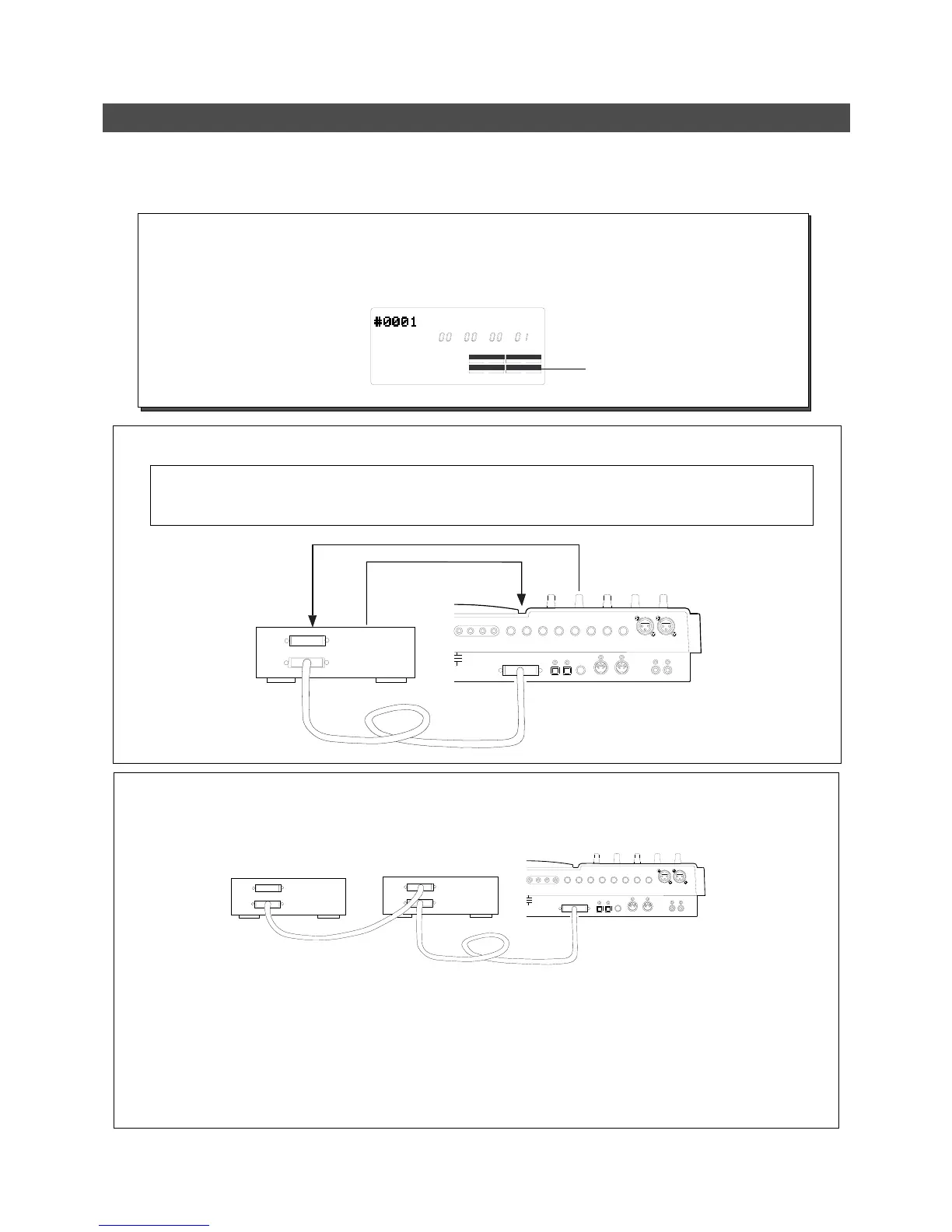
When you are using an optional 2.5-inch E-IDE hard disk for the save and load operation, make sure that [IDE]
lights up in the current drive section of the display. If a SCSI drive is connected to the FD-4 as the current drive,
disconnect the drive. Alternatively, turn off the power to the SCSI drive before you turn on the power to the FD-4.
[IDE] lights up
Connect a SCSI backup drive (ID # = 6) to the SCSI connector on the FD-4 with a 2.5-inch E-IDE hard disk retrofitted.
< Note on connections>
Be sure to connect a SCSI backup drive to the FD-4 SCSI connector.
Make sure that the ID number for the SCSI backup drive is set to ì6î.
SCSI backup drive
(ID # = 6)
Save
Load
FD-4 with a 2.5-inch internal hard disk
Backup SCSI drive
Current SCSI drive
FD-4 with a 2.5-inch internal hard disk
When the 2.5-inch hard disk is assigned as the current drive:
Switch on power to the FD-4 only and not to the two SCSI drives connected.
If save/load of song data is to be executed using the SCSI drive assigned for backup, switch on power to the SCSI
drive assigned for backup and then the FD-4. Do not switch on power to the SCSI drive assigned for the current drive.
By utilizing either method, the FD-4 will always recognize the internal 2.5-inch E-IDE hard disk as the current drive.
When the SCSI drive is assigned as the current drive:
Power to any equipment that is interconnected must, of course, be switched on. The SCSI drive will be automatically
recognized as the current drive.
As shown in the drawing, when the SCSI drive assigned for the current drive is daisy chained to the SCSI drive
for backup and also connected to the optional 2.5-inch E-IDE internal hard disk which is in the current drive
mode, please note the following items.
Note:



 To Next Page