9
FD-4 Ownerís Manual Supplement
CLK
SYNC OUT DRIVE
IDE
AUTO A.PUNCH
SETUP
?
SURE
44.1kHz
CLK
SYNC OUT DRIVE
IDE
AUTO A.PUNCH
SETUP
44.1kHz
CLK
SYNC OUT DRIVE
IDE
AUTO A.PUNCH
SETUP
44.1kHz
CLK
SYNC OUT DRIVE
IDE
AUTO A.PUNCH
SETUP
44.1kHz
< Quick Troubleshooting >
If you are stuck in one of the following situations while saving and loading song data using a SCSI backup drive, refer to
the explanations below for corrective actions.
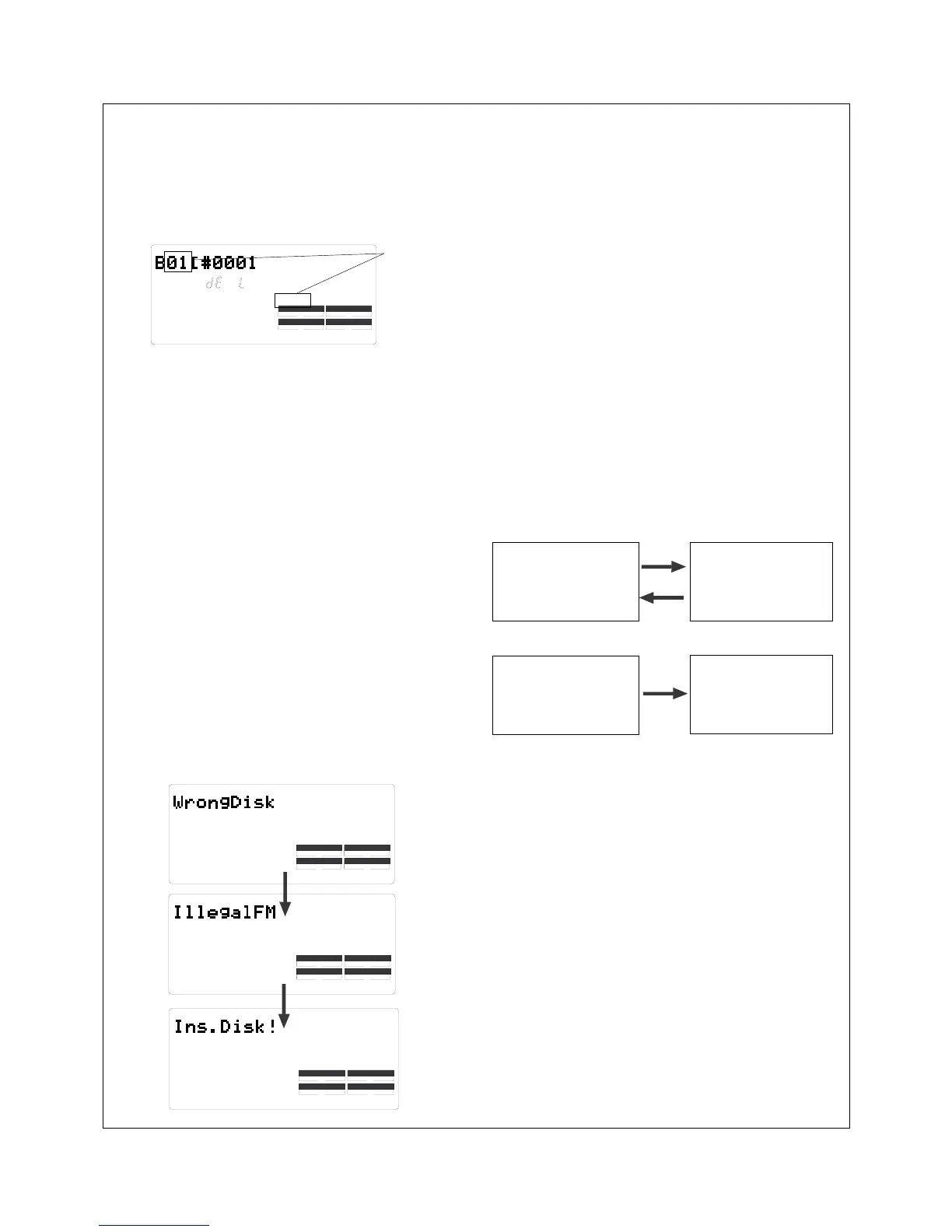
The FD-4 displays the following during the save
operation using a SCSI backup drive.
#
Flashing
The backup disk contains some data and does not have
enough free space to record new data. The FD-4 is asking
you whether or not the existing data should be deleted.
Take one of the following actions.
* If you wish to delete the existing data:
Press the EXECUTE/YES key twice. Pressing the key once
causes [Del. All ?] and [SURE ?] to flash, and pressing it
again deletes the existing data so that you will be able to
continue the save operation.
* If you do not wish to delete the existing data:
Turn the JOG dial to display [Eject], then press the EX-
ECUTE/YES key. The disk will be ejected. Insert another
backup disk in the drive.
When you inserted a SCSI backup disk into the
backup drive to save data, the following messages
appeared in turn and the disk was ejected.
#
The FD-4 recognizes that the backup disk cannot be used in
its current condition. There are two reasons for this.
Current drive
Backup drive
disk in Normal mode
data recorded in
Normal mode
save
load
save
Current drive
Backup drive
disk in
Mastering 1 or 2 mode
disk used to save/load
data in Normal mode
To be able to use the ejected disk, you need to reformat it as
described below.
Quit SETUP mode and return to the Time Base dis-
play of the current disk, then insert the disk in the
backup drive.
Select the [Bk Format ?] menu in SETUP mode and
reformat the backup disk.
*
*
*
*
For example, the disk used to save or load data in Mastering 1
or 2 mode is inserted to save data in Normal mode. That is,
you tried to use a disk (that was once used to save or load data
in a particular recording mode) to save data in a different re-
cording mode.
You inserted a disk that was used for the current
drive.
The diskís recording mode differs from that of the
data to save or load.



 To Next Page