4
FD-4 Ownerís Manual Supplement
INPUT 3
R MON OUT L
R ST OUT L
AUX RTN 1
R MONO/L
AUX RTN 2
R MONO/L
2 AUX SEND 1
4 INSERT 3
INPUT 4
SCSI
OUTIN
DATA
R
RECORDER IN
LIN
MIDI
OUT
PUNCH
IN/OUT
DATA
MIDI
INPUT 3
R MON OUT L
R ST OUT L
AUX RTN 1
R MONO/L
AUX RTN 2
R MONO/L
2 AUX SEND 1
4 INSERT 3
INPUT 4
SCSI
OUTIN
DATA
R
RECORDER IN
LIN
MIDI
OUT
PUNCH
IN/OUT
DATA
MIDI
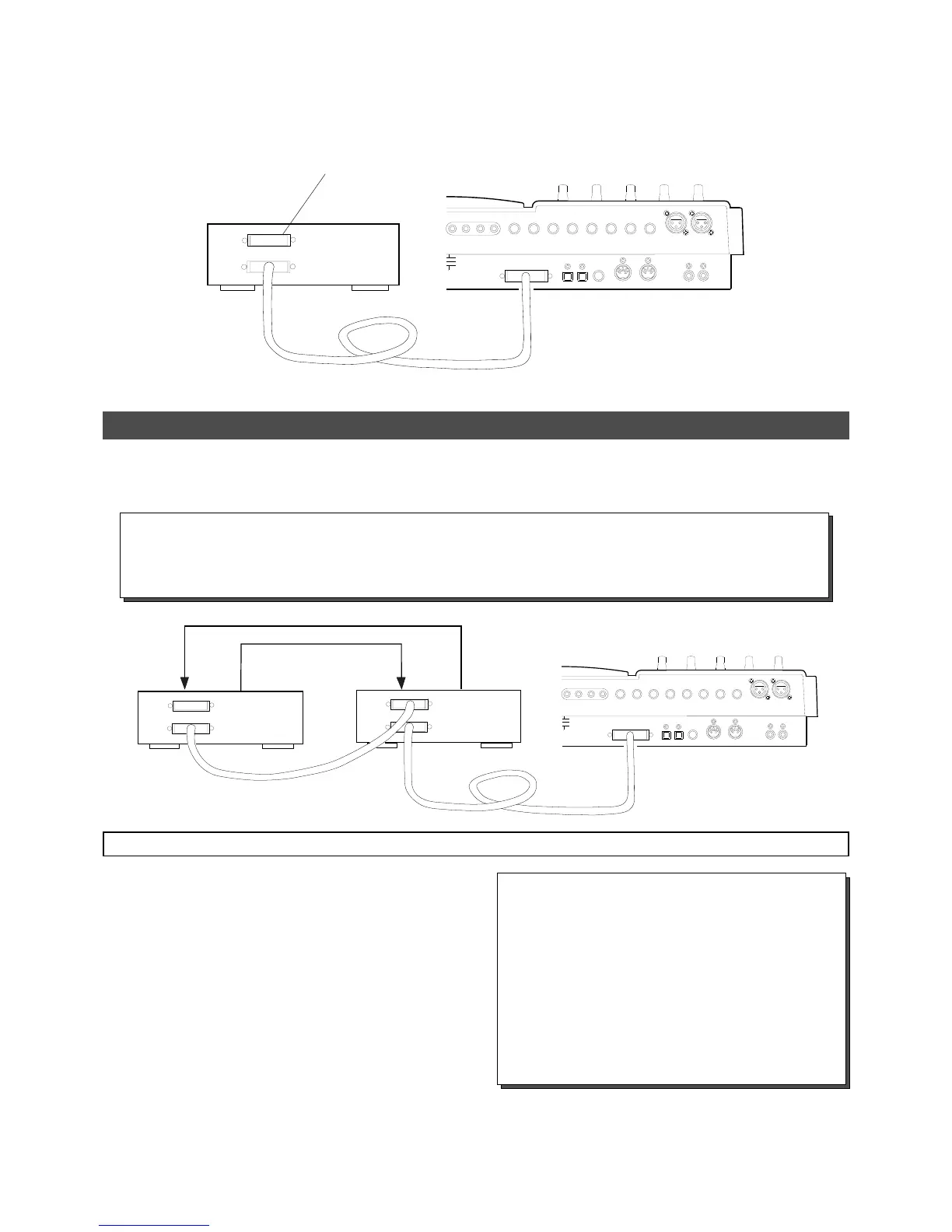
For those who use an optional 2.5î internal hard disk drive, saving and loading song data is realized by simply connecting a
backup SCSI drive shown below. As mentioned before, the ID number for backup SCSI drive must be set to ì6î and attach the
terminator .
SCSI drive for backup
(ID number = 6)
Be sure to attach a terminator to
one of either SCSI terminals.
FD-4 with an optional 2.5î hard disk
drive retrofitted
Saving/loading data using a SCSI drive as the current drive
This section explains how to save and load data between a current SCSI drive (removable or fixed) and a backup SCSI drive.
Turn off the power of all the connected devices before you make connections.
Save
Load
Current drive
Backup drive
(ID number = ì6î)
FD-4
SCSI drive connection and preparation
<Title of data to be saved to a backup SCSI disk>
Data recorded in the current drive has a name, such as
Program 1 or Program 2. (These titles appear abbrevi-
ated, such as [P01], [P02].)
On the other hand, a backup disk manages data using
different titles, such as Backup 1 or Backup 2. (These
appear abbreviated, such as [B01] or [B02] on the dis-
play.)
For example, Program 1 (P01) on the current drive disk
is saved as Backup 1 (B01) for the backup disk.
Connect your backup SCSI drive to the SCSI connector
on the current drive. Be sure to attach a terminator on the
second SCSI drive to terminate the SCSI chain regardless
of connection order.
Be sure to set the ID number for the backup SCSI drive to
ì6î. Also be sure to set the ID number for the current
drive to an elective one among ì1 through 5î.
Prepare the disk recorded as the current drive and a backup
disk (unformatted at this stage).
*
*
*
Unlike the save/load operation using a DAT, you cannot abort the save/load operation that uses a SCSI drive
while in process. Nor can you monitor audio data during operation. Also, you cannot load data to a disk
formatted in a recording mode that differs from that on the backup disk. For example, you cannot load data
from a backup disk in Normal mode to a disk in Mastering mode.
Note:



 To Next Page