6
FD-4 Ownerís Manual Supplement
CLK
SYNC OUT DRIVE
SCSI
AUTO A.PUNCH
ABS
44.1kHz
CLK
SYNC OUT DRIVE
SCSI
AUTO A.PUNCH
ABS
44.1kHz
CLK
SYNC OUT DRIVE
SCSI
AUTO A.PUNCH
SETUP
44.1kHz
DIGITAL
CLK
SYNC OUT DRIVE
SCSI
AUTO A.PUNCH
ABS
44.1kHz
CLK
SYNC OUT DRIVE
SCSI
AUTO A.PUNCH
SETUP
?
MB
SURE
44.1kHz
CLK
SYNC OUT DRIVE
SCSI
AUTO A.PUNCH
SETUP
DIGITAL
44.1kHz
CLK
SYNC OUT DRIVE
SCSI
AUTO A.PUNCH
SETUP
44.1kHz
<Memo>
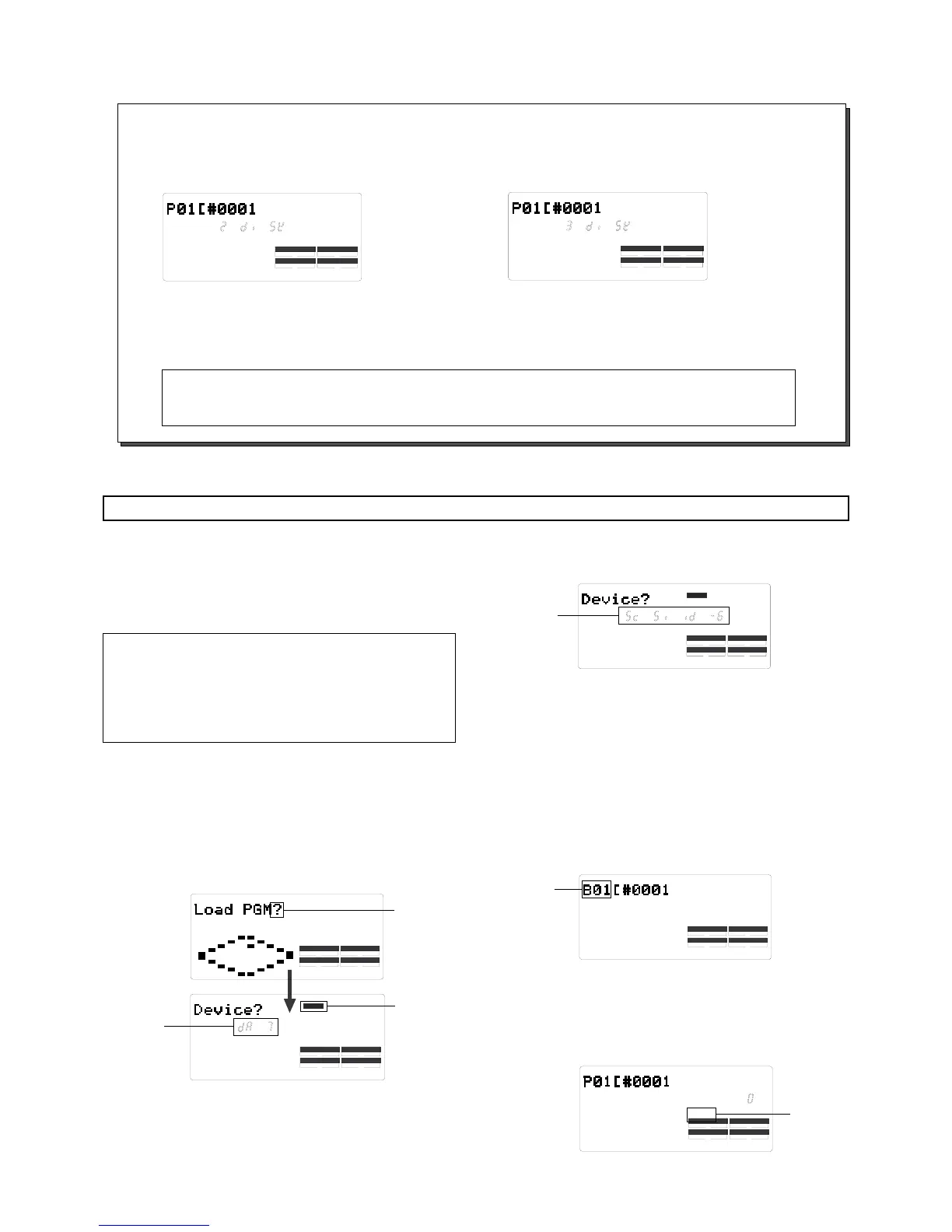
If program data to be saved is larger than the space available on one backup disk, the FD-4 tells you how many backup
disks are required when you select a Program in Step 6 of the ìSaving Dataî procedure in the previous page.
(e.g.)
Two backup disks are
required.
(e.g.)
Three backup disks are
required.
When you set the first disk, the save operation starts. When the disk is full, the FD-4 automatically ejects the disk and
displays [Ins. Disk 2], meaning ìPlease insert the second disk.î
Insert the second disk to continue the save operation.
Loading data
You can load data using the ìLoad PGM ?î menu in SETUP
mode. The following procedures assume that the backup disk
has been inserted into the backup SCSI drive, and a format-
ted disk has been inserted into the current SCSI drive.
*
< [Load PGM ?] menu>
* Input signal options: [dAT], [SCSi id-6]
* Program options: P01 - P99 (an individual Program)
* Track options
DAT: track 1 - 4, track 1 - 6
SCSI disk: All tracks will be automatically selected.
Press the SETUP key to enter SETUP mode, then
use the JOG dial to select [Load PGM ?] menu.
Press the EXECUTE/YES key.
[Device ?] appears, [DIGITAL] lights up, and the selected
input signal option flashes. ([dAT] flashes.)
1.
2.
Flashing
Lights up
Flashing
Turn the JOG dial to select a flashing [SCSi id-6]
to load data from the connected SCSI disk.
3.
Flashing
Press the EXECUTE/YES key.
The saved backup number (B01) flashes. This means that
B01 on the backup disk is selected to load.
If only this backup file exists on the disk, turning the JOG
dial will allow you to select [B01] or [Eject].
Select [Eject] if you wish to change the disk.
If there are multiple backup files on the disk, using the
JOG dial allows you to select the desired backup data (B01,
B02, B03, etc.) or [Eject].
4.
Flashing
Flashing
Press the EXECUTE/YES key.
The FD-4 indicates that the load destination disk (current
drive disk) does not have any data, then indicates a flash-
ing [SURE?].
5.
Mark the disks so that you can identify the order of the disks and you will be able to insert the disks
in the correct order to perform the load operation.
Note:


 To Next Page