19
2
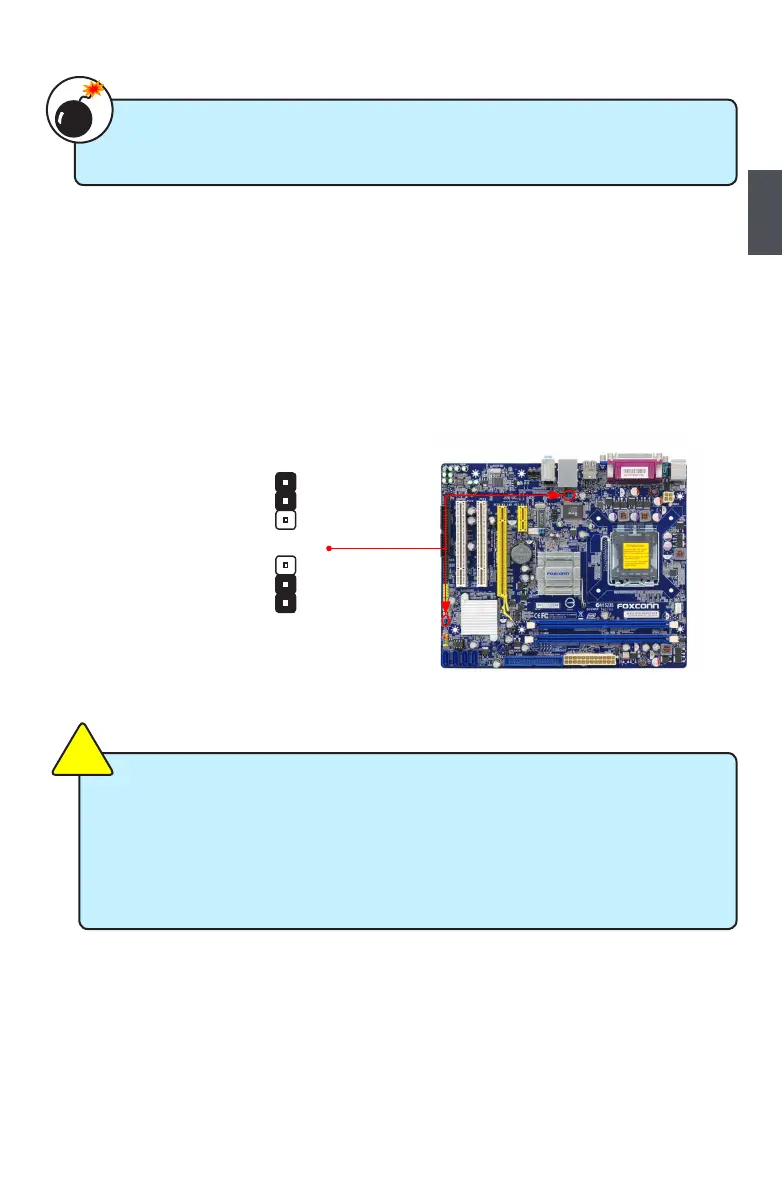
USB device wake-up Jumper: USBPW1357_1 / USBPW0246_1
1. Set the jumper to pins 1-2 (+5V) to wake up the computer from S1 sleep mode using the
connected USB devices.
2. Set the jumper to pins 2-3 (+5VSB) to wake up the computer from S3 and S4 sleep modes
using the connected USB devices. At the same time, a corresponding setting must be set in
BIOS as below:
Set “CMOS Setup” -> “Power Management Setup” -> “USB Wake Up From S3” to “Enabled”.
USBPW1357_1/ USBPW0246_1
+5V
(Default)
1
2
3
+5VSB
1
2
3
■ USBPW1357_1 is for the rear USB connectors, USBPW0246_1 is for the internal
USB ports.
■ The USB device wake-up feature requires a power supply that can provide 500mA
on +5VSB lead for each USB port; otherwise, the system will not power up.
■ The total current consumed must not exceed the power supply capability (+5VSB)
whether under normal condition or in sleep mode.
C
A
U
T
I
O
N
!
■ Disconnect the power cable before adjusting the jumper settings.
■ Do not clear the CMOS while the system is turned on.
W
A
R
N
I
N
G
!


 To Next Page
 Loading...