
 Need help?
Do you have a question about the Foxconn G41MX Series and is the answer not in the manual?
Detailed technical specifications of the motherboard components and features.
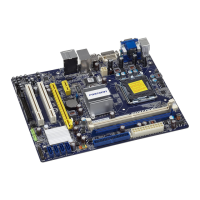
Visual guide to the motherboard components and their locations.
Description of ports and connectors located on the back of the motherboard.
Guide for installing the CPU and its cooling solution.
Instructions for installing RAM modules into the motherboard slots.
Guide on how to install various expansion cards into the motherboard slots.
Connecting internal components and configuring motherboard jumpers.
Accessing the BIOS setup utility and navigating its main menu options.
Configuring system settings, monitoring hardware status, and managing power.
Setting security features, loading defaults, and saving/exiting BIOS settings.
Overview of the software and drivers included on the utility CD.
Steps for installing system drivers and software utilities from the CD.
Introduction to various software utilities for system management and customization.
 General
| Form Factor | Micro ATX |
|---|---|
| Maximum Memory | 8GB |
| Socket | LGA 775 |
| Storage Interface | 4 x SATA 3Gb/s |
| Audio | Realtek ALC662 6-Channel HD Audio |
| Chipset | Intel G41 |
| Memory Slots | 2 |
| Expansion Slots | 2 x PCI |
| USB Ports | 8 x USB 2.0 |
| Supported CPU | Intel Core 2 Quad/Core 2 Duo/Pentium Dual Core/Celeron Processors |
| Rear Panel Ports | 1 x PS/2 Keyboard, 1 x PS/2 Mouse, 1 x VGA, 4 x USB 2.0, 1 x RJ-45, 3 x Audio Jacks |
| LAN | Realtek (RTL8111DL Gigabit LAN) |






 To Next Page