CD INSTRUCTION
55
1-3 Local Update - Update
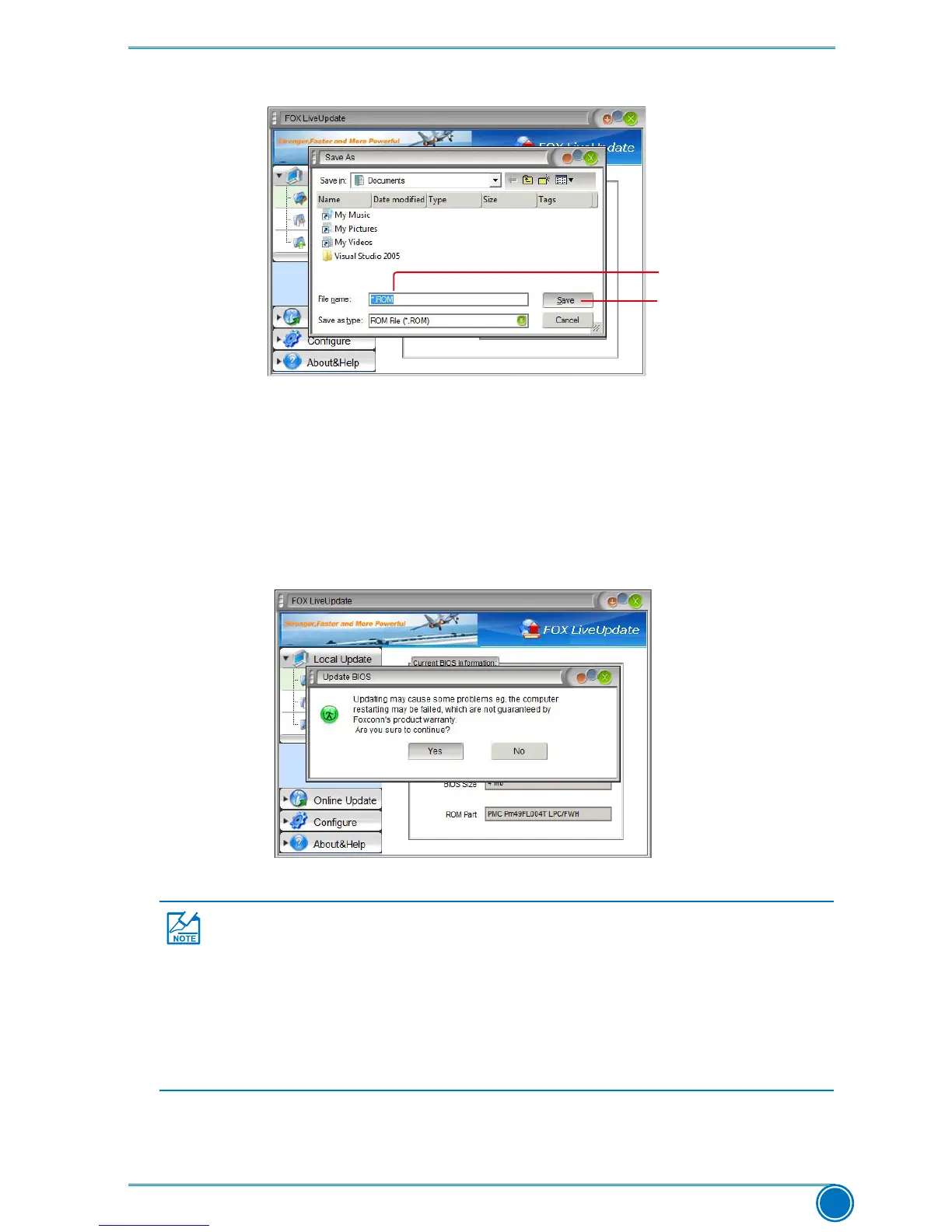
ThispagehelpsyoutoupdateyourBIOSfromalocalle.Afterclick“Update”,Analert
messagewillbedisplayedtoensureifyoureallywanttocontinue,click“Yes”toconrm.A
setupwizardwillguideyoutoloadalocalBIOSletonishtheoperation.Youmustremember
fromwhichdirectorytoloadyournewBIOSle(withanextensionof".BIN"forAwardBIOS,
".ROM"forAMIBIOS)beforethesetupwizardstarts.
KeyinaBIOSname
Click here
FOX LiveUpdate can automatically backup old BIOS before update. This feature
canbeenabledinthe"Congure-System"setup.Pleasereferto"Congure-
System"sectionformoredetail.ThedefaultbackupdirectoryisC:\LiveUpdate_
Temp,butthebackuplenamewillbeautomaticallygenerated.Itishardtondit
out from a backup directory, and we recommend you using Explorer to check date/
timemessageofthisbackupletonditoutandwriteitsnamedowntoremember
it.











 To Next Page