01 02 03 04
4 4 4 4
!
4
01 02
4
03
4 4
04
Start-up, Filling and Emptying
Page 21
PRESELECTION FUNCTION WHEN PRIMING:
Usually, milk line 1 is always lled. To ll a second milk line (if availa-
ble):
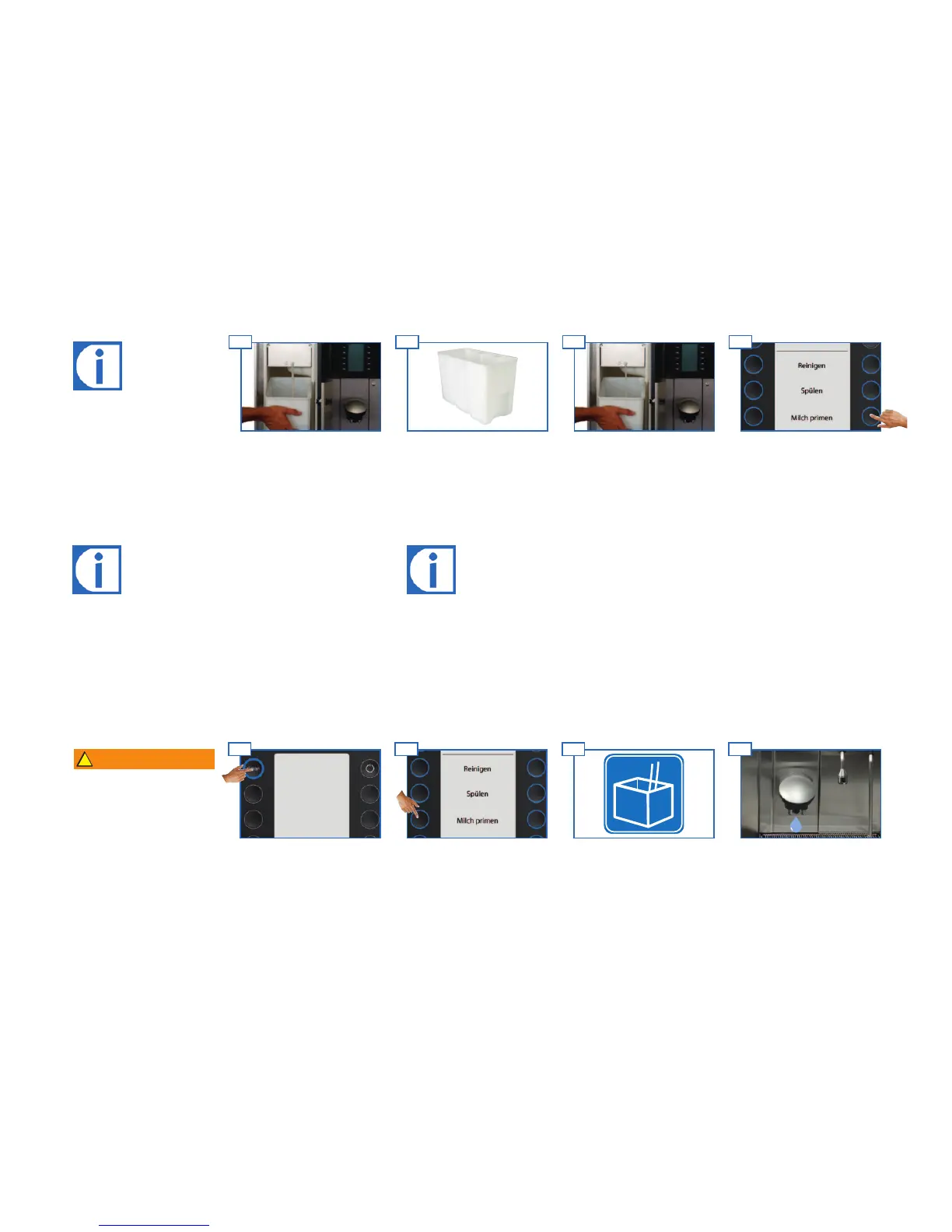
1. Press Clean for at least 2 seconds.
2. Preselect the second milk type with Preselection Plus
3. Select Prime milk and hold the button.
WARNING
Danger of scalding
from hot milk and hot steam.
Do not touch the outlets or
the area under the outlets.
Milk will come out of the
outlet.
The milk lines are lled.
The Evolution Plus will draw
milk into the system.
Select Prime milk and hold the
button.
Press Clean for at least 2
seconds.
Clean menu appears.
PRIMING MILK:
Every time the milk system is cleaned, the milk lines have to be
relled.
The milk priming function performs this task for the existing milk
pump.
If the machine is to be switched o, milk priming is not necessary.
Priming the milk
4
Instead of the milk container,
you can also use bag-in-a-box
containers or gallon containers.
Milk quantity and temperature
are monitored constantly.
Prime the milk.Slide in the milk container and
close the door.
Add milk to the container and
insert the suction tube.
Open the refrigeration unit and
remove the milk container.
Filling milk (optional)



 To Next Page