F3Dn Service Manual Advanced Troubleshooting Guide / Section 1.3
For Technical Support, Call 800-537-2653. Copyright 2006 Franke, Inc. All rights reserved.
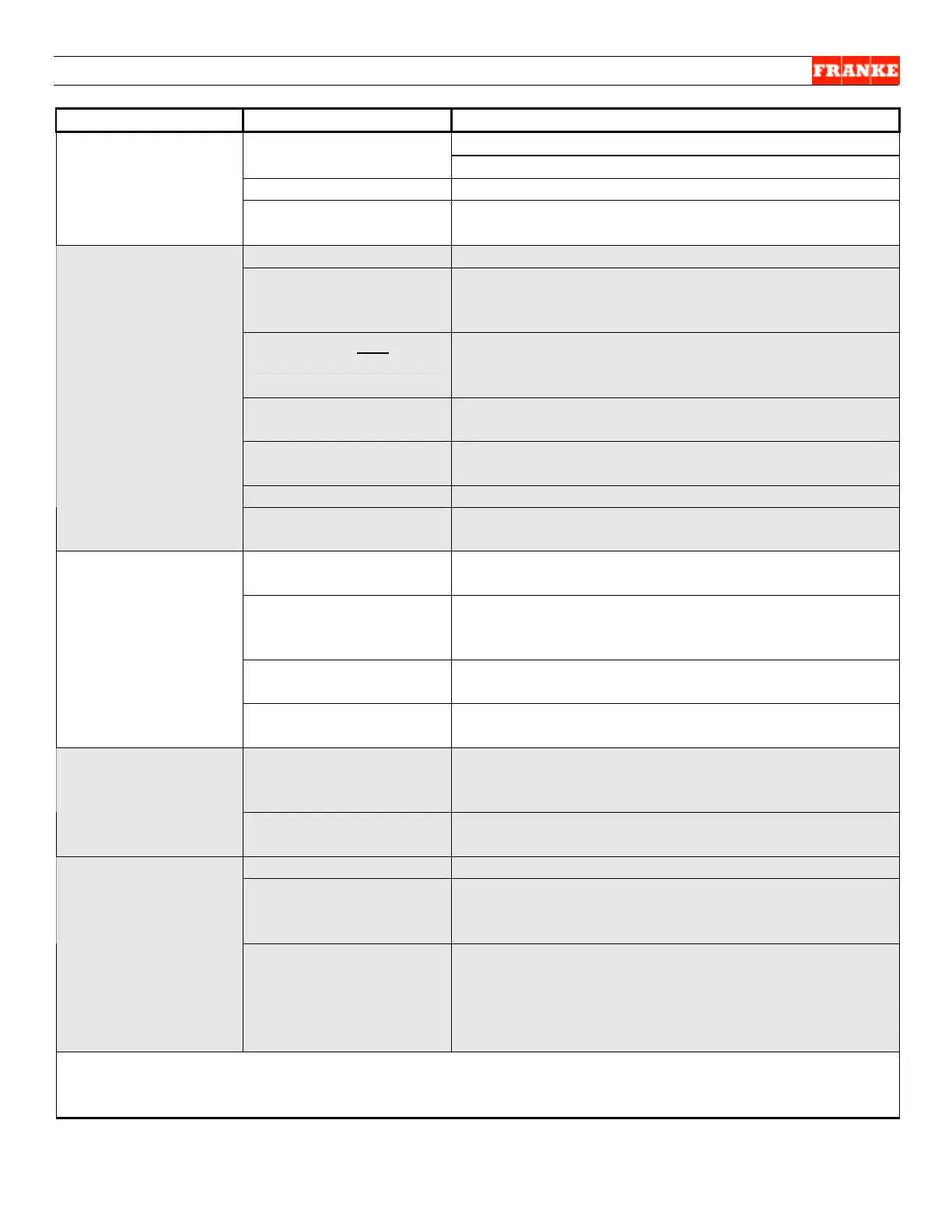
The Problem Possible Cause What To Check & Do
Breaker OK? Yes = Continue; No = Call electrician
Power not available to
unit:
Receptacle OK? Yes = Continue; No = Call electrician
Power cord OK? Yes = Continue; No = Replace power cord
Main Power Not
“ON”
Main power switch? Yes = Check for loose wires on back of switch;
No = Replace switch, [See Sect. 2.15]
No power to machine? See Main Power Not “ON” instructions above.
Temperature Indicator
displaying
temperature?
Yes = continue; No = check 24-Volt AC transformer;
[See Sect. 2.16 for temperature indicator
replacement]
No power to one lane
only:
“Push & Hold” touch pad for 2 seconds (required) to
turn each lane on: AUTO or MANUAL light ON?
Yes = Test & return unit to service; No = continue…
24-Volt DC Power
Supply OK?
Yes = continue…; No = replace Power Supply per
Section 2.17
PC Control Board OK? Yes = continue…; No = replace Control Board per
Section 2.18
Ribbon Cable OK? Yes = continue…; No = replace Ribbon Cable
No Display On
Control Panel
Operator’s Panel OK? Yes = Return unit to service; No = replace Operator
Control Panel per Section 2.14
French fries in
Hopper?
Yes = continue; No = fill with fries to sensor level or
simulate fries present to test.
Low product sensor
out of calibration?
Calibrate low product sensor per Section 3.1; Is
light still flashing? Yes = continue…; No = Return
unit to service.
Low Product Sensor
defective?
Yes = replace Low Product Sensor per Section
2.11; No = continue…
Low Product Light Is
Flashing
PC Control Board
failed?
Yes = replace PC Board per Section 2.18; No = call
Franke Technical Support.
Is Hopper, Drum &
Baffle assembled
correctly?
Yes = continue…; No = reassemble correctly &
press RESET LANE touch pad
“Reset Lane”
Light s are ON
[Failure to tare
error]
Is Product Chute
assembled correctly?
Yes = continue…; No = reassemble correctly &
press RESET LANE touch pad
French fries in hopper?
Yes = continue…; No = Fill with fries & continue…
Reset Lane Button? Press “Reset Lane” button; after 20 seconds, did
“Load Ready” light illuminate? Yes = Return unit to
service; No = continue…
“Reset Lane”
Lights are Flashing
Steadily [Time out
error]
Fries bridge In
Hopper?
Open door and press “Reset Lane” button again.
Did drum rotate? Yes = look for fries bridged inside
hopper due to thawing and refreezing. Disrupt
bridge by hand. Press Reset Button. No = Go to
“No Fries Dispensed” section which follows.
[NEXT PAGE]



 To Next Page