29
Advanced Router
Configure LAN, Firewall, and Customization settings.
- LAN
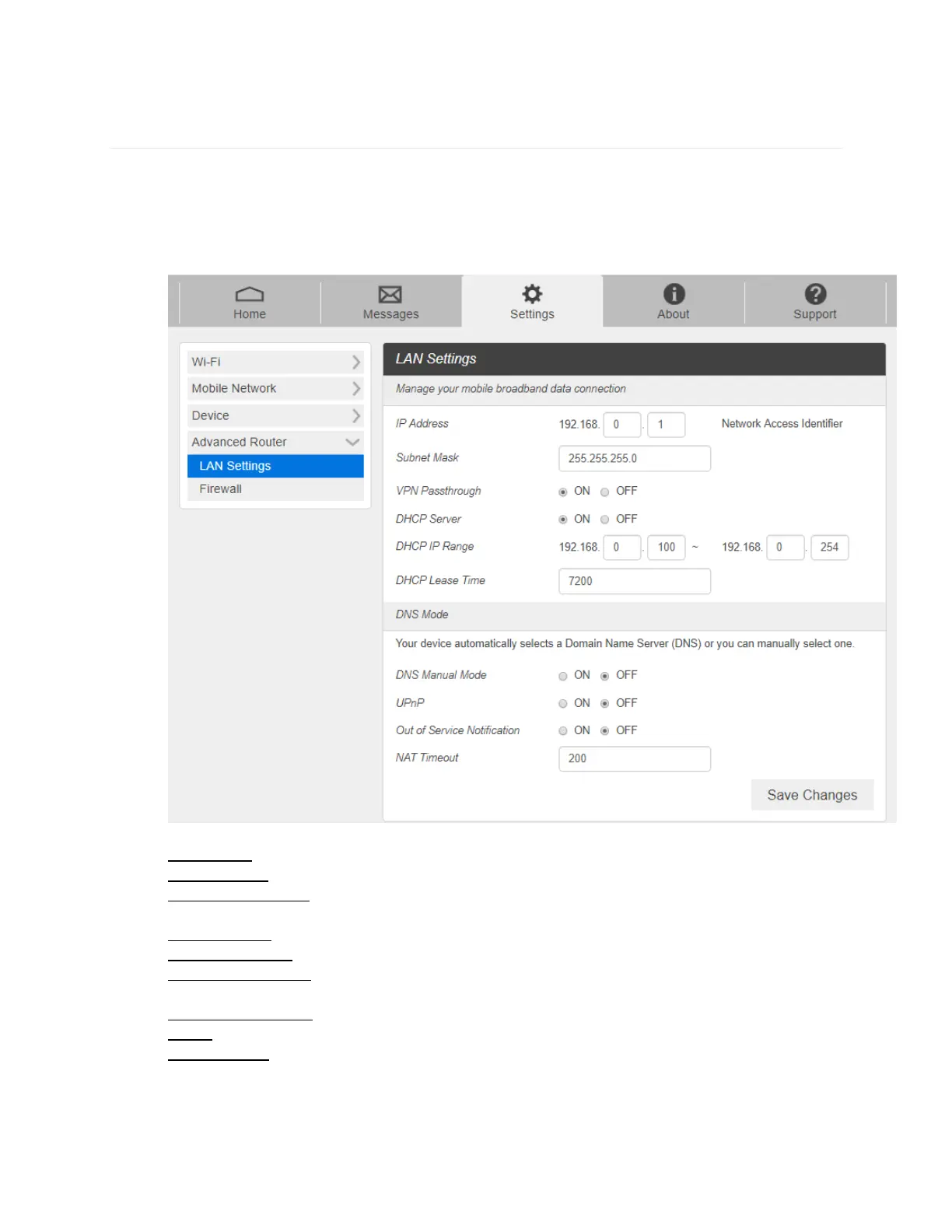
1. From the Web UI, click Settings > Advanced Router > LAN Settings to display the router
information shown in the following figure.
- IP Address: IP address for Web User Interface.
- Subnet Mask: Subnet mask for the IP address.
- VPN Pass-through: VPN pass-through must be enabled if you want to allow VPN tunnels
to pass through your device’s firewall.
- DHCP Server: Enable or disable DHCP Server function.
- DHCP IP Range: Allocate begin and end IP address for IP Range.
- DHCP Lease Time: Define how long the leased IP address will be. The new IP address
will be relocated after the IP address is expired.
- DNS Manual Mode: Turn DNS manual mode on or off.
- UPnP: Turn UPnP (Universal Plug n Play) mode on or off.
- NAT Timeout: Set TCP NAT time.
2. Click Save changes to save your settings.



 To Next Page