17
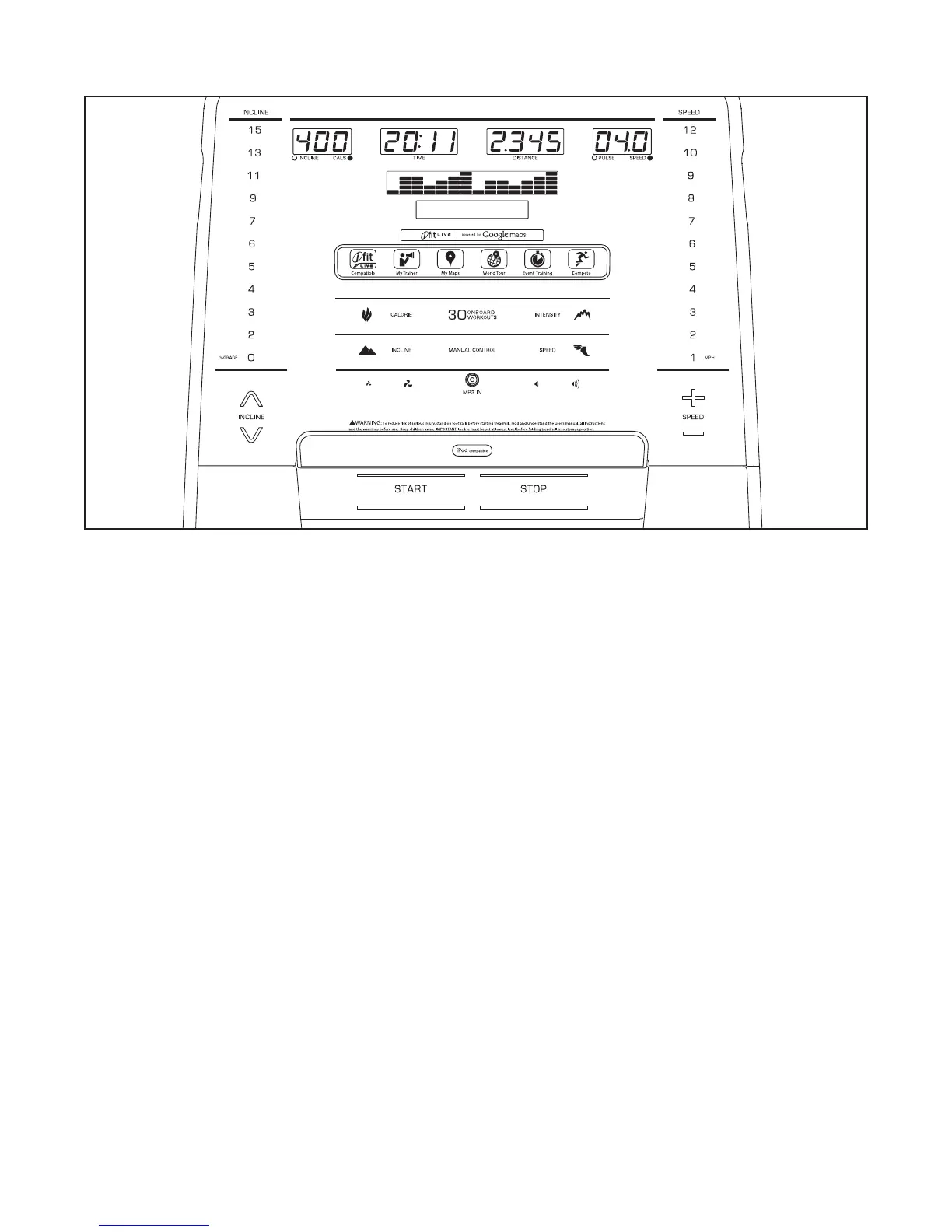
CONSOLE DIAGRAM
FEATURES OF THE CONSOLE
The treadmill console offers an impressive array of
features designed to make your workouts more effec-
tive and enjoyable. When you use the manual mode,
you can change the speed and incline of the treadmill
withthetouchofabutton.Asyouexercise,theconsole
willdisplayinstantexercisefeedback.Youcaneven
measure your heart rate using the handgrip heart rate
monitor.
In addition, the console features thirty onboard work-
outs—seven calorie workouts, nine incline workouts,
seven intensity workouts, and seven speed workouts.
Each workout automatically controls the speed and
incline of the treadmill as it guides you through an
effectiveexercisesession.
The console also features an iFit Live mode that
enables the treadmill to communicate with your wire-
less network through the included iFit Live module.
With the iFit Live mode, you can download personal-
ized workouts, create your own workouts, track your
workout results, race against other iFit Live users, and
access many other features.
You can even listen to your favorite workout music or
audio books with the console’s stereo sound system
whileyouexercise.
To turn on the power, see page 18. To use the man-
ual mode, see page 18. To use an onboard workout,
see page 20. To use an iFit Live workout, see page
21. To use the information mode, see page 22. To
use the stereo sound system, see page 23.
Note: The console can display speed and distance
ineithermilesorkilometers.Tondwhichunitof
measurement is selected, see THE INFORMATION
MODE on page 22. For simplicity, all instructions in this
manual refer to miles.
IMPORTANT: If there are sheets of plastic on the
console, remove the plastic. To prevent damage
to the walking platform, wear clean athletic shoes
while using the treadmill. The first time you use
the treadmill, observe the alignment of the walking
belt, and center the walking belt if necessary (see
page 27).



 To Next Page