20
ENGLISH
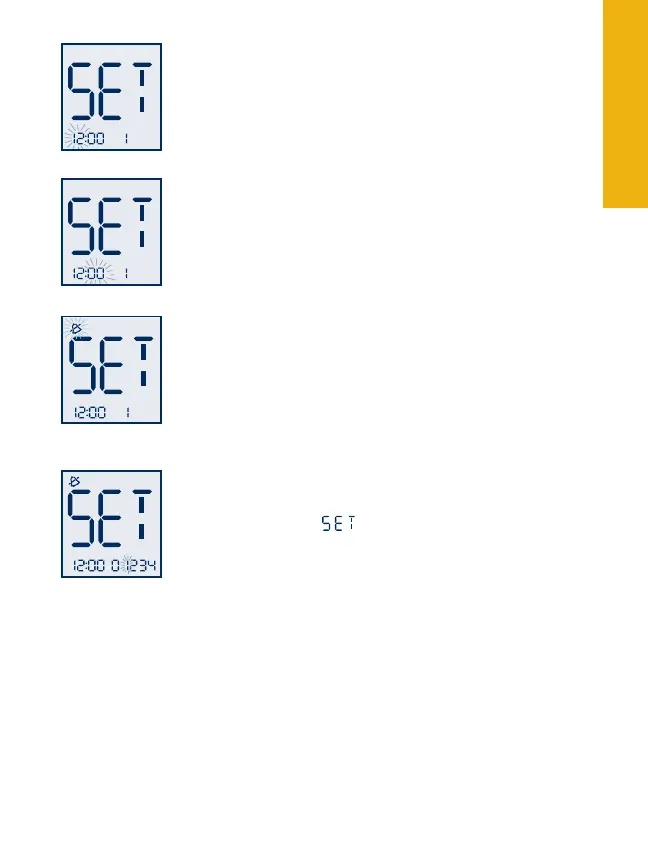
Press the “3. m” button to move to the hour setting.
With the hour blinking, press the “c” button
until the correct hour appears.
Press the “4. m” button to move to the minute
setting. With the minute blinking, press the “c”
button until the correct minute appears.
Press the “5. m” button to move to the reminder
alarm volume setting. Default setting is off.
Press the “c” button to select the desired volume
setting: low, high, or off.
Press the “6. m” button to finalize your alarm
setting. This will bring you back to the reminder
alarm setting
mode.
If you wish to set multiple reminder alarms press
“c” to move to reminder alarm 2. Repeat.
Note: To save your reminder alarm settings and exit set up mode,
press and hold the “m” button for two seconds until the meter turns
off. Press the “m” button when “0” is blinking to move to the next set-
up screen without setting any reminder alarms.
Select reminder
alarm
Select reminder
alarm volume
Select minute
Select hour



 To Next Page