NOTE: The driver can activate or deactivate the
start-up self-test by accessing the setup menu.
Menu System
The menu system is shown on the driver display
screen once the self-test is finished. The menu sys-
tem responds to input from the driver and remains
active as long as the ignition is on. In order for the
driver to operate the menu system, the ignition must
be ON, and the park brake must be set (ON). The
main features of the menu system are described
below.
•
Setup—this is used to set various parameters,
which are saved when the ignition is turned off.
Setup has select display units, startup screen,
LCD contrast, and reset parameters.
•
Maintenance—shows various maintenance in-
tervals such as engine oil, air filter, etc.
•
Diagnostics—this is used for setting and read-
ing inputs and outputs and checking the
12/05/2012 f611202
4
5
8
10
9
12
3
67
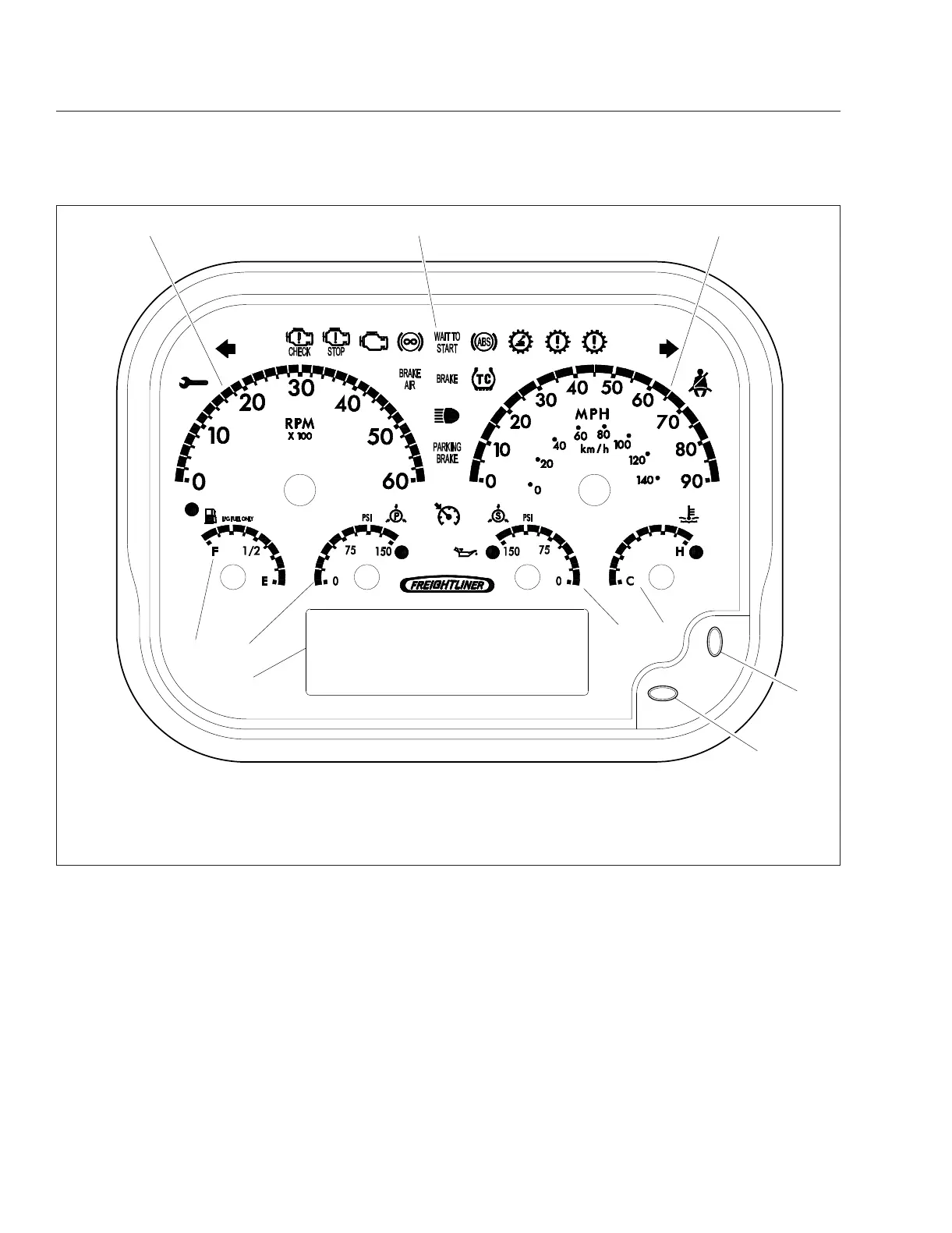
1. Tachometer
2. Dash Message Center
3. Speedometer
4. Fuel Level Gauge
5. Primary Air Pressure Gauge
6. Secondary Air Pressure Gauge
7. Coolant Temperature Gauge
8. Dash Driver Display Screen
9. Toggle Button, Down
10. Toggle Button, Right
Fig. 19.4, Gauge Layout (typical, U.S.), LPG Engines
Propane Fuel System
19.7











 To Next Page