74 PB
Wired Controller FSWC1 Owner's Manual
3
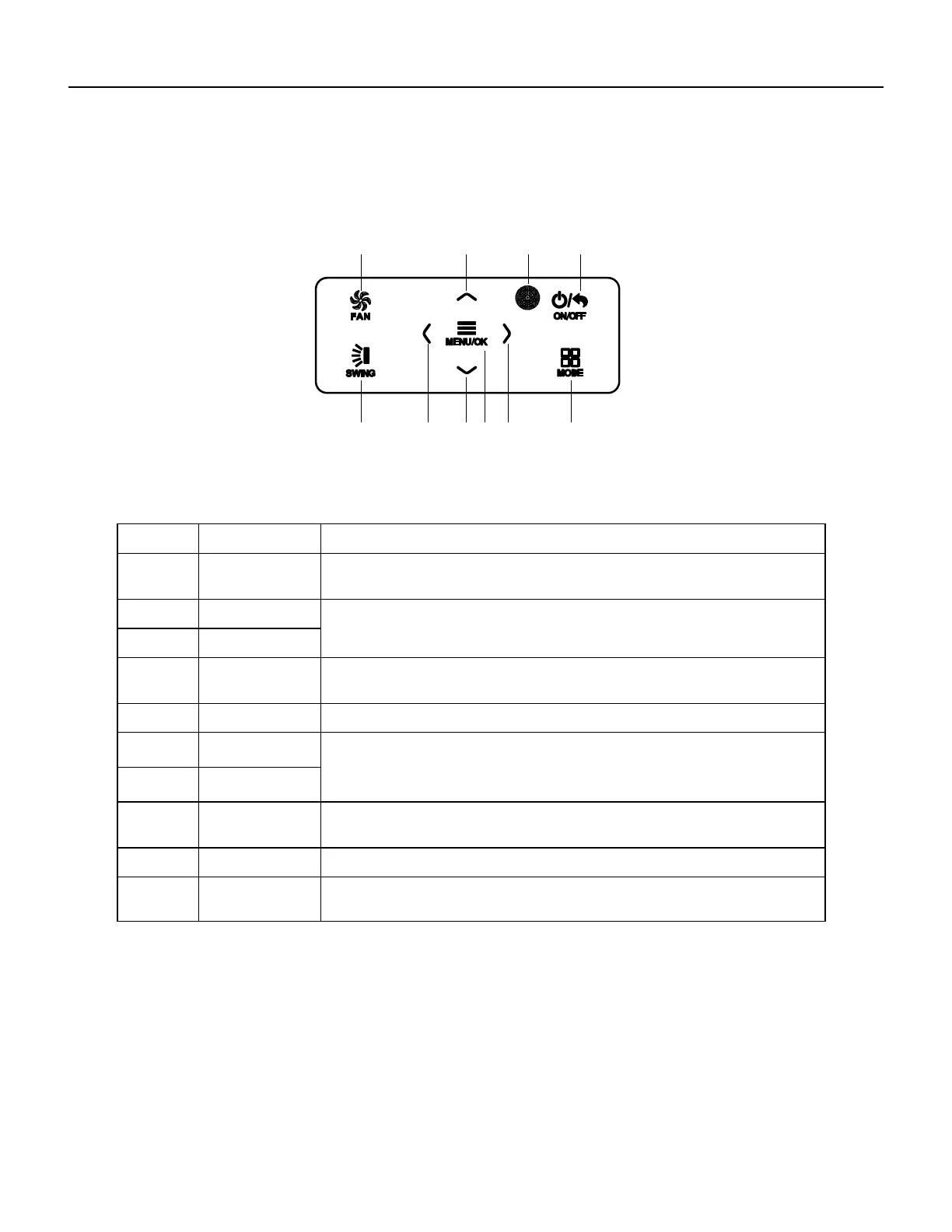
2 Buttons
2.1 Button Graphics
Fig. 2 Button graphics
2.2 Function Instructions of Buttons
No. Button name Button Function
1 FAN
Set low speed, medium speed,high speed, turbo and auto speed.
2
∧
(1) Set temperature
(2) Set parameter
(3) Move option cursor
6
∨
3 ON/OFF/BACK
(1) Turn on or turn off unit
(2) Return to last page
4 SWING Set up&down swing and set left&right swing
5
<
(1) Set related function on or off
(2) Move option cursor
(3) Set parameter
8
>
7 MENU/OK
(1) Enter menu page
(2) Confirm setting
9
10
MODE Set auto, cooling, dry, fan and heating modes for indoor unit.
3 Operation Instructions
3.1 Menu Structure
Normal setting of wired controller can be set directly on the main page, including
fan speed, swing, set temperature, mode, ON/OFF. The setting and status view of
other functions can be set in corresponding submenu. Detailed menu structure is as
shown in Fig. 3.
1 2 3
4 56
10
978
Remote control
receiver window
WIRED CONTROLLER
Buttons




 To Next Page