105
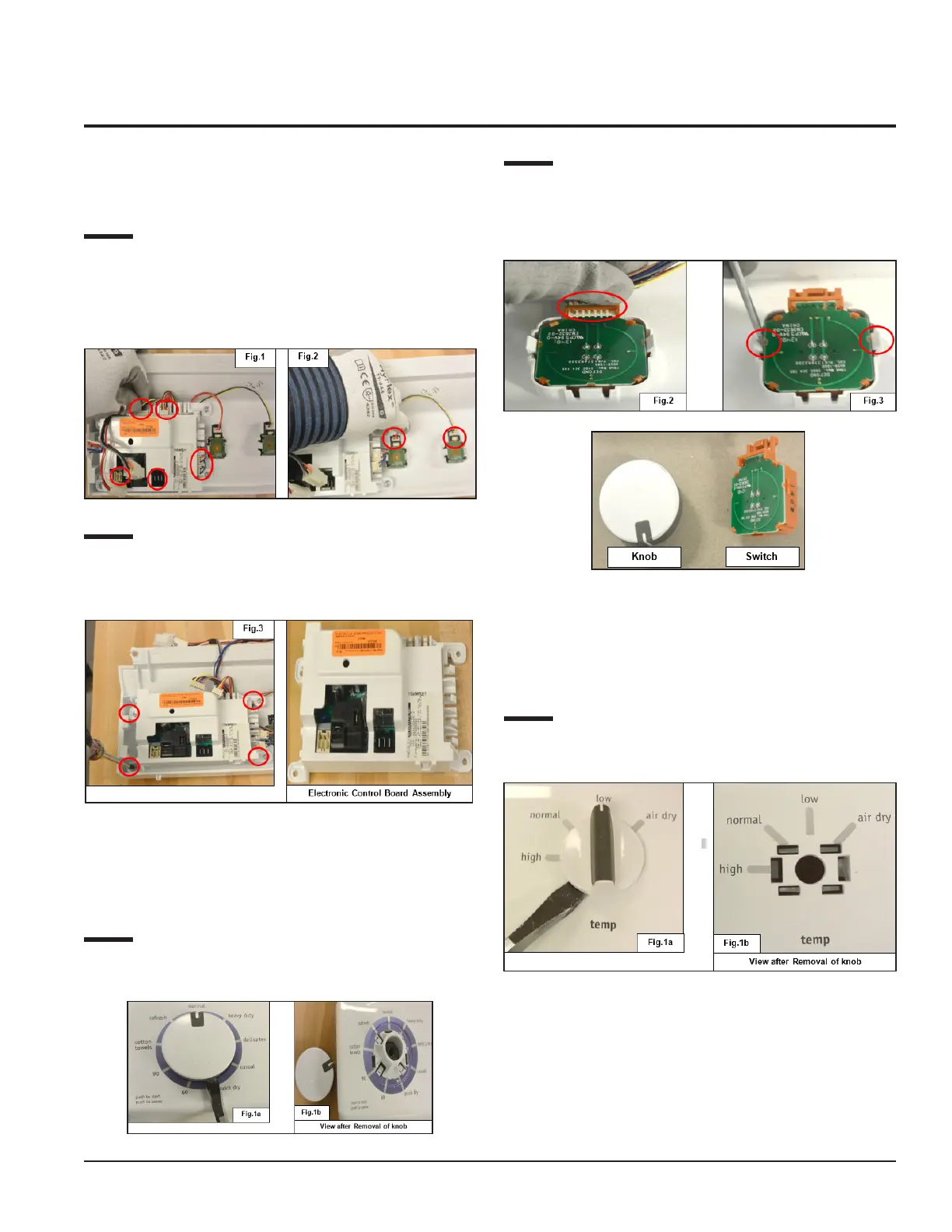
11.2.1 Electronic Control Board
Accessibility
Step: 1
Detach the connectors from the Electronic Control Board
(See Fig.1), Cycle Selector (Switch, 9 positions) Temperature
Selector (Switch, Option 4 positions) and Chime Selector
(Switch, Option 2 positions) (See Fig. 2).
Step: 2
Loosen the screws (4) (See Fig. 3), which is fitted with the
Control Panel console to separate the Electronic Control
Board Assembly from the console.
11.2.2 Program Selector
Accessibility
Step: 1
Remove the Program Selector knob from the console as
shown in Figs. 1a and 1b.
Step: 2
Detach the connector from the Cycle Selector Switch (See
Fig. 2) and unfasten the (2) snaps to remove the switch from
the console (See Fig. 3).
11.2.3 Temperature Selector
Accessibility
Step: 1
Remove the Temperature Selector knob from console as
shown in Figs. 1a and 1b.


 To Next Page
 Loading...