4-1
BIELA14-T SERIES GEN III LOV™ ELECTRIC FRYER
CHAPTER 4: M4000 CONTROLLER INSTRUCTIONS
4.1 M4000 General Information
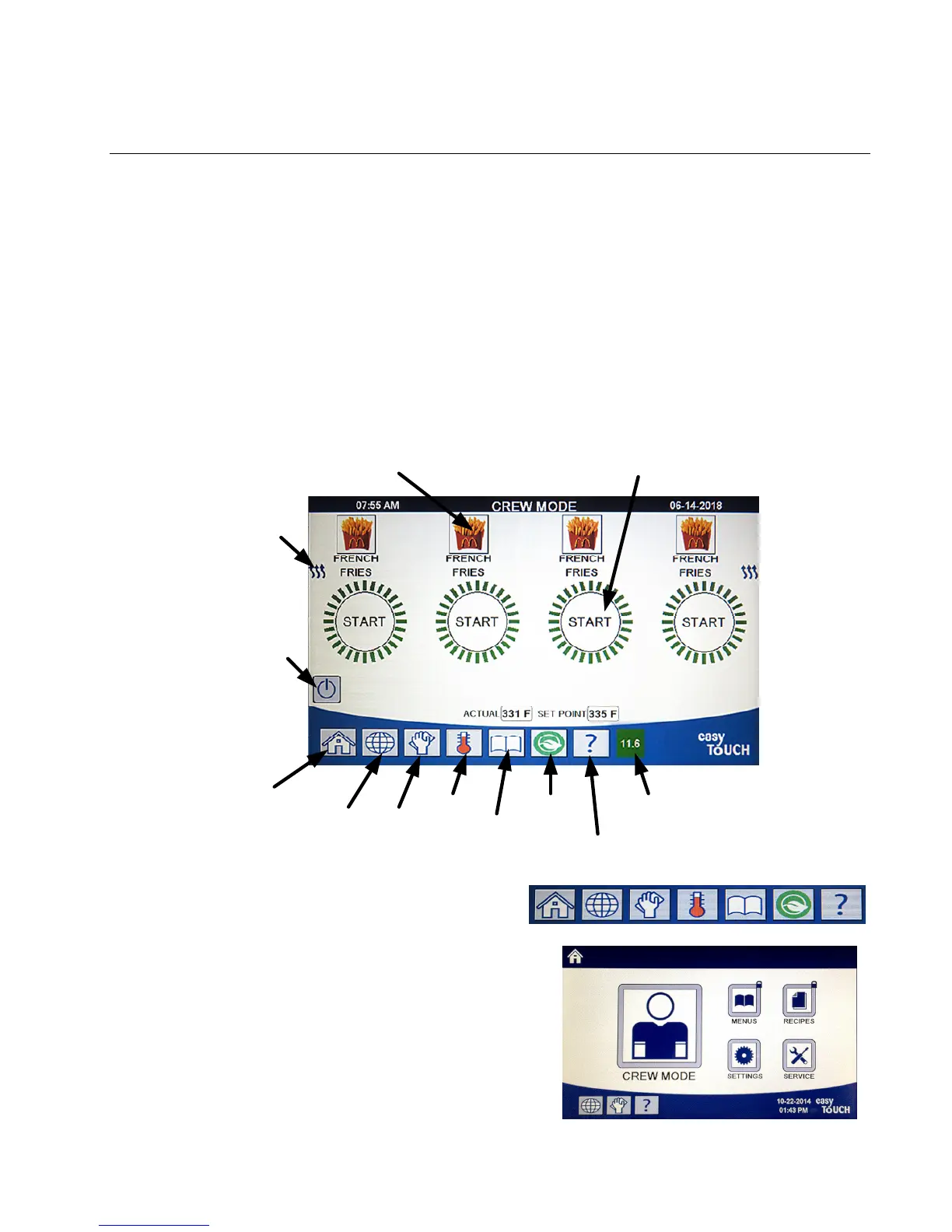
Welcome to the M4000, an easy to use touch screen controller with the utility of 40-product menu capability. One
button push starts a cook cycle for a selected product. Just choose a menu item on a product button and press the
START button under the display showing the desired item. The controller can move seamlessly from McNuggets to
Crispy Chicken to any added menu item.
The M4000 will operate with electric and gas fryers, both full- and split-vat.
4.2 M4000 Button Description and Functions
4.2.1 Navigation Buttons
Change
Language
Home
Button
(Settings,
Recipes)
Filter
Menu
Energy
Saver
Change
Menu
Information
Statistics
Temp
On‐Off
(Press and
Hold to
switch on.
Press to
switch off)
Heat
Indicator
Product/Change Product
Start Cook/Cancel Alarm
TPM
(Oil Quality)
4.2.1.1 Main Menu Button Bar
The main menu button bar at the bottom of the screen is
used to navigate the various M4000 menus (see Figure 1).
4.2.1.2 Home Button
The home button is used to switch to the home screen (see
Figure 2). The home screen has Crew Mode, Menus, Recipes,
Settings and Service buttons.
Fi
ure 1
Figure 2













 To Next Page