4-12
4.8 Fryer (Manager) Settings Programming
It is necessary upon initial power up or when changing out a controller to configure these local manager settings for
the fryer. The setup includes language, date and time, temperature scale, sound settings, filter settings, energy
savings, lane assignments and screen brightness. These settings should ONLY be changed by a manager or
technician.
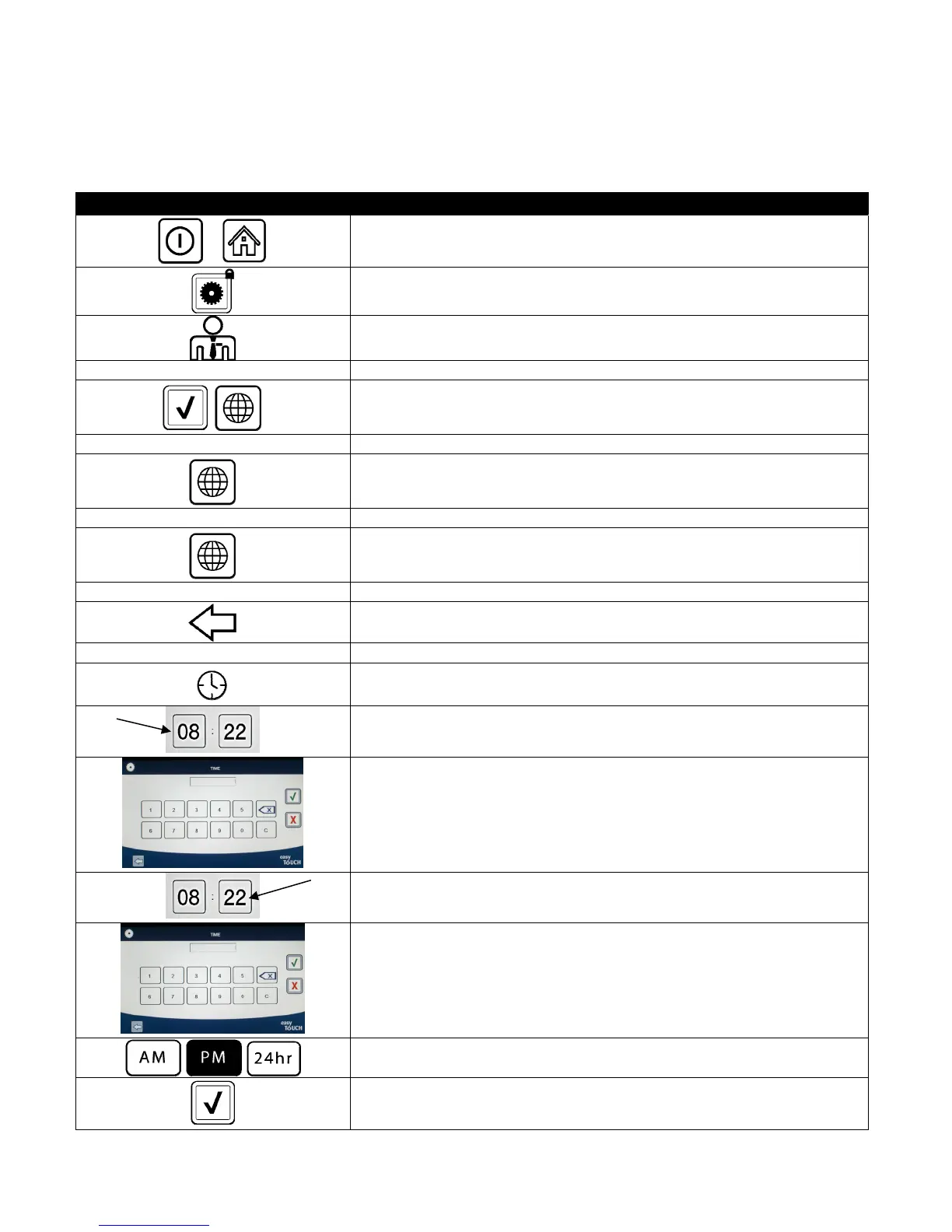
DISPLAY ACTION
1. With the controller at the off/standby position, press the Home button.
2. Press the Settings button.
3. Press the Manager button.
1 2 3 4 4. Enter 1234
5. Press the √ (check) button.
□ LANGUAGE 6. Press the Language button.
7. Press the Primary Language button.
□ ENGLISH 8. Select the primary language desired.
9. Press the Secondary Language button.
□ SPANISH 10. Select the secondary language desired.
11. Press the Back button.
□ DATE & TIME 12. Press the Date & Time button.
13. Press the Set Time button
14. Press the hour’s box.
15. Using the key pad, enter the time in hours.
16. Press the minute’s box.
17. Using the key pad enter the time in minutes.
18. Press the AM, PM or 24HR button.
19. Press the √ (check) button.













 To Next Page