4-11
DISPLAY ACTION
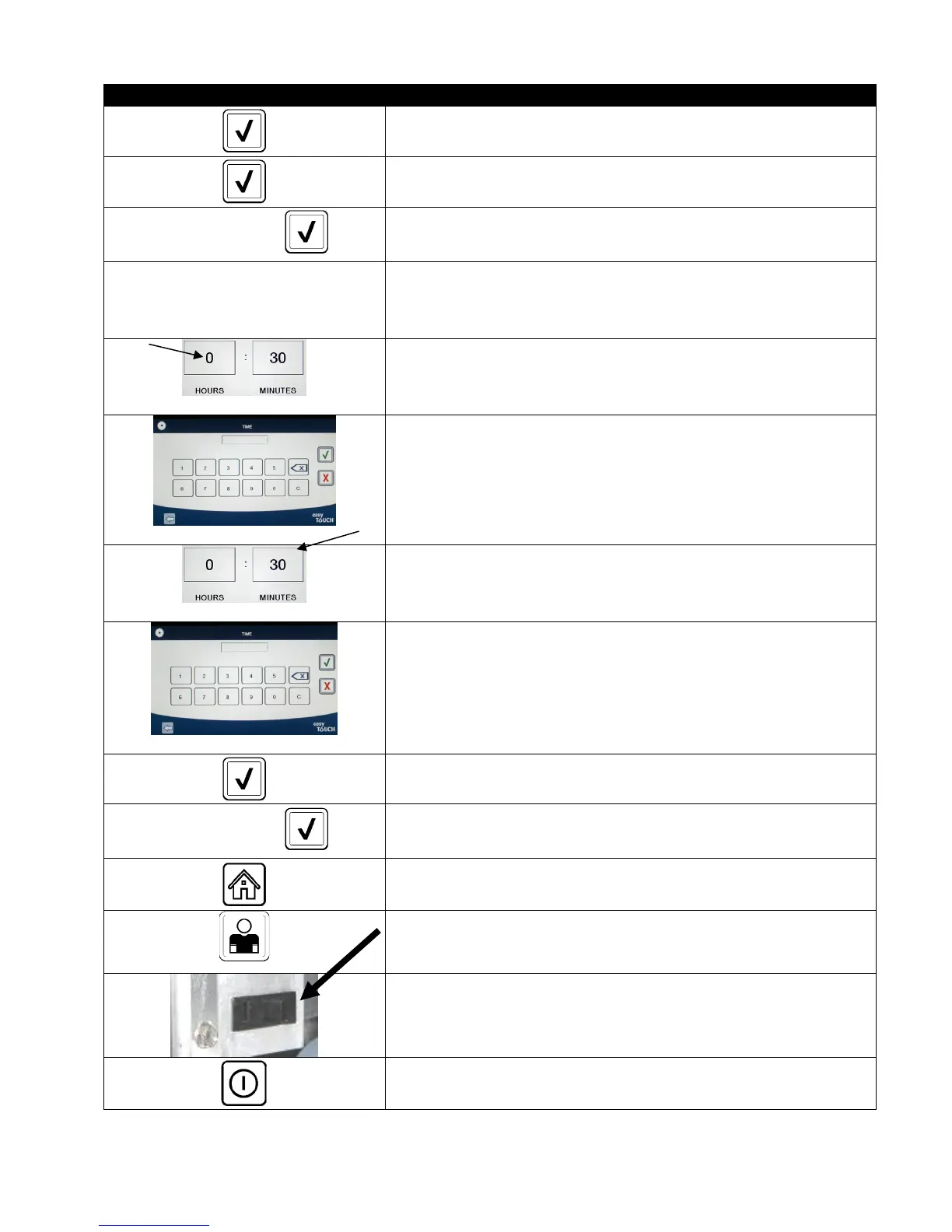
64. Press the √ (check) button once the value is entered.
65. Press the √ (check) button to save the value.
SETUP COMPLETE
66. Press the √ (check) button inside the SETUP COMPLETE box.
□ DISPOSE DELAY TIMER
67. Press the Dispose Delay Timer button. This is the amount of time
once the DISCARD NOW prompt is displayed and bypassed before
the DISCARD NOW message returns. (Default is: 30 minutes.
Minimum value is :00 = DISABLED, maximum value is 4:00 hours.)
68. Press the hour’s box to enter a delay time in hours.
69. Using the key pad, enter the time in hours.
70. Press the minute’s box to enter a delay time in minutes.
71. Using the key pad enter the time in minutes.
72. Press the √ (check) button to save the value.
SETUP COMPLETE
73. Press the √ (check) button inside the SETUP COMPLETE box.
74. Press the Home button.
CREW MODE
75. Press the Crew Mode button.
76. Press and hold the reset switch inside the left door for thirty (30)
seconds.
77. The system reboots in approximately 45 seconds and returns to
off/standby mode.













 To Next Page