4-19
DISPLAY ACTION
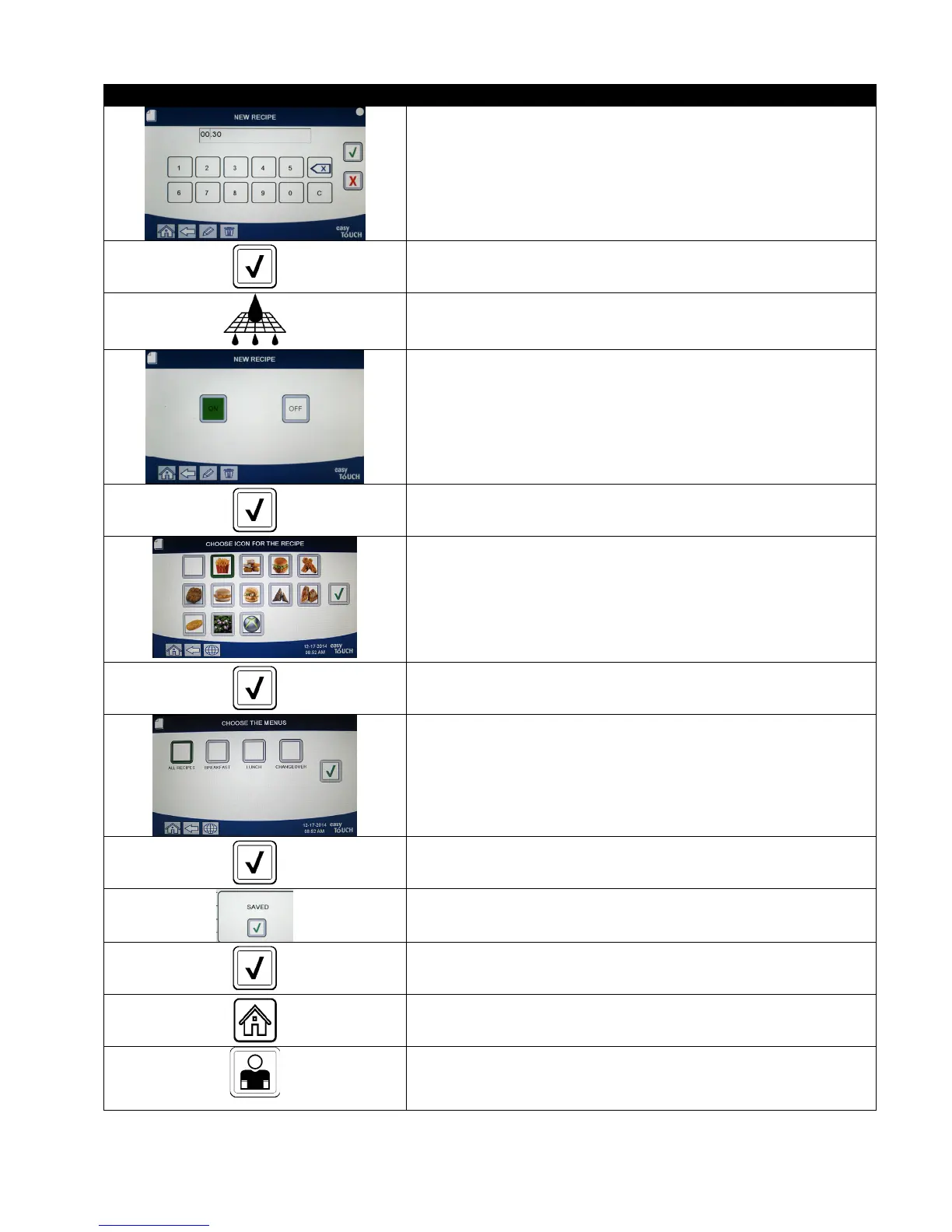
27. Enter the time in minutes and seconds for the seconds shake to
be performed.
28. Press the √ (check) button.
29. Press the Filter button.
30. Ensure that the filter button is ON to enable auto filtration for
this product. This setting is used to prevent co-mingling of
product specific oils. For products such as FISH, select NO to
prevent auto filtration.
31. Press the √ (check) button.
32. Choose the icon to associate with the product recipe that is
being entered or edited.
33. Press the √ (check) button.
34. Choose the menu(s) to associate with the product recipe that is
being entered or edited.
35. Press the √ (check) button.
36. The controller displays SAVED.
37. Press the √ (check) button.
38. Select another product to edit or press the + key to add
additional products. If finished press the home button.
CREW MODE
39. Press the Crew Mode button to return to main screen.













 To Next Page