5-15
5.3.11 Deep Clean (Boil-Out) for Bulk Oil Systems
The deep clean mode is used to remove carbonized oil from
the frypot.
NOTE: Refer to Kay Chemical “Fryer Deep Clean
Procedure” instructions to clean the LOV™ fryer.
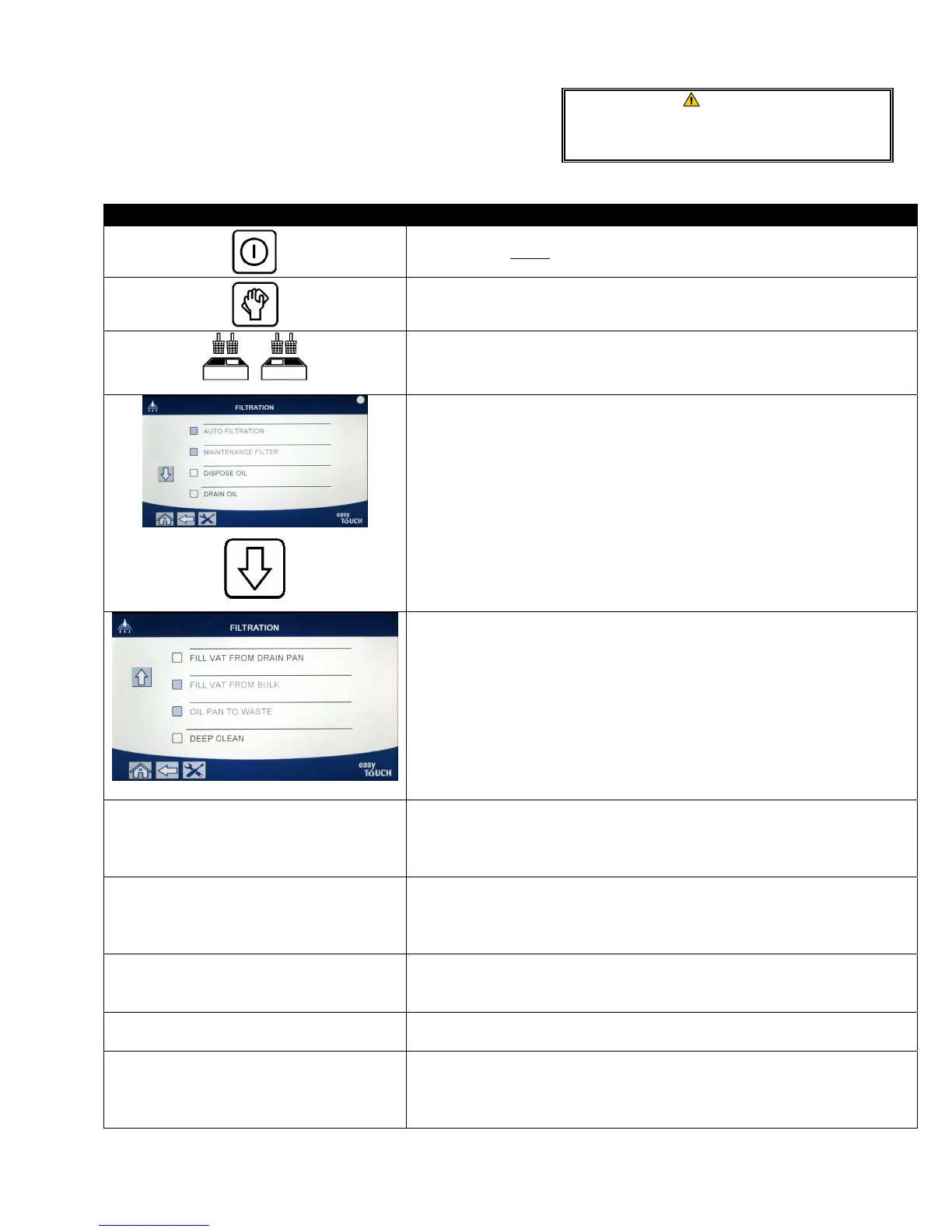
DISPLAY ACTION
1. The fryer MUST be OFF.
2. Press the filtration menu button
3. Select LEFT VAT or RIGHT VAT for split vats.
4. Press the down arrow.
5. Select DEEP CLEAN.
DEEP CLEAN?
6. Press the √ (check) button to continue. If the X button is selected, the
user returns to the filtration menu. If no pan is detected, the controller
displays INSERT PAN until the pan is detected.
BULK TANK FULL?
7. This message is only displayed if the bull tank is full. Press the √
(check) button to acknowledge and call the bulk oil waste provider.
The display returns to OFF.
IS VAT OIL REMOVED?
8. Press the X button if oil is in the vat. Press the √ (check) button if the
vat is empty and skip to step 17.
DRAINING IN PROGRESS
9. No action required as oil drains into filter pan.
VAT EMPTY?
10. Once the vat is empty, press the √ (check) button to continue.
WARNING
Ensure a filter pad is in place prior to draining
or disposing of oil. Failure to insert a filter pad
may result in clogged lines and/or pumps.













 To Next Page