Section 4 Service, Configuration & Testing
26 FT742-DM (RS485) Sensors – User Manual
4.4 The Acu-Test Pack
To help users carry out a test bench assessment of the digital sensors, FT Technologies sells an Evaluation test
Pack. This includes Acu-Vis software and the FT054 digital test cable. The test cable allows for connection
between the sensor, an external supply and PC via a Type A USB connection. The sensor’s communication
settings can then be checked, the heater set point configured and the wind speed and wind direction displayed.
4.4.1 The Acu Vis PC Software
The Acu Vis software is supplied on a CD and will work on PCs running Windows XP, Vista, 7, 8, 8.1 and 10.
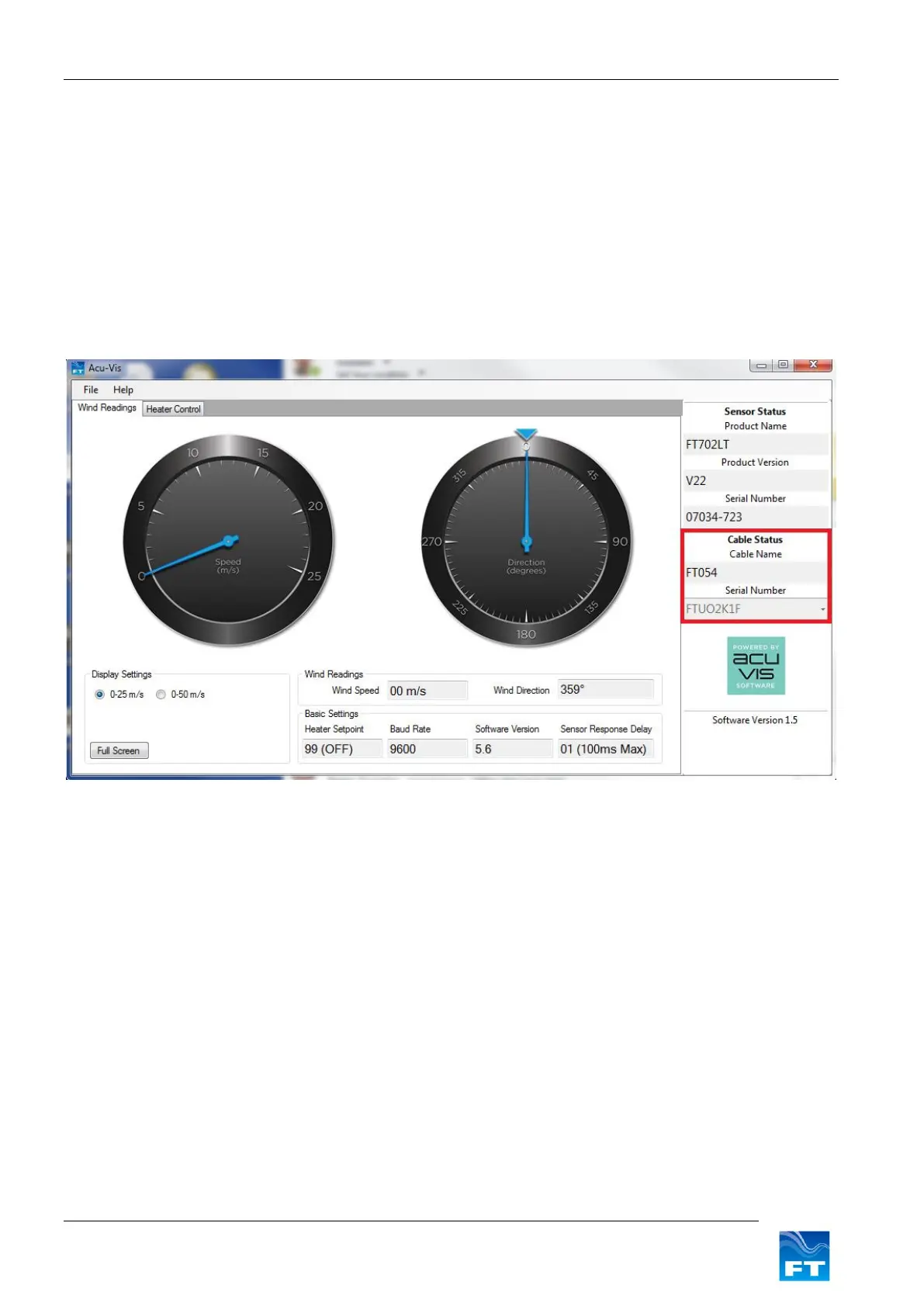
The Acu Vis software automatically detects the FT054 USB test cable and wind sensor. The program will detect
the wind sensor as long as it is powered up and functional. The dials then show the real-time wind speed and
direction from the wind sensor as shown in Figure 11.
Figure 11: Acu-Vis Dials
The program also shows the communication settings that the sensor is using, as well as its software version
and serial number.
The Heater Control tab can be used to monitor the sensor’s heaters and to change the sensor’s heater set point
temperature as shown in Figure 13.


 To Next Page