Section 4 Service, Configuration & Testing
28 FT742-DM (RS485) Sensors – User Manual
Quick Start Steps
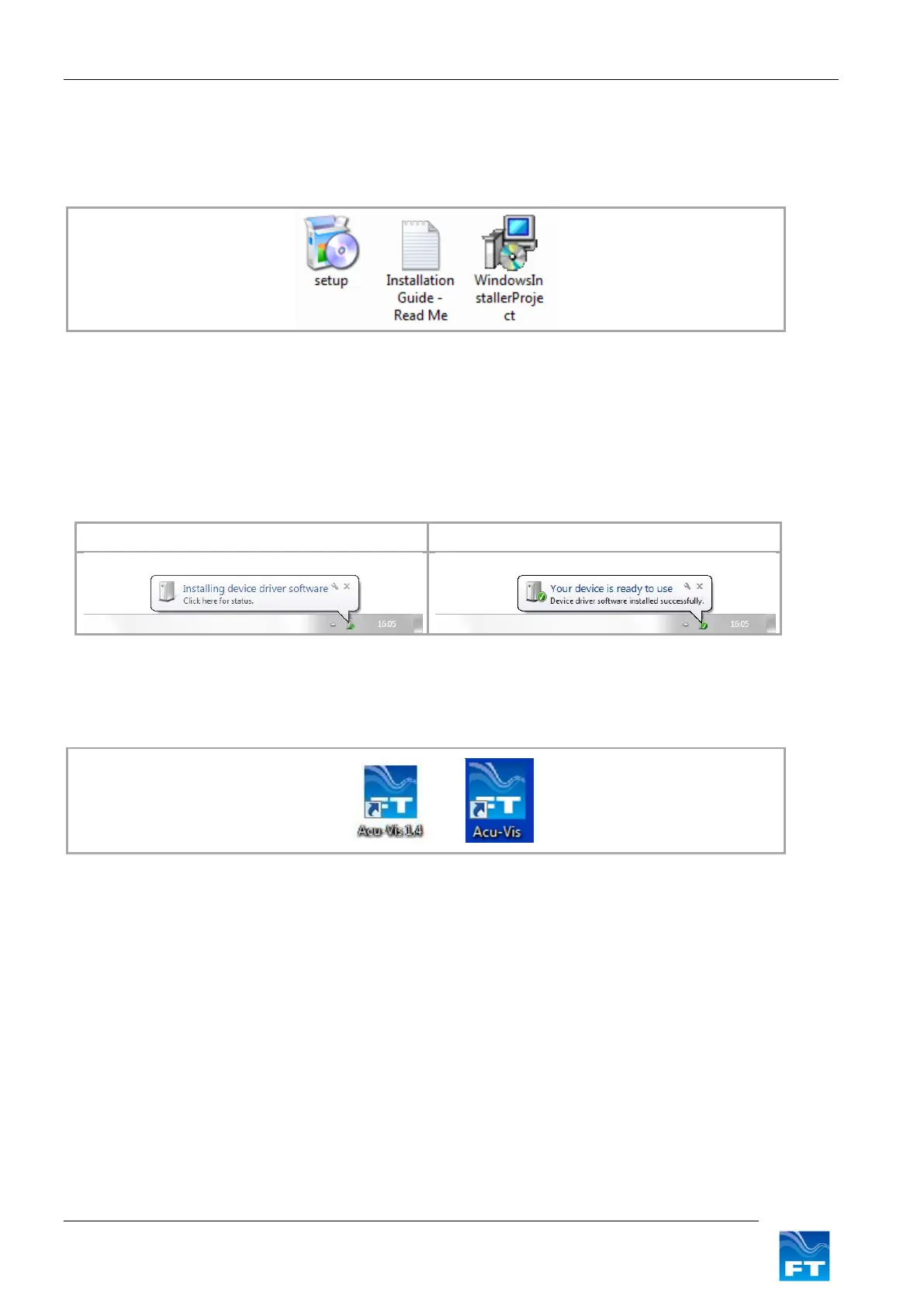
1. Insert the Acu-Vis CD into the PC and install Acu-Vis, by running the setup.exe file.
Figure 14: Acu-Vis Install Files
2. Remove the sensor and FT054 cable from their packaging and mate the connectors together.
3. Connect the +24VDC terminal of the power supply (current limit set to 6A) to the white wire (Red test
plug) and 0V terminal to the brown wire (black test plug). Then switch on the power supply.
4. Connect the USB cable to the Computer and allow Windows to detect the cable and install any drivers.
Please wait for Windows to install the hardware
Figure 15: Windows driver installation sequence
5. Once the above sequence is complete, wait approximately 10 seconds and then run Acu-Vis by
selecting the shortcut icon on the desktop or from the start menu in the FT Technologies folder.
Figure 16: Acu-Vis Shortcut Icon
6. If you need to change over the evaluation cable it is recommended to firstly close the program, replace the
cable and allow enough time for Windows to recognise the new cable and install its drivers. Then restart
Acu-Vis.


 To Next Page