244
Shortcuts
9
SELECT CUSTOM SETTING
The H IMAGE QUALITY SETTING> SELECT CUSTOM SETTING item (item
A
) shows the current custom settings bank:
•
q: No custom settings bank selected.
•
t–u: Select a bank to view the settings saved using the H IMAGE
QUALITY SETTING> EDIT/SAVE CUSTOM SETTING option.
•
r–s: The current custom settings bank.
Viewing and Changing Settings
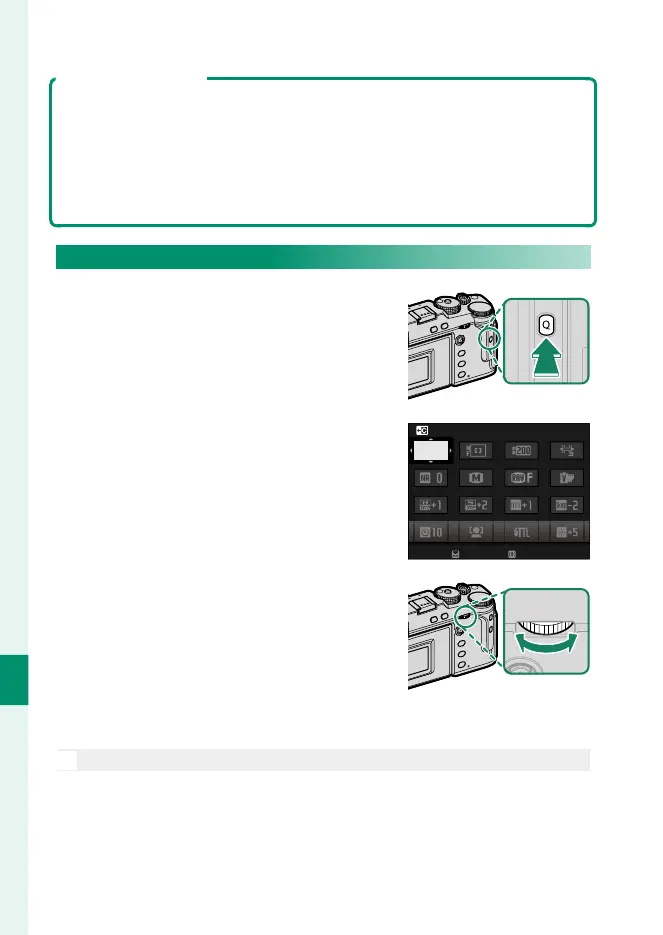
1
Press Q to display the quick menu
during shooting.
2
Use the focus stick (focus lever) to
highlight items and rotate the rear
command dial to change.
•
Changes are not saved to the cur-
rent settings bank.
•
Settings that di er from those in
the current settings bank (t–u)
are shown in red.
BASE
ENDEND
BASE
ENDSET
SELECT CUSTOM SETTING
3
Press Q to exit when settings are complete.
N
The quick menu can also be edited using touch controls.



 To Next Page