44
3
Basic Photography and Playback
Taking Photographs (Mode P)
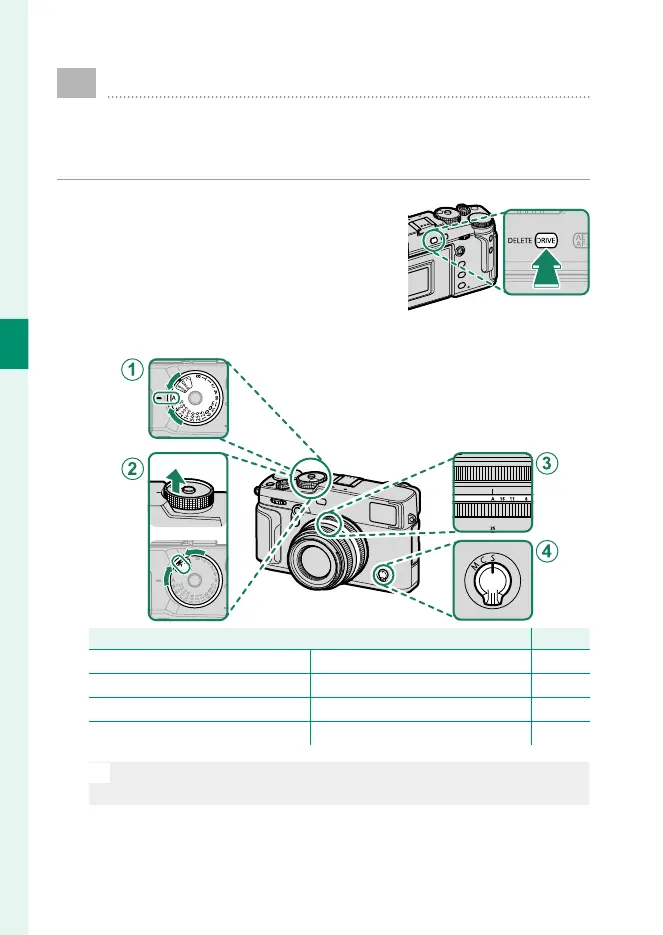
This section describes how to take pictures using program
AE (mode P). See pages 58–66 for information on S, A,
and M modes.
1
Press the DRIVE button and select STILL
IMAGE in the drive-mode menu.
2
Adjust settings for program AE.
Setting
P
A
Shutter speed A (auto) 58
B
Sensitivity A (auto) 79
C
Aperture A (auto) 58
D
Focus mode S (single AF) 68
O
To choose another shutter speed after selecting A(auto), hold the
dial lock release and rotate the shutter speed dial.



 To Next Page